
Question

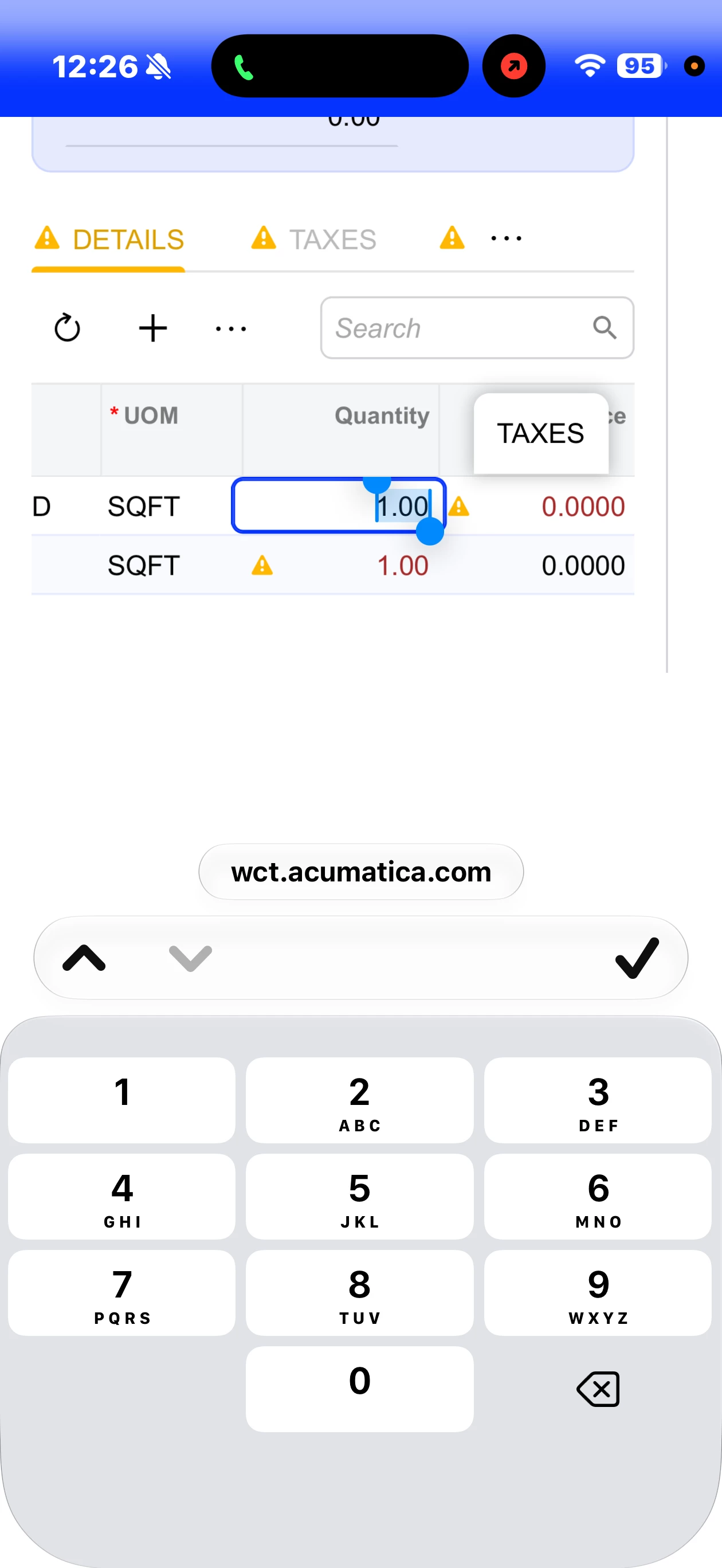
26R1 Mobile web has no decimal on the keyboard

  • August 7, 2026
  • 2 replies
  • 40 views

fosterjeff01
Freshman II
Forum|alt.badge.img+1

Since the upgrade to 2026R1, if you view the ERP via http (some functionality isn’t available in the app, such as SO copying, etc), the decimal is now missing (used to show up next to the zero) from the numeric keyboard to enter cents into the field.  This makes the web interface difficult for any currency transactions the aren’t whole numbers.  There is a workaround in that you can enter a number into the field and when you leave the field it will add the decimalization to the whole number (.00) (to make 1 into 1.00) and then you can use your finger to go back into it to edit the cents and/or remove the whole number.  Hoping this is fixed in an update!
 

2 replies

alanconroy31
Freshman II
  • Freshman II
  • August 10, 2026

Looks like its missing the inputmode=”decimal” now. Have you tried a different keyboard like swiftkey from the app store?


KrunalDoshi
Semi-Pro II
Forum|alt.badge.img+6
  • Semi-Pro II
  • August 11, 2026

hi ​@fosterjeff01,

A few questions:

  • Does this also happen in your instance when you open the screen using your system browser?
  • Does this happen for all items, or only for specific items?

First thing to check is Quantity Decimal Places and the item's Divisible Unit setting

Go to:

System Management → Companies (CS101500)

Look for:

Quantity Decimal Places

If this is set to 0, Acumatica treats quantities as whole numbers, so 2.50 will not be accepted/displayed as a decimal quantity.

Could you also check whether Divisible Unit is enabled for the affected item?

Go to:

Stock Items (IN202500) → General tab

Check the item's Base Unit and Divisible Unit.

If Divisible Unit is unchecked, Acumatica may prevent fractional quantities in the base UOM. Acumatica documentation describes this setting as controlling whether decimal quantities can be specified in the base UOM.

Let me know if this is helpful.