

Solved

Unable to update Movement class for Item-Warehouse using the Update Movement Class screen (IN506100)

  • April 15, 2026
  • 4 replies
  • 105 views
  • Translate All

Hello, wondering if anyone is or has had the same issue when updating the current movement class for an item-warehouse using the Update Movement Class screen (IN506100)


I’ve tried the following:

  1. Select Warehouse and Period, then Click “PROCESS ALL”
  2. Projected Movement Class would populate on some items
  3. I’ve tried selecting an item with a projected movement class and then click “PROCESS”
  4. Current movement class for that item would not get populated on (IN506100).
  5. I checked warehouse details for that item-warehouse and there is no value on the movement class.

I’d appreciate if anyone has any suggestion or knows what I’m doing wrong to let me know. Thank you!!



Best answer by yorch79

Hi ​@yorch79 were you able to find a solution? Thank you!

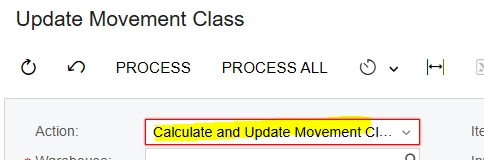
Hi ​@Chris Hackett , yes I did, it’s silly actually, I was just not selecting the correct action for it, in this case I needed to select the Calculate and Update action instead of the default to just calculate. Thank you for following up!


View original

4 replies

Were you able to check whether the Multiple Warehouse feature is enabled or not? If enabled, ensure that the ABC Code and Movement Class are assigned to the specific warehouse.


Translate

  • Author
  • Freshman II
  • June 30, 2026

Were you able to check whether the Multiple Warehouse feature is enabled or not? If enabled, ensure that the ABC Code and Movement Class are assigned to the specific warehouse.


Yes, I was able to verify that Multiple Warehouses is enabled. when I assign manually a value to the corresponding warehouse, it will show in the current movement class. what is not happening is current movement class value getting updated with the projected calculated value for the item when I process the line.

Translate

Chris Hackett
Community Manager
Forum|alt.badge.img
  • Acumatica Community Manager
  • September 29, 2026

Hi ​@yorch79 were you able to find a solution? Thank you!

Translate

  • Author
  • Freshman II
  • Answer
  • October 14, 2026

Hi ​@yorch79 were you able to find a solution? Thank you!

Hi ​@Chris Hackett , yes I did, it’s silly actually, I was just not selecting the correct action for it, in this case I needed to select the Calculate and Update action instead of the default to just calculate. Thank you for following up!


Translate
