Solved

Remove Default warehouse from Inventory Lookup

  • July 11, 2023
  • 8 replies
  • 295 views
  • Translate All

Foujan
Jr Varsity II
Forum|alt.badge.img

I imported inventories against a default warehouse an location. However, decided to remove it later on before entering any transactions.


Bulk removed default warehouse and locations from ‘inventory card’ and ‘Item Warehouse Details’ screen.

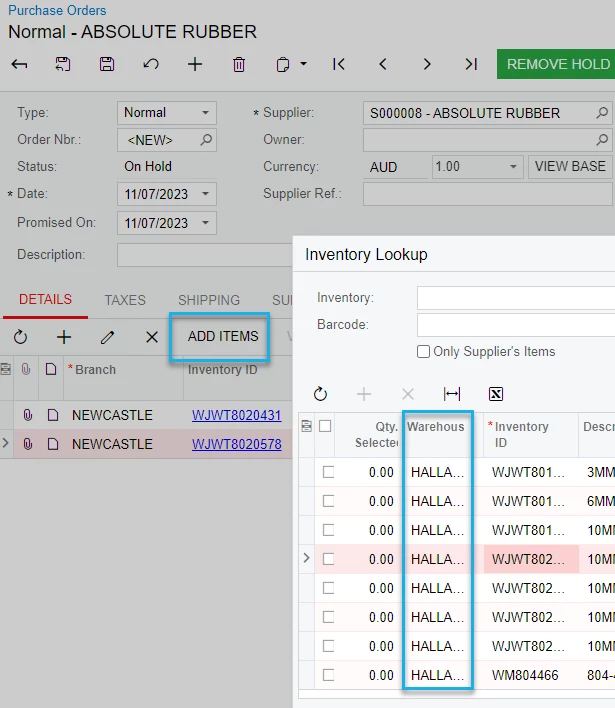
Now when creation purchase order and using ‘Add Items’ button, system still holds this information in inventory lookup as a siteID value.

If adding lines manually using + button it’s all goof. Only when using below Add Items button.


How can I remove warehouses from here?


Best answer by Kandy Beatty

@Chris Hackett Hi Chris, unfortunately not yet. we found out there is a hidden table adds the warehouse ID to stock items once you add it to the item card in system. removing it does not remove it from that table, but if you have access to database you should be able to remove it. 

Hi @Foujan 

Yes, once a transaction has been created with the warehouse, it will keep it in the tables. Even though it was an import scenario, it still creates a transaction. 

View original

8 replies

dcomerford
Captain II
Forum|alt.badge.img+16

Have you tried Recalculating Inventory IN505000 also check the Replenishment tab on the item 

Translate

Foujan
Jr Varsity II
Forum|alt.badge.img
  • Author
  • Jr Varsity II
  • July 11, 2023

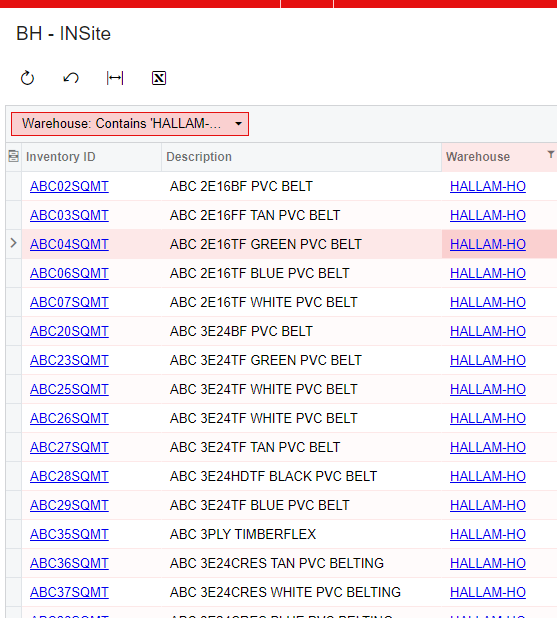
@dcomerford Yes. but still no results. I tried to create a GI using INSiteStatus table, and found this table holds this information, but I cannot use import scenario to remove data from it.


Translate

dcomerford
Captain II
Forum|alt.badge.img+16

You might have to use a SQL script to remove them from this table but proceed with caution

Translate

  • July 14, 2023

Looks like you have the warehouse and location defaulted to several stock items.  You could import over the location (change the default location).  

Translate

Chris Hackett
Community Manager
Forum|alt.badge.img
  • Acumatica Community Manager
  • August 9, 2023

Hi @Foujan were you able to find a solution? Thank you!

Translate

Foujan
Jr Varsity II
Forum|alt.badge.img
  • Author
  • Jr Varsity II
  • August 13, 2023

@Chris Hackett Hi Chris, unfortunately not yet. we found out there is a hidden table adds the warehouse ID to stock items once you add it to the item card in system. removing it does not remove it from that table, but if you have access to database you should be able to remove it. 

Translate

Kandy Beatty
Captain II
Forum|alt.badge.img+18

@Chris Hackett Hi Chris, unfortunately not yet. we found out there is a hidden table adds the warehouse ID to stock items once you add it to the item card in system. removing it does not remove it from that table, but if you have access to database you should be able to remove it. 

Hi @Foujan 

Yes, once a transaction has been created with the warehouse, it will keep it in the tables. Even though it was an import scenario, it still creates a transaction. 

Translate

  • October 18, 2023

Have you checked the Item-Warehouse Details Records.  It also contains the default issue from and default issue to fields.

Translate