



Hello All,
How can we show Customer Class Prices in Self Services Portal ?
Thank you’
Jennifer
Hello All,
How can we show Customer Class Prices in Self Services Portal ?
Thank you’
Jennifer
Best answer by hkabiri
If you have the Sales Price Worksheet(ScreenId=AR202010) released effective date on or before the day item being added to cart for the Price Class assigned to customer you should see the specific price when you open the catalogue as well as when you add the item to Cart. It should show the customer price class specific price on My Cart(ScreenId=SP700001).
Please verify it again and in case you cannot find the root cause please submit a ticket for Support.
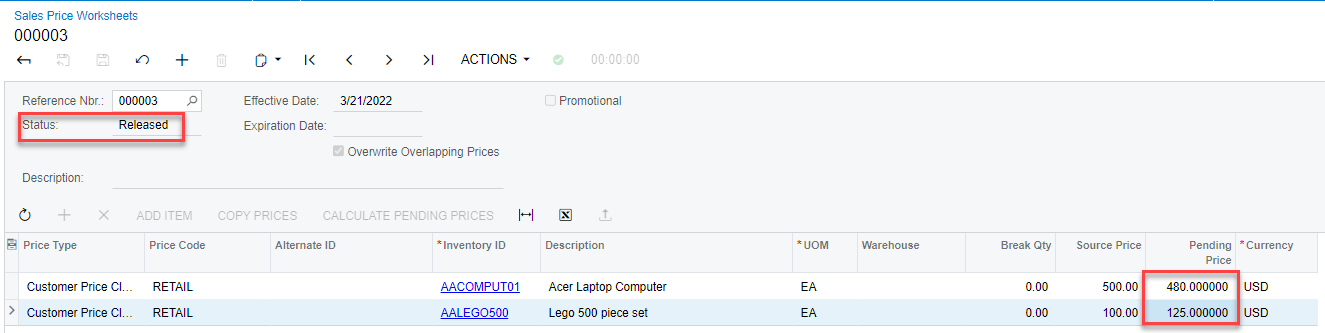
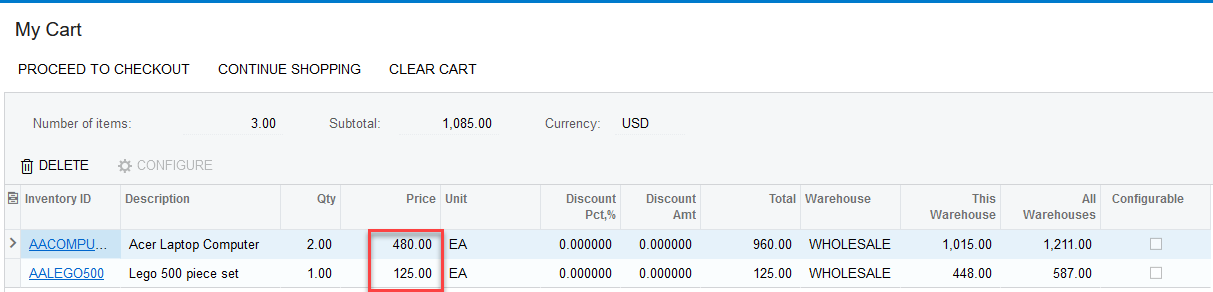
Item showing the price for specific Customer price class
No account yet? Create an account
Enter your E-mail address. We'll send you an e-mail with instructions to reset your password.


