Answer

LOGO on MAC

  • June 1, 2021
  • 6 replies
  • 91 views

Forum|alt.badge.img

 Hello People of Acumatica :) 


I have a problem when printing an invoice on a MAC PC, the logo won’t show up. 

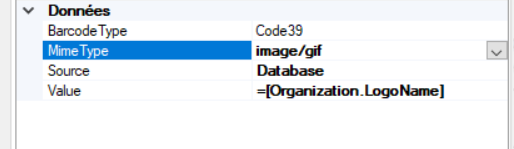
Below is the screenshot of the field in report designer


Best answer by idrusm52

Hi Nawres,

Have you try with Source : External as below, as we don’t have any issue printing the logo while using Macintosh.

 

6 replies

Gabriel Michaud
Captain II
Forum|alt.badge.img+11

Hello @NAWRES,

Are you printing from a PDF or HTML?

What is your Acumatica version? There were some issues in older version with PDF printing using Mac’s default PDF Viewer (the Preview app).


Forum|alt.badge.img
  • Author
  • Jr Varsity II
  • June 4, 2021

Hello @Gabriel Michaud ; 

We’ve tried both; pdf and HTML. 


We’re on version  20.1.2105.120 [20.112.0035]


Gabriel Michaud
Captain II
Forum|alt.badge.img+11

Thanks for your reply. What is the format of the logo file? Can you try reuploading the logo in a different file format? Ex: if it’s a GIF, try a PNG or JPG


Forum|alt.badge.img
  • Author
  • Jr Varsity II
  • June 5, 2021

I already did that :( tried GIF; png … but noting works 


Forum|alt.badge.img
  • Author
  • Jr Varsity II
  • June 30, 2021

Hello Guys ; 


No one has the same issue ? 


idrusm52
Jr Varsity III
Forum|alt.badge.img
  • Jr Varsity III
  • Answer
  • July 1, 2021

Hi Nawres,

Have you try with Source : External as below, as we don’t have any issue printing the logo while using Macintosh.