Hello.
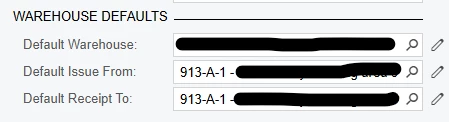
When we create a new item in acumatica, we fill in the Default Warehouse, Default Issue From, and Default Receipt To fields within the Stock Items screen.
However, on the first use of the item the system creates an entry in the Item Warehouse Details and populates it from the warehouse settings instead of the item settings, which is just a broad catchall location instead of the specific location on the item. This would be fine if the material was coming/going from the non-default warehouse, but it shouldn’t be the case when using the default warehouse.
Once this entry has been made, the system seems to entirely ignore the defaults in the Stock Items screen.
How can i get the system to initially populate using the Stock Item settings instead of the Warehouse settings?
Stock Item:
Initial population after putting initial items into location 913-A-1 in an adjustment (adjustment did not default to 913-A-1 either):