

Solved

How to round the qty when do automatically Replenishment?

  • June 7, 2021
  • 4 replies
  • 467 views
  • Translate All

Forum|alt.badge.img+6

Hello,

      I love the replenishment  feature. But we always purchase whole cases from vendor, while sometimes the auto created PO by “Create Purchase Order” screen are in decimal cases, like 2.34, 1.34,11.88 cases, which is not proper to send to vendor directly?

       Is there a way I can round up the figure in Replenishment process?


        It looks like I can find a solution in below


       But is customization the only way to solve the issue?
Best answer by alicezyks51

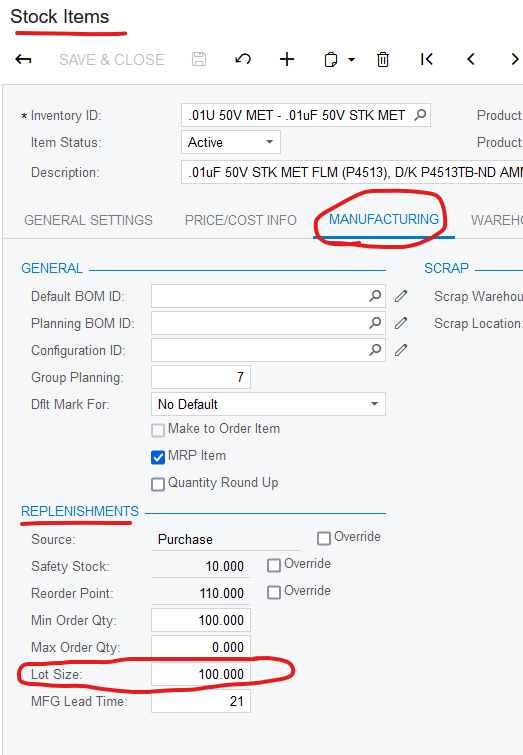
Lot control is not needed - we don’t do lot control either. The lot size is on the Stock Items Manufacturing tab under the Replenishments section. 

You can also set the lot size on the vendor details tab in the event that you order from more than one vendor and their lot sizes vary.

View original

4 replies

Forum|alt.badge.img+1

Have you tried setting the lot size to the units in a case? ie. Case of 24 items would have lot size of 24. The replenishment quantity will be upped to the next multiple of 24 which will be a full case.

Translate

Forum|alt.badge.img+6
  • Author
  • Captain II
  • June 16, 2021

@alicezyks51 
Thank you for your idea. But where can I set the lot size, and does it mean I have to enable lot control?
We did not do lot control on items. is lot control a must?
 

Translate

Forum|alt.badge.img+1

Lot control is not needed - we don’t do lot control either. The lot size is on the Stock Items Manufacturing tab under the Replenishments section. 

You can also set the lot size on the vendor details tab in the event that you order from more than one vendor and their lot sizes vary.

Translate

Forum|alt.badge.img+6
  • Author
  • Captain II
  • June 19, 2021

@alicezyks51 
Thank you for sharing this. We currently stopped the automatically replenishment for another reason. But I will have a try and get back to you later.
It looks like a solution.

Translate