Solved

Default Qty while entering Quote / SO entry

  • January 1, 2021
  • 6 replies
  • 891 views
  • Translate All

Forum|alt.badge.img

Hello,


Is is possible to change the default qty from 0 to 1 while entering line items during quote or sales order entry.  This will speed up the process due to most line entry is only quantity of 1.

Thanks

Best answer by vkumar

Hi @Nelson Yip 


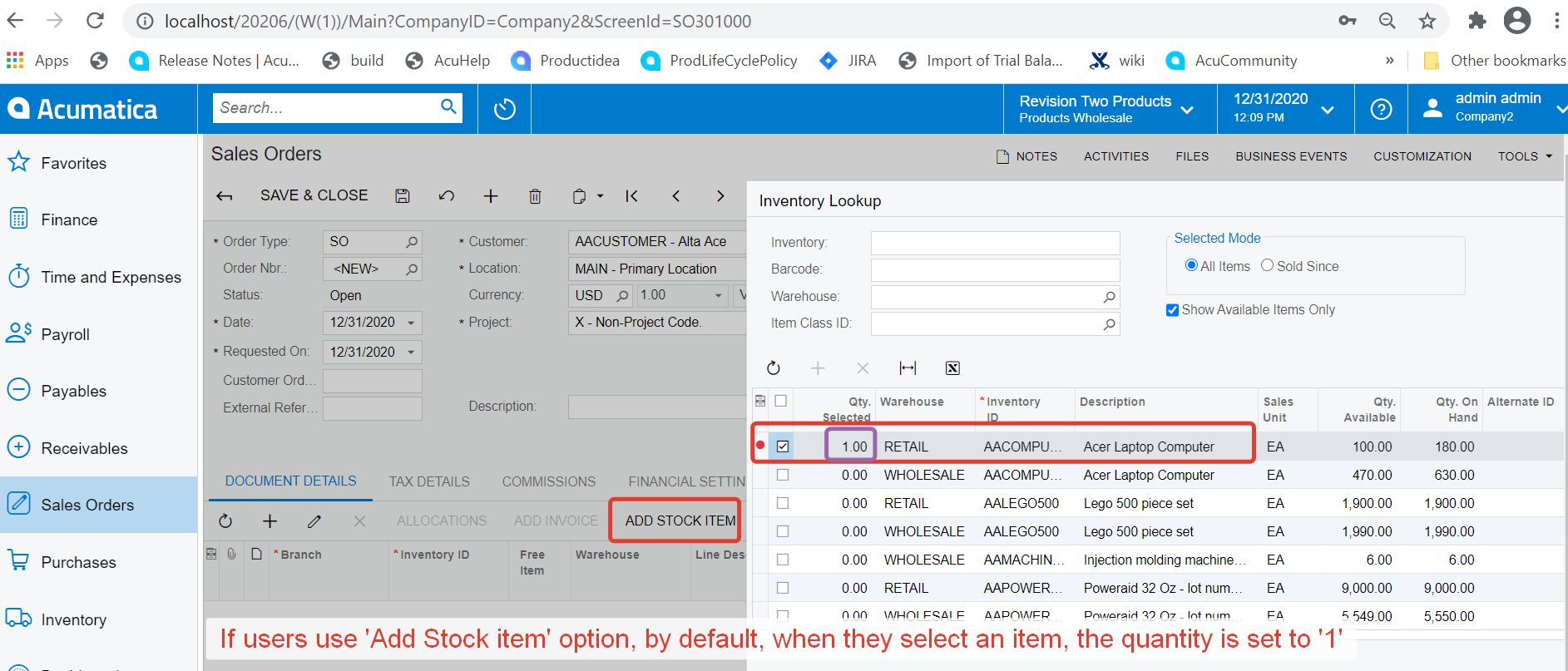
In Addition to details provided above, out of the box option ‘Add Stock item’ always sets the quantity to ‘1’, when user selects an item from the list.  
Hope this helps, 

Wish you happy new year!


Regards,

View original

6 replies

david41
Jr Varsity II
  • Jr Varsity II
  • January 1, 2021

I believe that this would need to be a customization on the form to force a default value into the qty field.

Translate

PatrickSchlenker90
Varsity III
Forum|alt.badge.img+1

Hi Nelson,

you will need a customization to handle this requirement (set the qty by default to 1). According to my knowledge, there is no configuration in acumatica to achieve the required behavior.

Translate

Naveen Boga
Captain II
Forum|alt.badge.img+20

Hi @Nelson Yip 

Yes, Its required customization and the same functionality we are using the Sales Order screen in one of our projects. Below is the customization code and hope this helps!!


 protected virtual void SOLine_OrderQty_FieldDefaulting(PXCache sender, PXFieldDefaultingEventArgs e, PXFieldDefaulting baseEvent)
{
baseEvent?.Invoke(sender, e);
SOLine row = e.Row as SOLine;
if (row == null) return;

if (row.OrderQty == 0 && Base.IsImport != true && (row.Behavior == "SO" || row.OrderType == "CM"))
{
e.NewValue = row.OrderQty = 1;
}
}


Translate

Forum|alt.badge.img+12
  • Acumatica Support Team
  • Answer
  • January 4, 2021

Hi @Nelson Yip 


In Addition to details provided above, out of the box option ‘Add Stock item’ always sets the quantity to ‘1’, when user selects an item from the list.  

Hope this helps, 

Wish you happy new year!


Regards,

Translate

Forum|alt.badge.img+6
  • Captain II
  • March 7, 2022

Hello,

          I understand we can do customization to achieve this, and I also understand the “add stock item” function has fulfilled this. But

1, Lots of users like to key in the line manually than use the add stock item window.

2, Also, the 0 qty on Soline make no sense, right?

If you agree to this, can you vote at :


Translate

Forum|alt.badge.img+5
  • Semi-Pro III
  • March 7, 2022

I think the counterpoint here is that zero is a convenient placeholder for an unconfigured item. If you accidentally add an item (somewhat easy to do with item number autosuggest), you don’t end up moving the order total on accident. So I don’t think zero is absurd. This should probably be end user configurable without code though.

Translate