Solved

Copy attachments and notes from Purchase Order to Bill

  • December 16, 2025
  • 2 replies
  • 110 views
  • Translate All

Forum|alt.badge.img

Hello!

I am required to copy any attached document from the Purchase Order level to Bill same as how it happens in the Sales Order through Order Type setting. 

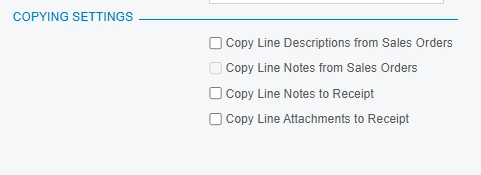
Currently it provides options only to copy line notes only up to Purchase Receipt Level. And we will have to manually add attachments to the Bill for reference, and it has become time consuming.

Is there any way that I can update this setting or modification ideas on this?

Thank You!

Best answer by Dipak Nilkanth

Hi ​@apallawala21,

I believe there is no out-of-the-box setting in Acumatica to automatically copy notes and attachments from a Purchase Order to an AP Bill.

To achieve this, you will need a customization.

A common approach is to add custom logic in the RowInserting (or RowInserted) event handler of the APInvoice DAC and use the built-in method:

PXNoteAttribute.CopyNoteAndFiles(sourceCache, sourceRow, targetCache, targetRow, copyNotes: true, copyFiles: true););

This method will copy both notes and attachments from the source document (PO) to the target document (AP Bill).

Hope this helps!

View original

2 replies

Dipak Nilkanth
Pro III
Forum|alt.badge.img+14

Hi ​@apallawala21,

I believe there is no out-of-the-box setting in Acumatica to automatically copy notes and attachments from a Purchase Order to an AP Bill.

To achieve this, you will need a customization.

A common approach is to add custom logic in the RowInserting (or RowInserted) event handler of the APInvoice DAC and use the built-in method:

PXNoteAttribute.CopyNoteAndFiles(sourceCache, sourceRow, targetCache, targetRow, copyNotes: true, copyFiles: true););

This method will copy both notes and attachments from the source document (PO) to the target document (AP Bill).

Hope this helps!

Translate

Forum|alt.badge.img+1

Hello ​@apallawala21 

I confirm that this is not an out of the box feature, however, it might be done through customization.

Here are the available settings on the PO preferences


Translate