Solved

Hide password in data field at Custom Screen

  • Jul 6, 2022 11:20 AM UTC
  • 12 replies
  • 333 views
  • Translate All

Forum|alt.badge.img+2

Hi,

In this topic 

The sample custom screen and endpoint was provided by @jinin for my solution, which contains custom screen with user and password for input  in Acumatica interface 

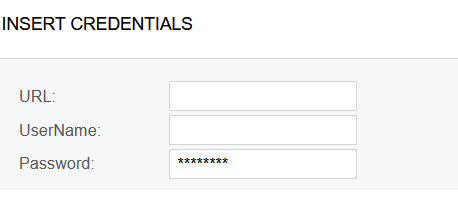
So, I have custom form with fields

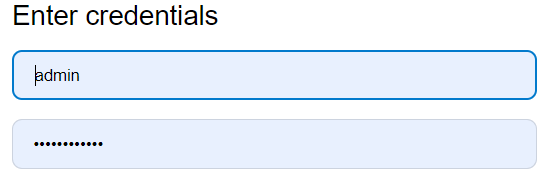
I need password value to be hidden same as at login tab

What actions at customization screen must be done for that ?

Acumatica version 2021R2

thanks in advance


Best answer by Naveen Boga

@Ivan  I’m assuming that the above one is the configuration screen.

In your DAC field, since you have provided the PXDefault(), then the system will consider that field as mandatory, hence asterisk (*) symbol appeared on the screen.

If you don’t want that field as mandatory, you can remove the PXDefault for the DAC field.


[PXUIField(DisplayName = "FTP Password")]       

[PXDefault()]             

[PXRSACryptStringAttribute(255, IsUnicode = true)]       

public virtual string FTPPassword { get; set; }

public abstract class fTPPassword : BqlString.Field<fTPPassword> { }

View original

12 replies

praveenpo
Semi-Pro III
Forum|alt.badge.img+3
  • Semi-Pro III
  • Jul 6, 2022 11:27 AM UTC

hi @Ivan ,

You can use [PXRSACryptStringAttribute(255, IsUnicode = true)]  at DAC level,this will encrypt the password.

Sample for your reference.

        [PXUIField(DisplayName = "FTP Password")]
        [PXDefault()]      
        [PXRSACryptStringAttribute(255, IsUnicode = true)]
        public virtual string FTPPassword { get; set; }
        public abstract class fTPPassword : BqlString.Field<fTPPassword> { }

Translate

Forum|alt.badge.img+2
  • Author
  • Varsity I
  • Jul 6, 2022 11:28 AM UTC

hi @Ivan ,

You can use [PXRSACryptStringAttribute(255, IsUnicode = true)]  at DAC level,this will encrypt the password.

Sample for your reference.

        [PXUIField(DisplayName = "FTP Password")]
        [PXDefault()]      
        [PXRSACryptStringAttribute(255, IsUnicode = true)]
        public virtual string FTPPassword { get; set; }
        public abstract class fTPPassword : BqlString.Field<fTPPassword> { }

Hi @praveenpo 

Thank you for provided info

I will check and let you know

Translate

Forum|alt.badge.img+2
  • Author
  • Varsity I
  • Jul 6, 2022 11:38 AM UTC

hi @Ivan ,

You can use [PXRSACryptStringAttribute(255, IsUnicode = true)]  at DAC level,this will encrypt the password.

Sample for your reference.

        [PXUIField(DisplayName = "FTP Password")]
        [PXDefault()]      
        [PXRSACryptStringAttribute(255, IsUnicode = true)]
        public virtual string FTPPassword { get; set; }
        public abstract class fTPPassword : BqlString.Field<fTPPassword> { }

@praveenpo 

It behaves strange

At the very beginning it has hidden value, but I have not inputted nothing at the very begging

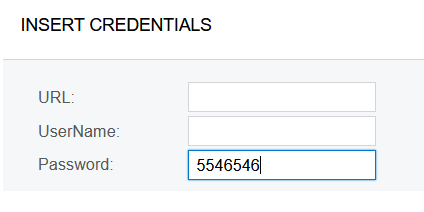
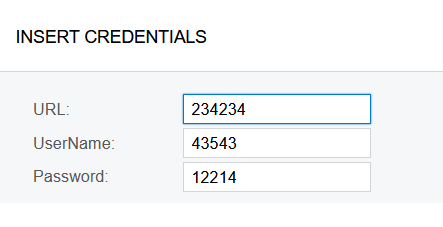
After I inputted value


After I inputted value, the encryption disappeared 

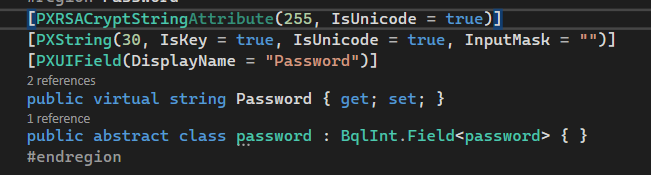
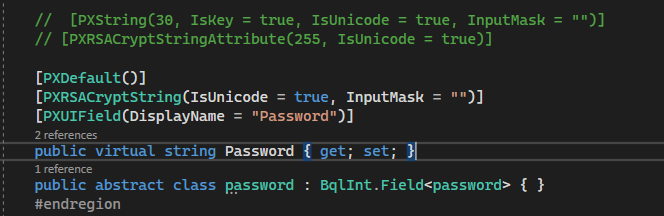
That is my code 


Translate

praveenpo
Semi-Pro III
Forum|alt.badge.img+3
  • Semi-Pro III
  • Jul 6, 2022 11:48 AM UTC

@Ivan ,

Please provide TextMode="Password" in aspx.

 <px:PXTextEdit ID="edFTPPassWord" runat="server" DataField="FTPPassWord" TextMode="Password" />

Translate

Forum|alt.badge.img+2
  • Author
  • Varsity I
  • Jul 6, 2022 11:54 AM UTC

@Ivan,

Please provide TextMode="Password" in aspx.

 <px:PXTextEdit ID="edFTPPassWord" runat="server" DataField="FTPPassWord" TextMode="Password" />

@praveenpo 

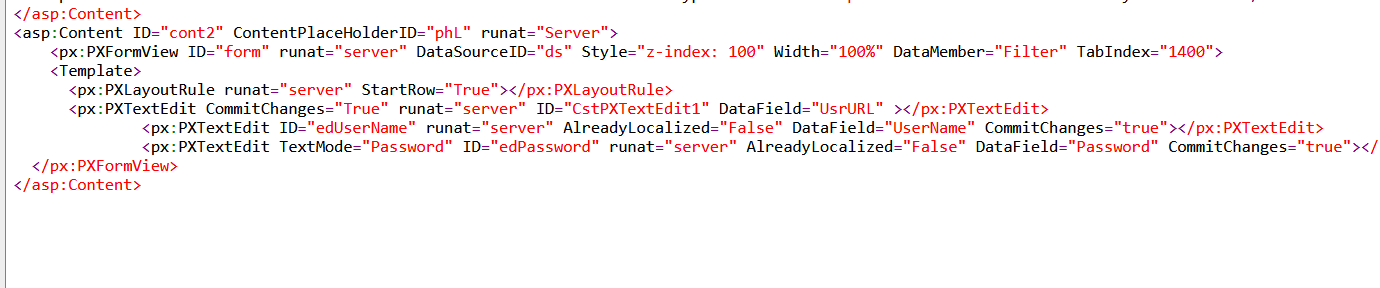
I am attaching password in aspx due to your request

<px:PXTextEdit ID="edPassword" runat="server" AlreadyLocalized="False" DataField="Password" CommitChanges="true"></px:PXTextEdit>

Translate

Forum|alt.badge.img+2
  • Author
  • Varsity I
  • Jul 6, 2022 2:33 PM UTC

 @praveenpo 

I added TextMode="Password"  in aspx

the problem remains same as I described above 

Translate

Naveen Boga
Captain II
Forum|alt.badge.img+20
  • Captain II
  • Jul 6, 2022 3:12 PM UTC

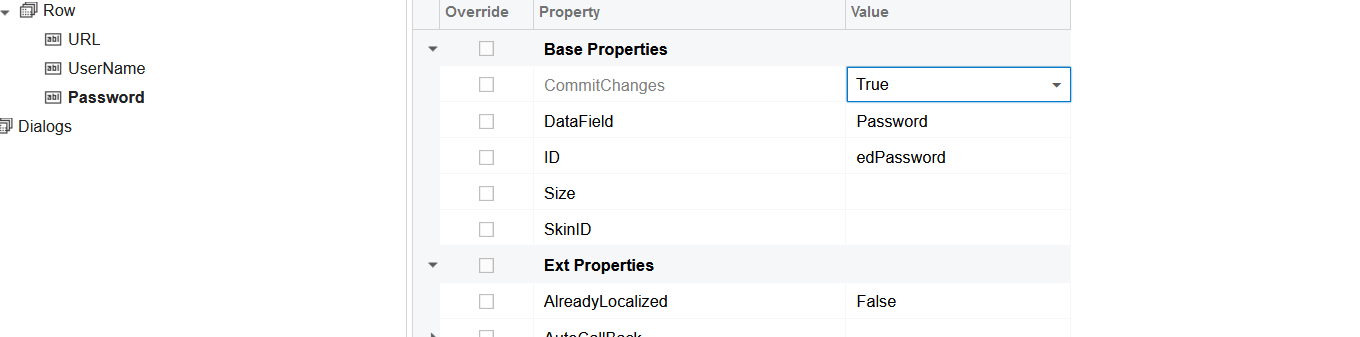
Hi @Ivan  It should work with the below code at the DAC level and make sure Commit Changes = “True” at the page level. It seems there is some issue with your code.


 [PXRSACryptString(IsUnicode = true, InputMask = "")]


Translate

Forum|alt.badge.img+2
  • Author
  • Varsity I
  • Jul 6, 2022 3:25 PM UTC

Hi @Ivan  It should work with the below code at the DAC level and make sure Commit Changes = “True” at the page level. It seems there is some issue with your code.


 [PXRSACryptString(IsUnicode = true, InputMask = "")]


Hi @Naveen Boga 

Thank you for your reply

I checked Commit Changes property according to your advise

And inserted your code 

Unfortunately it did not help 

I have stars depiction before I have inputted something while I just opened the page


Translate

Naveen Boga
Captain II
Forum|alt.badge.img+20
  • Captain II
  • Jul 6, 2022 3:29 PM UTC

Hi @Ivan  There is nothing wrong with the above code, it should work.

For some reason, it is not working in your instance.

You can try in the other instance and verify this.

Translate

Forum|alt.badge.img+2
  • Author
  • Varsity I
  • Jul 6, 2022 3:34 PM UTC

Hi @Ivan  There is nothing wrong with the above code, it should work.

For some reason, it is not working in your instance.

You can try in the other instance and verify this.

I understood

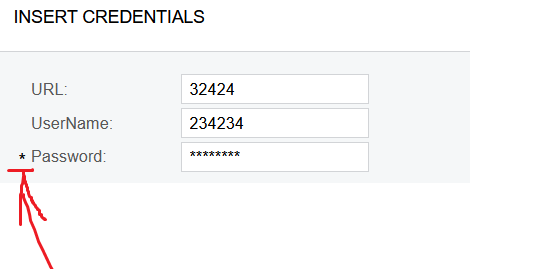
One more question - Is ok that before password textblock a star symbol appeared

It looks like it general view problem 

Translate

Naveen Boga
Captain II
Forum|alt.badge.img+20
  • Captain II
  • Answer
  • Jul 6, 2022 3:47 PM UTC

@Ivan  I’m assuming that the above one is the configuration screen.

In your DAC field, since you have provided the PXDefault(), then the system will consider that field as mandatory, hence asterisk (*) symbol appeared on the screen.

If you don’t want that field as mandatory, you can remove the PXDefault for the DAC field.


[PXUIField(DisplayName = "FTP Password")]       

[PXDefault()]             

[PXRSACryptStringAttribute(255, IsUnicode = true)]       

public virtual string FTPPassword { get; set; }

public abstract class fTPPassword : BqlString.Field<fTPPassword> { }
Translate

Forum|alt.badge.img+2
  • Author
  • Varsity I
  • Jul 6, 2022 3:48 PM UTC

@Ivan  I’m assuming that the above one is the configuration screen.

In your DAC field, since you have provided the PXDefault(), then the system will consider that field as mandatory, hence asterisk (*) symbol appeared on the screen.

If you don’t want that field as mandatory, you can remove the PXDefault for the DAC field.


[PXUIField(DisplayName = "FTP Password")]       

[PXDefault()]             

[PXRSACryptStringAttribute(255, IsUnicode = true)]       

public virtual string FTPPassword { get; set; }

public abstract class fTPPassword : BqlString.Field<fTPPassword> { }
@Naveen Boga  thank you for provided answers

Translate