Solved

Creating Purchase order through API

  • Feb 7, 2024 1:30 PM UTC
  • 11 replies
  • 653 views
  • Translate All

Driss
Jr Varsity III
Forum|alt.badge.img

Hi team

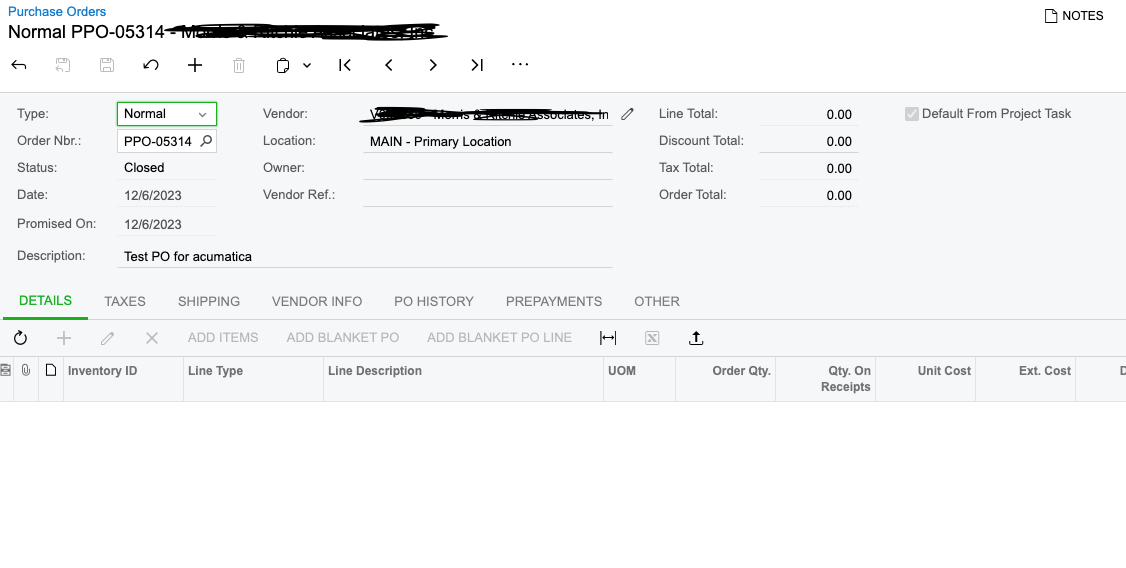
Im creating PO through API in old tenenat i was creating only skeleton of PO with no line items and it still defaulting to on hold status but now when we changed the to new tenant the PO will default to “Closed” how can i change that 


here is the PO 


  • Instaed of defaulting to Closed if i don’t have items mapped i want it to be defaulted to “Open” OR “On-Hold”


Thanks

Best answer by Driss

@frederickodendaal77 Hi- No luck about that what i did i created a dummy item with that Purchase Order just to prevent closed status and once i add all line to it i deleted that dummy item as i give line number of “989” 

Thank you so much for your help

View original

11 replies

Forum|alt.badge.img+1
  • Varsity I
  • Feb 8, 2024 12:24 AM UTC

Does the same thing happen when using the GUI?

Translate

Forum|alt.badge.img

You could just force the PO on hold in your API call when you create it:


{

"Type":{"value":"Normal"},

"ReferenceNbr":{"value":"1"},

"Hold":{"value":"True"},

"VendorID":{"value":"AAVENDOR"},

"Description":{"value":"TestPO"},

"Date":{"value":"2023/03/27"}


}


Translate

Driss
Jr Varsity III
Forum|alt.badge.img
  • Author
  • Jr Varsity III
  • Feb 8, 2024 1:20 PM UTC

@keithschm I created manuanly and same thing it defaulting to “Closed”

Translate

Driss
Jr Varsity III
Forum|alt.badge.img
  • Author
  • Jr Varsity III
  • Feb 8, 2024 1:22 PM UTC

@frederickodendaal77 Yes i just tested it and it still creating PO with closed status

Translate

Forum|alt.badge.img

@frederickodendaal77 Yes i just tested it and it still creating PO with closed status

What version are you testing on?

Translate

Driss
Jr Varsity III
Forum|alt.badge.img
  • Author
  • Jr Varsity III
  • Feb 8, 2024 1:36 PM UTC

@frederickodendaal77 This right?


Translate

Forum|alt.badge.img

@frederickodendaal77 This right?


I’m on 23.112 and it is working. What version of the endpoint are you using?
http://localhost/2023R1/entity/Default/22.200.001/PurchaseOrder

Translate

Driss
Jr Varsity III
Forum|alt.badge.img
  • Author
  • Jr Varsity III
  • Feb 8, 2024 2:29 PM UTC

@frederickodendaal77 I see , same endpoint version can you try and create PO with no item in GUI and see if it will default to “Open” Or “onHold”

Thank you

Translate

Forum|alt.badge.img

@Driss When I create it manually with no item in the GUI then it still saves on hold. Do you have any customization on that screen?

Translate

Driss
Jr Varsity III
Forum|alt.badge.img
  • Author
  • Jr Varsity III
  • Feb 8, 2024 2:51 PM UTC

@frederickodendaal77 Thank you for the confirmation, so i guess that will be a version thing i will check and let you know thank you so much

Translate

Driss
Jr Varsity III
Forum|alt.badge.img
  • Author
  • Jr Varsity III
  • Answer
  • Feb 10, 2024 1:43 PM UTC

@frederickodendaal77 Hi- No luck about that what i did i created a dummy item with that Purchase Order just to prevent closed status and once i add all line to it i deleted that dummy item as i give line number of “989” 

Thank you so much for your help

Translate