Solved

Create and confirm a shipment

  • Sep 13, 2022 6:47 PM UTC
  • 6 replies
  • 1130 views
  • Translate All

I’m trying to create and confirm a shipment all in a single Rest API call. I’m trying to do this in Postman first just to see it work. What am I getting wrong?

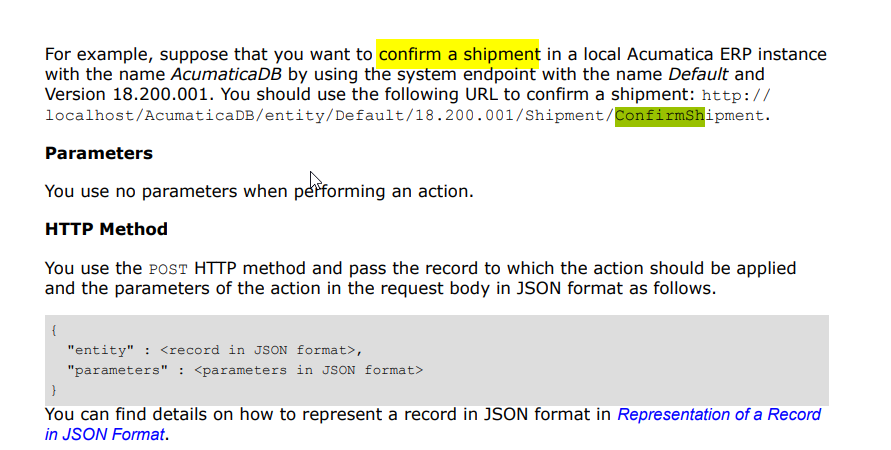
POST URL: http://accounting/(W(1))/entity/Default/20.200.001/Shipment/ConfirmShipment

Structure:

{
    "entity": {
        "ShipmentNbr": {
            "value": ""
        },
        "Type": {
            "value": "Shipment"
        },
        "Operation": {
            "value": "Issue"
        },
        "ShipmentDate": {
            "value": "9/13/2022"
        },
        "CustomerID": {
            "value": "CUST2943"
        },
        "WarehouseID": {
            "value": "XODUS"
        },
        "ShipVia": {
            "value": "UPS NXT DAY AE"
        },
        "OverrideFreightPrice": {
            "value": true
        },
        "FreightAmount": {
            "value": 5.67
        },
        "Details": [
            {
                "OrderType": {
                    "value": "SO"
                },
                "OrderNbr": {
                    "value": "SO251106"
                },
                "InventoryID": {
                    "value": "50500"
                },
                "UOM": {
                    "value": "CASE"
                },
                "ShippedQty": {
                    "value": "2"
                },
                "LineNbr": {
                    "value": 1
                }
            }
        ]
    },
    "parameters": {}
}
 
Return:
{
    "message": "An error has occurred.",
    "exceptionMessage": "Specified argument was out of the range of valid values.\r\nParameter name: Invalid uri structure",
    "exceptionType": "System.ArgumentOutOfRangeException",
    "stackTrace": "   at System.Monads.ArgumentCheck.Check[TSource](TSource source, Func`2 checkCondition, Func`2 exceptionSource)\r\n   at PX.Api.ContractBased.SystemContracts.V2.RestController.PutFile(String objectName, String ids)\r\n   at lambda_method(Closure , Object , …...
}

Best answer by jinin

Hi @Preethin 

We had the same situation when we work with multiple shipments. We did the below workaround. After completing the confirmed shipment action, we checked the status of the order, and still shows open, marking the shipment as completed forcefully.

Sample code:

if (docgraph.Document.Current.Status == SOShipmentStatus.Open)
            {
                bool? iscompleted = false;
                foreach (PXResult<SOOrderShipment, SOOrder> result in docgraph.OrderList.Select())
                {
                    SOOrder order = result;
                    if (order.Status == SOOrderStatus.Completed)
                        iscompleted = true;
                }
                if (iscompleted == true && docgraph.Document.Current.Confirmed == true && (docgraph.Document.Current.ShipmentType == INDocType.Issue && docgraph.Document.Current.UnbilledOrderCntr > 0 && docgraph.Document.Current.BilledOrderCntr == 0 && docgraph.Document.Current.ReleasedOrderCntr == 0 || docgraph.Document.Current.ShipmentType == INDocType.Transfer))
                {
                    docgraph.Document.Current.Status = SOShipmentStatus.Confirmed;
                    docgraph.Document.Update(docgraph.Document.Current);
                    docgraph.Save.Press();
                }
            }

View original

6 replies

jinin
Pro I
Forum|alt.badge.img+12
  • Pro I
  • Sep 14, 2022 7:51 AM UTC

Hi @XodusRich 

I don't think the option is available to create and confirm shipments at a time in the default Acumatica API. We can create a custom endpoint and write logic to create and confirm shipments at a time.

The above API call will work only for confirming shipment. The JSON should be like the below,

{

    "entity": {

        "Type": {

            "value": "Shipment"

        },

        "ShipmentNbr": {

            "value": "000330"

        }

    },

    "parameters": {}

}


Translate

  • Author
  • Freshman I
  • Sep 14, 2022 12:31 PM UTC

It’s there. If I take that JSON and execute it through my .net app, it does create and confirm a shipment. I’m just not getting a shipment number on the result.


Source: https://www.acumatica.com/media/2020/02/AcumaticaERP_IntegrationDevelopmentGuide.pdf page 95

Translate

jinin
Pro I
Forum|alt.badge.img+12
  • Pro I
  • Sep 14, 2022 3:05 PM UTC

Hi @XodusRich 

Its mentioned only to confirm shipment. Not  mentioned that create and confirm


Translate

Preethin
Freshman I
  • Freshman I
  • Apr 17, 2023 11:29 PM UTC

How do you confirm multiple shipments without running into  "exceptionMessage":"The previous operation has not been completed yet." 
When I am making an REST API call to Acumatica through Boomi this is what I encounter for every other shipment, any suggestions I tried script for wait 30-60seconds and it skips the script. 


Thank you in advance.


Translate

jinin
Pro I
Forum|alt.badge.img+12
  • Pro I
  • Answer
  • Apr 18, 2023 4:58 AM UTC

Hi @Preethin 

We had the same situation when we work with multiple shipments. We did the below workaround. After completing the confirmed shipment action, we checked the status of the order, and still shows open, marking the shipment as completed forcefully.

Sample code:

if (docgraph.Document.Current.Status == SOShipmentStatus.Open)
            {
                bool? iscompleted = false;
                foreach (PXResult<SOOrderShipment, SOOrder> result in docgraph.OrderList.Select())
                {
                    SOOrder order = result;
                    if (order.Status == SOOrderStatus.Completed)
                        iscompleted = true;
                }
                if (iscompleted == true && docgraph.Document.Current.Confirmed == true && (docgraph.Document.Current.ShipmentType == INDocType.Issue && docgraph.Document.Current.UnbilledOrderCntr > 0 && docgraph.Document.Current.BilledOrderCntr == 0 && docgraph.Document.Current.ReleasedOrderCntr == 0 || docgraph.Document.Current.ShipmentType == INDocType.Transfer))
                {
                    docgraph.Document.Current.Status = SOShipmentStatus.Confirmed;
                    docgraph.Document.Update(docgraph.Document.Current);
                    docgraph.Save.Press();
                }
            }

Translate

Vignesh Ponnusamy
Acumatica Moderator
Forum|alt.badge.img+5

@Preethin, You can check the status of the ConfirmShipment action using the Location from the header in the response and then can Confirm the next shipment. For more details on the Location header, please refer, https://help.acumatica.com/(W(5))/Help?ScreenId=ShowWiki&pageid=91bf9106-062a-47a8-be1f-b48517a54324

Translate