

Solved

Bills are created with Closed state

  • Feb 13, 2023 7:13 PM UTC
  • 7 replies
  • 147 views
  • Translate All

Forum|alt.badge.img+2

Hi,

I am using such request for creating Bills

{

  "VendorRef": {

    "value": "2134"

  },

   "Hold": {

        "value": false

    },

  "DueDate": {

    "value": "3/2/2023"

  },

  "Vendor": {

    "value": "V-02366"

  },

  "Date": {

    "value": "1/31/2023"

  },

  "Terms": {

    "value": "N30"

  }

}

Console shows that request is successful and it’s status is “Balanced”
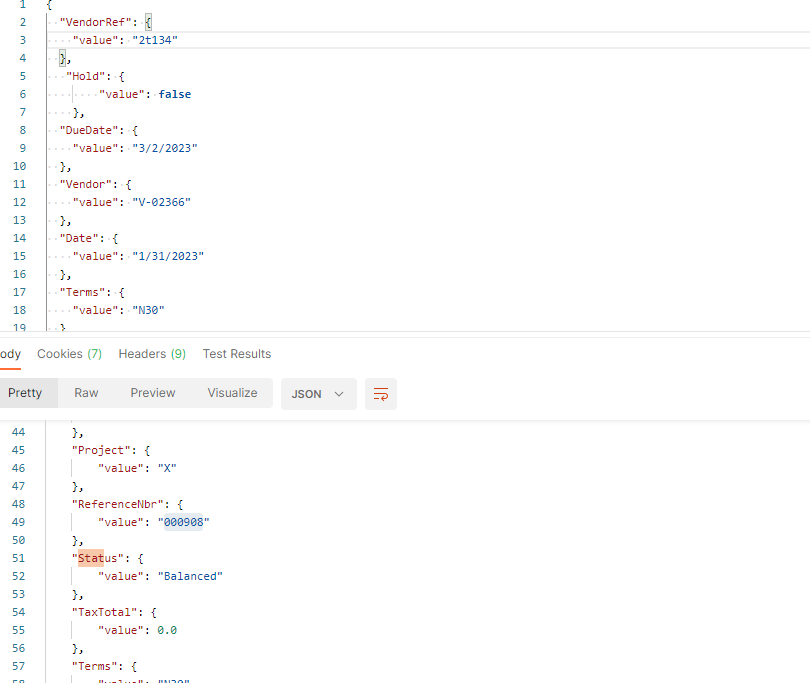
However in Acumatica it is in “Closed” state

I tried lots of vendors, lots of another combinations, but result remains the same

What I should check ?

Kindest regards

Best answer by aaghaei

If you are a member of Customizer role, either by above shortcut or from top right items selecting “inspect element” and then clicking on ui controls you can see the controls properties.


There is no preference for this purpose in AP. There is one for validating the document total and number manually entered that I do not believe will help you as it serves different purpose.

View original

7 replies

aaghaei
Captain II
Forum|alt.badge.img+11
  • Captain II
  • Feb 13, 2023 7:55 PM UTC

Your open balance is zero. When a bill has zero balance and gets released, the release method will automatically close it as platform doesn’t expect subsequent payments for it.

Translate

Forum|alt.badge.img+2
  • Author
  • Varsity I
  • Feb 13, 2023 11:32 PM UTC

Your open balance is zero. When a bill has zero balance and gets released, the release method will automatically close it as platform doesn’t expect subsequent payments for it.

Hi @aaghaei 

Thanks for response. Where I can check this option “bill’s balance” ? Can I set it manually to non-zero value in order to continue generate bills ?

Translate

aaghaei
Captain II
Forum|alt.badge.img+11
  • Captain II
  • Feb 13, 2023 11:50 PM UTC

If you ctrl alt click on the “balance” from your screenshot you will see what is the field you need to update with amount. 

the better alternative is to enter the exact same invoice values using interface and compare the numerical value of the header of manually entered invoice with API generated one and update the mismatch fields logic in your API connection

Translate

Forum|alt.badge.img+2
  • Author
  • Varsity I
  • Feb 14, 2023 4:49 PM UTC

If you ctrl alt click on the “balance” from your screenshot you will see what is the field you need to update with amount. 

the better alternative is to enter the exact same invoice values using interface and compare the numerical value of the header of manually entered invoice with API generated one and update the mismatch fields logic in your API connection

Hi @aaghaei 

I tried this “If you ctrl alt click on the “balance” from your screenshot you will see what is the field you need to update with amount. ” nut nothing was happened

As I remember there is way to turn off check for available balance for Bills. But I do not remember where this setting is located. I checked AP Preferences tab, but did not found. Can you suggest how to turn off check for balance or where can I set it to greater value ?

Translate

aaghaei
Captain II
Forum|alt.badge.img+11
  • Captain II
  • Answer
  • Feb 14, 2023 6:14 PM UTC

If you are a member of Customizer role, either by above shortcut or from top right items selecting “inspect element” and then clicking on ui controls you can see the controls properties.


There is no preference for this purpose in AP. There is one for validating the document total and number manually entered that I do not believe will help you as it serves different purpose.

Translate

Chris Hackett
Community Manager
Forum|alt.badge.img
  • Acumatica Community Manager
  • Mar 20, 2023 9:11 PM UTC

Hi @Ivan  were you able to find a solution? Thank you!

Translate

Forum|alt.badge.img+2
  • Author
  • Varsity I
  • Mar 21, 2023 10:33 AM UTC

Hi @Ivan  were you able to find a solution? Thank you!

Yes, I choosed best answer. Thank you 

Translate

