Solved

Version of Node.js for 25R2

  • November 3, 2025
  • 13 replies
  • 440 views
  • Translate All

Joe Schmucker
Captain II
Forum|alt.badge.img+3

I am working on MUI in 25R2 for my custom screens.

I have v22.21.1 installed.  According to my web search, 

“For Acumatica 2025, specifically for versions like 2025 R1 and 2025 R2, the recommended Node.js version is 22.x.x, with specific references to 22.11.0 for 2025 R1.”

From the Node.js web site, the closest version I could find is 22.21.1.  

When I run npm run getmodules, it does it’s thing.

Then, I run npm run build-dev.  It also does it’s thing and my pages are compiled.

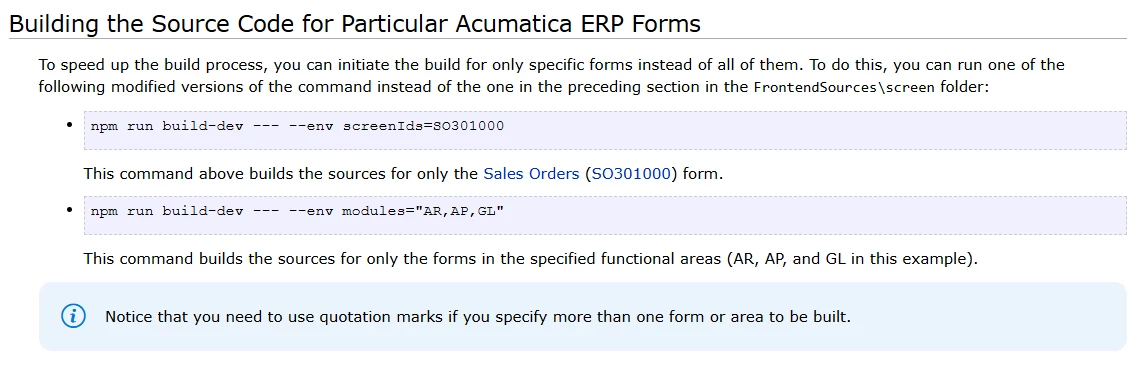
If I subsequently run npm run build -- ---env screenIds=IC401095 to rebuild my page after a tweak, I get this error:

exec error: Error: Command failed: gulp build
'gulp' is not recognized as an internal or external command,
operable program or batch file.

Here is my workaround to update my page:

  1. Re-run npm run getmodules
  2. run npm run build -- ---env screenIds=IC401095

The page is compiled and looks fine on my site.

I noticed that when I run a build, it says node build-and-clean.js

> build
> node build-and-clean.js ---env screenIds=IC401095

I THINK that the getmodules puts all the correct files in place and the build works ONE time.  A subsequent attempt to build loses the original .js files because of the build-and-clean.

Is this a bug?  Has anyone else encountered this?

 

Best answer by darylbowman

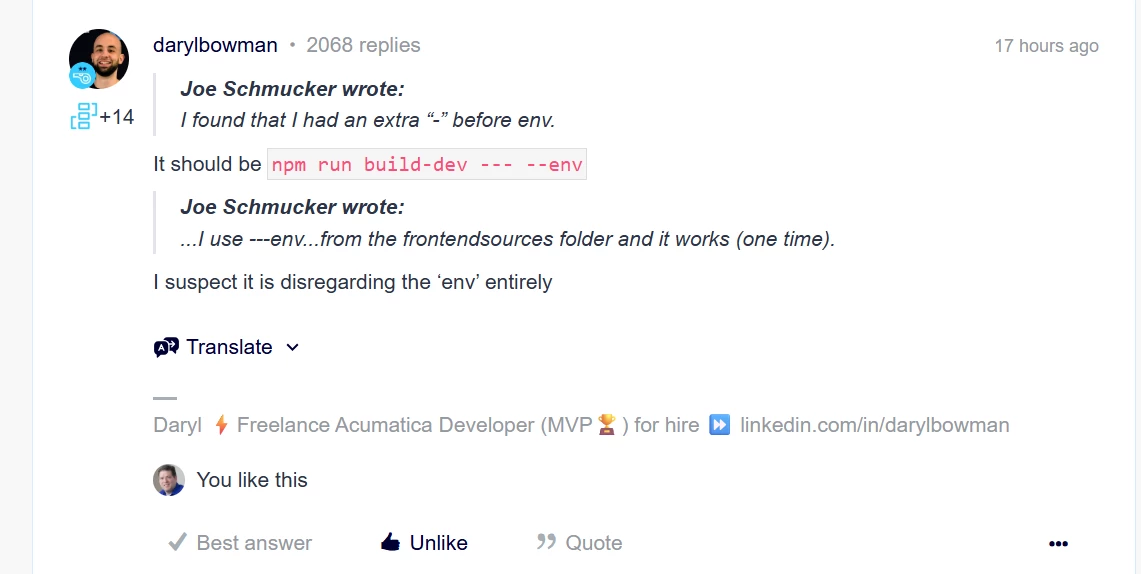
I found that I had an extra “-” before env.

It should be npm run build-dev --- --env  

...I use ---env...from the frontendsources folder and it works (one time).

I suspect it is disregarding the ‘env’ entirely

View original

13 replies

darylbowman
Captain II
Forum|alt.badge.img+17

Where are you running the extended build command from? It needs to be from \FrontendSources\screen. Also, as you found, if you run 'build', you need to run 'getmodules' again. Alternatively, run build-dev instead.

Translate

Joe Schmucker
Captain II
Forum|alt.badge.img+3

HI ​@darylbowman    I am running it from frontendsources.  That is what the t-290 training docs said to to.

I will try it from the screen folder.

Edit:

I ran getmodules from the frontendsources folder.  All set.

Ran npm run build-dev -- ---env screenIds=IC401095 from the screen folder.  I found that I had an extra “-” before env.  If I run it with “--env”, it works.  Note that I use ---env when running it from the frontendsources folder and it works (one time).

Thanks for the answer!


Translate

darylbowman
Captain II
Forum|alt.badge.img+17

Correct, for build-dev. But not the extended build-dev:


Translate

darylbowman
Captain II
Forum|alt.badge.img+17

I found that I had an extra “-” before env.

It should be npm run build-dev --- --env  

...I use ---env...from the frontendsources folder and it works (one time).

I suspect it is disregarding the ‘env’ entirely

Translate

Joe Schmucker
Captain II
Forum|alt.badge.img+3

There is a post somewhere on the forum where someone said that there needs to be 3 dashes.  I cannot find it, but I swear I saw it…  :-)

Translate

darylbowman
Captain II
Forum|alt.badge.img+17

Yes, three dashes, but not before env

Translate

Joe Schmucker
Captain II
Forum|alt.badge.img+3

I am so tired of beating my head against the wall.  I now have pretty MUI screens.   I created a project to add them to for publishing.  When I click Modern UI Files to add them, the screen is empty.  I was able to add them in 25R1.  

Translate

darylbowman
Captain II
Forum|alt.badge.img+17

You need to move them from /src/screens/* to /src/development/screens/*. Then they will be available. And I do mean move. Otherwise, they will cause issues.

Translate

Joe Schmucker
Captain II
Forum|alt.badge.img+3

Dude...how did you find this info?  Is there documentation I don’t know about?  What would I do without you!!!

Translate

darylbowman
Captain II
Forum|alt.badge.img+17

It’s starting to float around here. I discovered it somewhat by accident when I saved a customization to a folder in 25 R2 that I had added MUI files to in 25 R1.

Translate

Joe Schmucker
Captain II
Forum|alt.badge.img+3

I created scr/develoment/screens/IC/(my screen ids).  I see them now.  For dev purposes, do I leave them there and edit them there?  Or, do I have to move them back where they were to rebuild them?

Edit:  I think I answered my own question.  I have to move the screens from development back to src/screens to edit and rebuild them.

Translate

darylbowman
Captain II
Forum|alt.badge.img+17

I either wait to add them to the package until they're finished or just update and publish instead of building. Once you have them published, it won't respect the built files anymore anyway.

Translate

Joe Schmucker
Captain II
Forum|alt.badge.img+3

If anyone looks to this post for an answer, I meant to flag this one as the answer to my original question.


Translate