Solved

T190 Quick Start in Customization 2022 R1

  • May 25, 2022
  • 11 replies
  • 678 views
  • Translate All

I am new to Acumatica ERP Development have started T190 Quick Start in Customization 2022 R1 , In this process downloaded sample source code from Acumatica GitHub, but when as per instruction trying to Build the application getting bellow error. Can anyone help how to fix this?


Error        D:\Acumatica ERP\PhoneRepairShop\licenses.licx: Could not transform licenses file into a binary resource.  Object reference not set to an instance of an object.
Best answer by Dmitrii Naumov

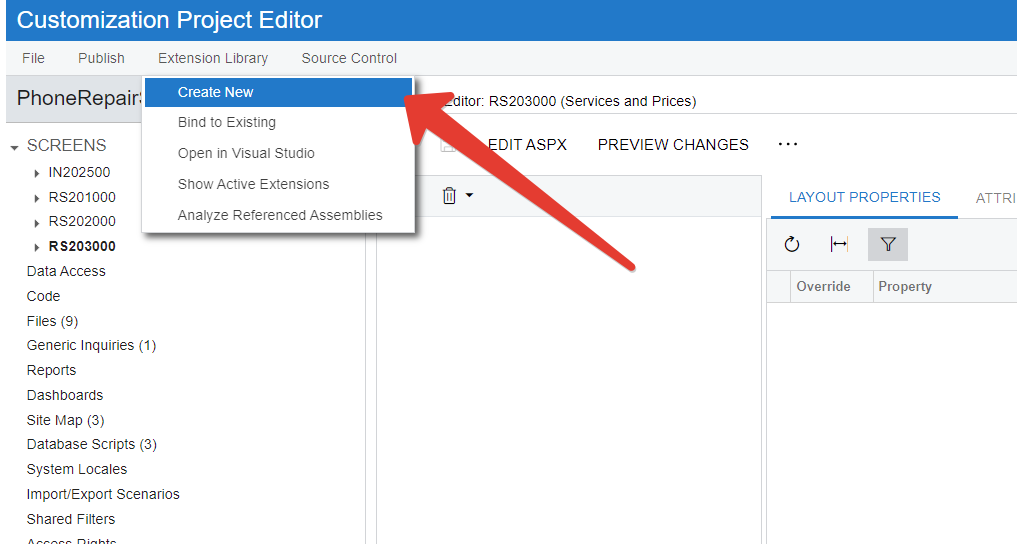
Workaround for that issue is the following:

  1. Open customization package
  2. Click “Extension Library → Create new” 
  3. Create new extension library and click ‘Ok’

  4. Click Extension Library → Bing to Existing

  5. Bind it to the extension library that you have from the training materials.

View original

11 replies

  • Author
  • Freshman I
  • May 25, 2022

When I have removed the licenses file and build the application that build fine, but when I am binding with Acumatica getting below error.
Exception Details: PX.Data.PXException: The file does not exist.

Translate

Chris Hackett
Community Manager
Forum|alt.badge.img
  • Acumatica Community Manager
  • June 9, 2022

Hi @pradeeps17 were you ever able to resolve your issue? Thank you!

Translate

andiB
Freshman I
  • Freshman I
  • June 24, 2022

Hi, I am having the same issue on the same course with the licenses.licx file.

“Could not transform licenses file into a binary resource.  Object reference not set to an instance of an object.”

Have you managed to resolve this?

Translate

andiB
Freshman I
  • Freshman I
  • June 24, 2022

Hi, I am having the same issue on the same course with the licenses.licx file.


It looks like I missed the fact that the VS solution has 2 projects in it:  “PhoneRepairShop_Code” and “Update TCourses”.  It is the latter that has the issue, but it appears not to be needed for the course?  I’ve just built the first project so I can carry on for now.

[edit] spoke to soon… now when I try binding the extension library (step 1.3 - part 5) it says “file not found”   Any idea what file it is expecting to find?

Translate

purwandaruw
Freshman II
Forum|alt.badge.img

Same with me, I’m facing same issues. 

Trying to use version 2021 R2, but the output still the same. Seems some file missing on the package. 

Translate

mehdihasanov
Acumatica Employee


Translate

mehdihasanov
Acumatica Employee

Unfortunately it doesn't seem like there is a workaround for this issue at this time. Your best course of action is to simply read through the guide and skip the implementation (or completely skip T190). If I were you I’d just jump into T200, it doesn’t have any issues.

Translate

Dmitrii Naumov
Community Manager
Forum|alt.badge.img+7

Workaround for that issue is the following:

  1. Open customization package
  2. Click “Extension Library → Create new” 
  3. Create new extension library and click ‘Ok’

  4. Click Extension Library → Bing to Existing

  5. Bind it to the extension library that you have from the training materials.

Translate

Elena Abilova
Community Manager
Forum|alt.badge.img
  • Education Technology Analyst
  • July 20, 2022

@andiB , @mehdihasanov, @pradeeps17, @purwandaruw47, please see the workaround provided.

Translate

purwandaruw
Freshman II
Forum|alt.badge.img

@andiB , @mehdihasanov, @pradeeps17, @purwandaruw47, please see the workaround provided.

Let me check again @Elena and thanks @Dmitrii Naumov 

Translate

@andiB , @mehdihasanov , @pradeeps17 , @purwandaruw47 , additional files have been uploaded to Github. Please pull the 2022R1 branch anew and use the latest version of files.

Translate