Solved

Report Attaching via Notification Template is not working

  • July 31, 2023
  • 10 replies
  • 368 views
  • Translate All

Forum|alt.badge.img+1

Hi all,


I have customized report and I wanted to attach it using notification template which is triggered by a Business event and Generic inquiry. But the issue is I am getting error saying “Object reference not set to an instance of an object”. 
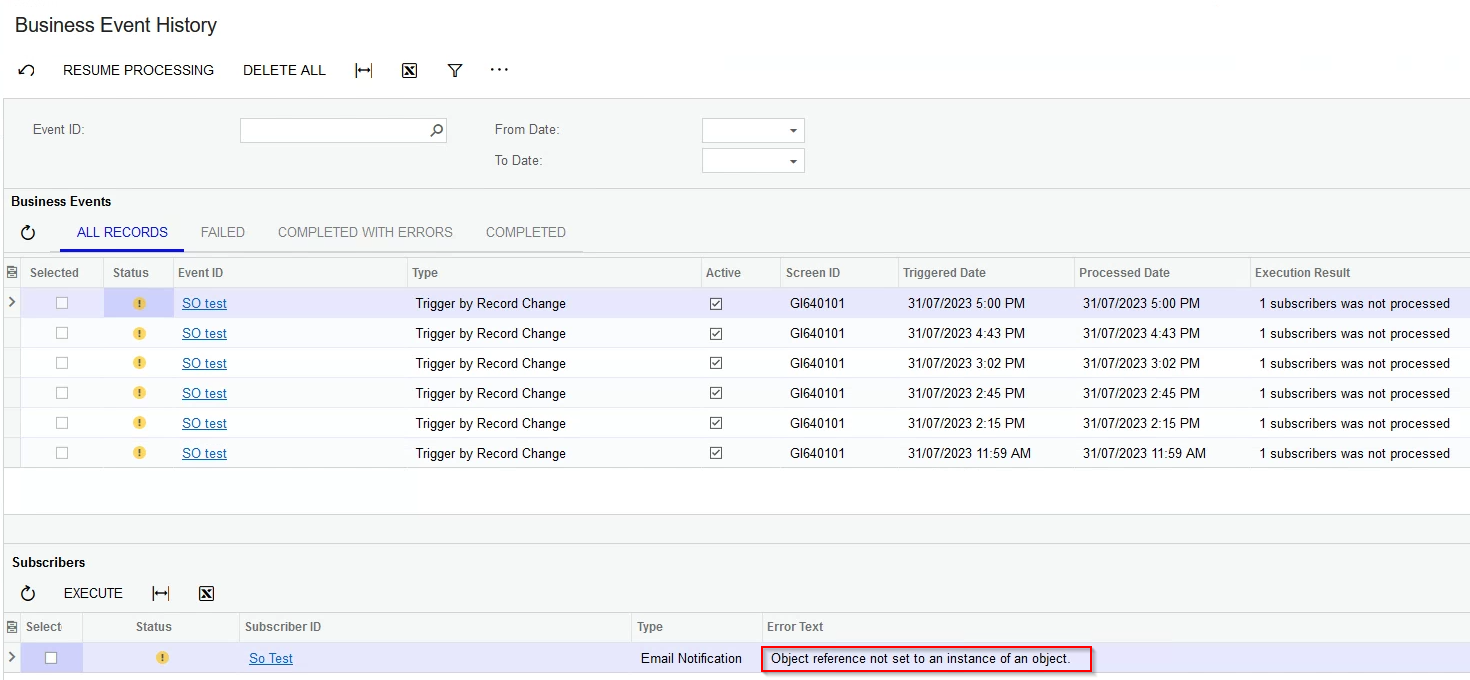
Business Event History

But when I’m running report in usual way it is generating without any issue. Also I can generate that report programmatically from code side as well. 


I tried passing fixed parameters and passing parameters through the GI as well in notification template. however, it is not working and it always gives above error message. 


what can be the issue here?
Best answer by charithalakshan49

Hi @manikantad18 Thanks for being so helpful🤝.

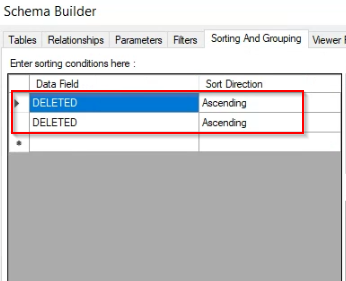
However, I was able to resolve the issue by removing the following sorting fields from the corresponding report. I think those sorting fields are useless as they are showing as DELETED and those may have effected the report generation in notification template as well.


View original

10 replies

Manikanta Dhulipudi
Captain II
Forum|alt.badge.img+16

Hi @charithalakshan49 

can you share the Notification XML report attachment here?

Share the screenshot of Report paramters?

Translate

Forum|alt.badge.img+1

@manikantad18 Thanks for the response. here they are,

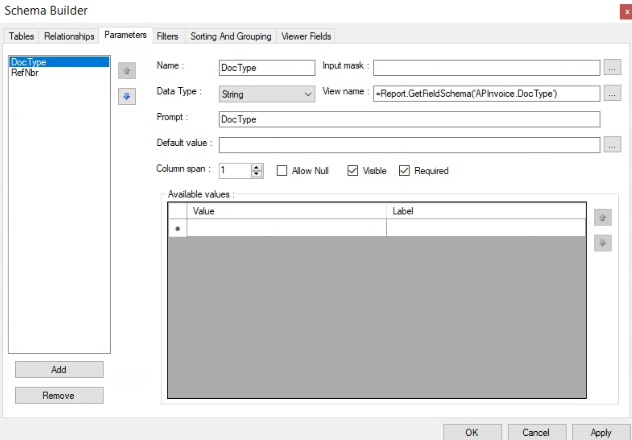
DocType Parameter


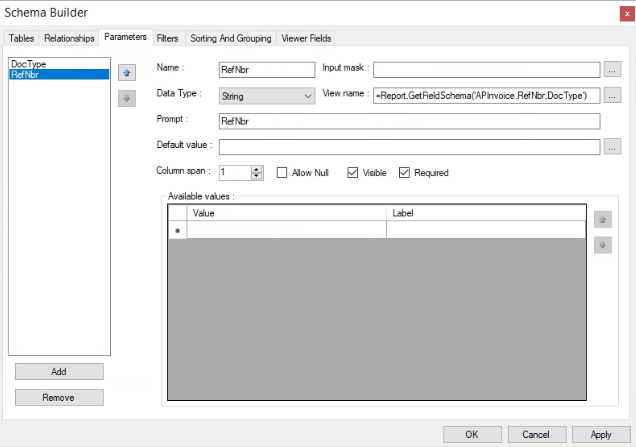
RefNbr Parameter


Translate

Manikanta Dhulipudi
Captain II
Forum|alt.badge.img+16

Hi 

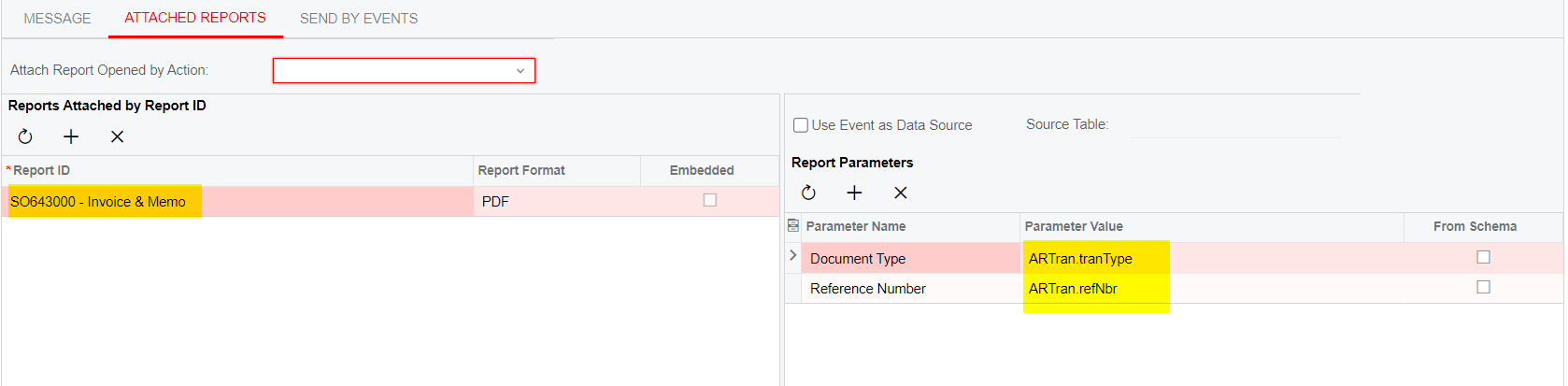
Are you passing parameter values in the template  as shown below.

We are sending the Invoice report along with Invoice confirmation email, So we need to pass the parameter values.

Translate

Forum|alt.badge.img+1

@manikantad18  Yes. I tried that as well. But it shows the same error in Business event history.

Translate

Manikanta Dhulipudi
Captain II
Forum|alt.badge.img+16

Hi @charithalakshan49 

Can you confirm if the email is sending with out attaching the report?

Thanks

Translate

Forum|alt.badge.img+1

Hi @manikantad18  Yes. When I remove the report attachment. it is sending without any issue. 

Translate

Manikanta Dhulipudi
Captain II
Forum|alt.badge.img+16

Hi @charithalakshan49 

Please share the GI Xml, Business event and report if possible.

Thanks

Translate

Forum|alt.badge.img+1

Hi @manikantad18 Thanks for being so helpful🤝.

However, I was able to resolve the issue by removing the following sorting fields from the corresponding report. I think those sorting fields are useless as they are showing as DELETED and those may have effected the report generation in notification template as well.


Translate

Manikanta Dhulipudi
Captain II
Forum|alt.badge.img+16

Hi @manikantad18 Thanks for being so helpful🤝.

However, I was able to resolve the issue by removing the following sorting fields from the corresponding report. I think those sorting fields are useless as they are showing as DELETED and those may effect the report generation in notification template as well.


Thank you for the Update.

Translate

I had the same experience with a business event.   The report sorting fields had a ‘DELETED’.   I removed this from report and the business event work as I needed.    

Translate