Answer

Print AR Statement - Remove Description

  • October 2, 2025
  • 5 replies
  • 38 views

Hello, on an invoice when a description is added it appears when statements are sent out. Any way to make sure it doesn't appear? 


Best answer by SunnyM

figured it out resolved. AR642000

5 replies

mohammadnawaz51
Jr Varsity I
Forum|alt.badge.img+4

@SunnyM Could you please provide a bit more detail about the issue? If the requirement is simply to hide the column from displaying, you can set the column’s Visible property to False in the Report Designer


  • Author
  • October 2, 2025

@mohammadnawaz51 Here you are. 


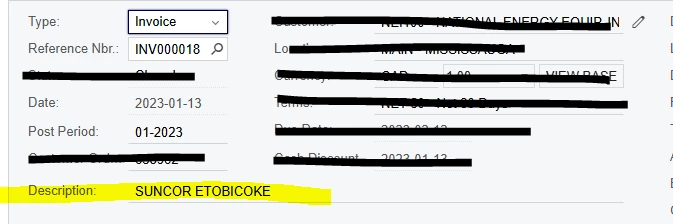
appears on the statement. Highlighted in yellow comes from the description field from the invoice that we do not want to appear on the statement. 


RohitRattan88
Acumatica Moderator
Forum|alt.badge.img+4
  • Acumatica Moderator
  • October 2, 2025

@SunnyM Could you please provide a bit more detail about the issue? If the requirement is simply to hide the column from displaying, you can set the column’s Visible property to False in the Report Designer

@SunnyM this is the answer. You could hide/remove the field via report designer.

See S150 Report Designer 2025 R1

Report Creation: Modification of an Existing Report


  • Author
  • October 2, 2025

@RohitRattan88 that field is not present on the AR invoice form. How do I pull the AR statement to into report designer? 


  • Author
  • Answer
  • October 2, 2025

figured it out resolved. AR642000