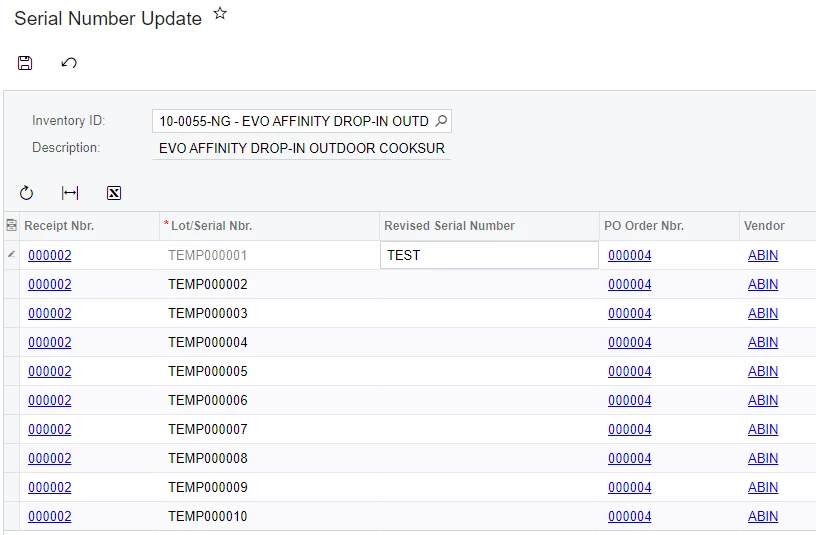
I have a custom screen I am using to attempt to update serial numbers in Acumatica. When the items are received, the customer doesn’t know the actual serial number at that time. We are autogenerating a TEMP number.
I have to TRY to update about 6 tables to change the S/N. Some of those tables have the S/N as a key field or a foreign key field, so I don’t know if I will even be able to do this.
However, when they click Save, I want to completely override the Save action by overriding the Persisting method. I do not want to even call the base method.
This is my screen:
This is my code:
public class SerialNumberUpdate : PXGraph<SerialNumberUpdate>
{
	[PXOverride]
	public virtual void Persist(Action baseMethod)
	{
		using (PXTransactionScope ts = new PXTransactionScope())
		{
			baseMethod();

			//MY STUFF

			ts.Complete(this);
		}
		//UpdWorkOrder.Cache.Persisted(false);
	}

	public PXSave<Filter> Save;
	public PXCancel<Filter> Cancel;
	public PXFilter<Filter> FilterView;

	public SelectFrom<POReceiptLineSplit>
		.InnerJoin<POReceiptLine>
			.On<POReceiptLine.receiptNbr.IsEqual<POReceiptLineSplit.receiptNbr>
				.And<POReceiptLine.receiptType.IsEqual<POReceiptLineSplit.receiptType>>
				.And<POReceiptLine.lineNbr.IsEqual<POReceiptLineSplit.lineNbr>>>
		.InnerJoin<POReceipt>
			.On<POReceipt.receiptNbr.IsEqual<POReceiptLine.receiptNbr>
				.And<POReceipt.receiptType.IsEqual<POReceiptLine.receiptType>>>
		.Where<POReceiptLineSplit.inventoryID.IsEqual<Filter.inventoryID.FromCurrent>>.View DetailsView;

	#region Event Handlers
	protected void Filter_RowPersisting(PXCache cache, PXRowPersistingEventArgs e)
	{
		var row = (Filter)e.Row;
		if (row == null) return;
		//AABPOReceiptLineSplitExt ext = row.GetExtension<AABPOReceiptLineSplitExt>();
		string joe = "joe";
	}
	#endregion

	[Serializable]
	[PXCacheName("Filter")]
	public class Filter : PXBqlTable, IBqlTable
	{
		#region InventoryID
		[Inventory]
		[PXUIField(DisplayName = "Inventory ID")]
		//[PXRestrictor(typeof(Where<InventoryItem.stkItem, Equal<False>>),
		//	Messages.CannotAddStockItemToRepairPrice)]
		public virtual int? InventoryID { get; set; }
		public abstract class inventoryID : PX.Data.BQL.BqlInt.Field<inventoryID> { }
		#endregion

	}
}
My break point in the event handler fires in debug

However, the break point in the override is not firing
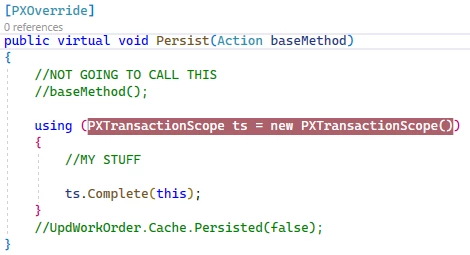
Does anyone know why the Persist override is not being reached?
Edit: for now, I am going to create a custom Action on the form and hide the Save button. But, I’d like to be able to use the Save button as it is esthetically better.