


Solved

Modern UI PXActionState button doesn't appear in sandbox environment, but does in development. How can I find out why?

  • August 28, 2026
  • 1 reply
  • 13 views

Forum|alt.badge.img+8

Version 26.101.0225

I’ve modified the Customers screen (AR303000) in Modern UI to add a detail grid to the Contact tab and to add some action buttons above the grids.

In my development environment, everything looks as it should:
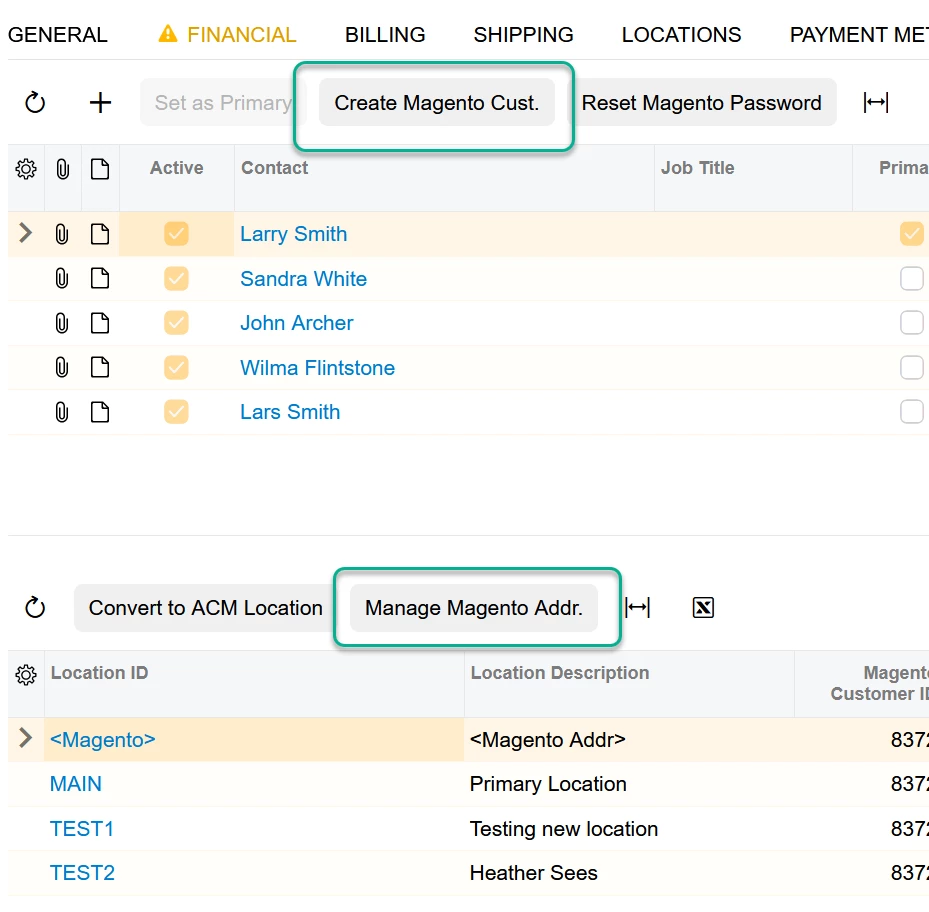
 

When I publish this to the sandbox environment, two of the buttons are missing:
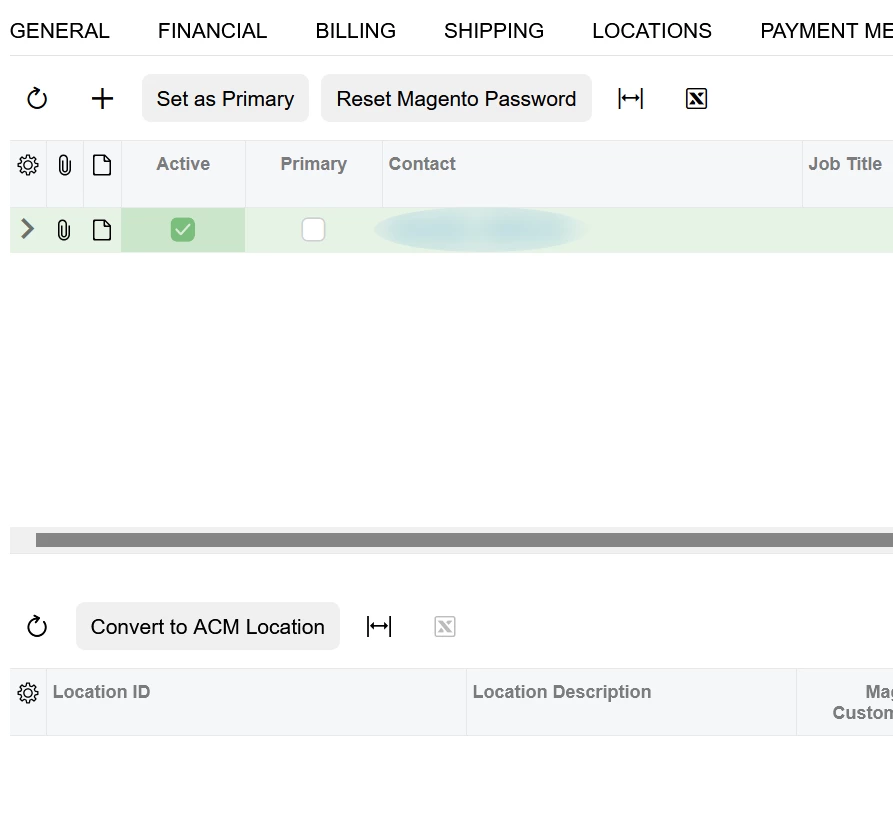
 

Using F12 to view the source I can see that the missing PXActionState code is there. The button is simply not visible.

How might I go about figuring out why it isn’t appearing?

C# and TS code below:
 

public PXAction<CRContact> ResetMagentoPassword;
[PXButton(Category = "ECommerce")]
[PXUIField(DisplayName = "Reset Magento Password", MapEnableRights = PXCacheRights.Select, MapViewRights = PXCacheRights.Select)]

...

public PXAction<CRContact> CreateMagentoCustomer;
[PXButton(Category = "ECommerce")]
[PXUIField(DisplayName = "Create Magento Cust.", MapEnableRights = PXCacheRights.Select, MapViewRights = PXCacheRights.Select)]

...

export interface ContactDetail_TPMagentoMods_generated extends ContactDetail { }
@gridConfig({
preset: GridPreset.ReadOnly,
syncPosition: true,
allowUpdate: false,
adjustPageSize: true,
showFilterBar: GridFilterBarVisibility.OnDemand,
quickFilterFields: ["DisplayName", "Salutation", "EMail", "Phone1"],
autoRepaint: ["MagentoCustomerLinkForContact"],
})
export class ContactDetail_TPMagentoMods_generated {

CreateMagentoCustomer: PXActionState;
ResetMagentoPassword: PXActionState;

UsrIsMagentoCustomer: PXFieldState;
UsrMagentoCustID: PXFieldState;
}


Best answer by Django

Solved.

I had to add the commands to the @gridConfig decorator.

@gridConfig({
syncPosition: true,
preset: GridPreset.ReadOnly,
topBarItems: {
AddAddressToMagento: {
index: 1, config: {
commandName: "AddAddressToMagento",
text: "Manage Magento Addr."}
},
ConvertAddrToLocation: {
index: 0, config: {
commandName: "ConvertAddrToLocation",
text: "Convert to ACM Location"}
}
}
})
export class MagentoCustomerLinkForContact extends PXView {

ConvertAddrToLocation: PXActionState;
AddAddressToMagento: PXActionState;
...

Also discovered that if I include the two PXActionState lines within the class then the text part of the topBarItems is ignored. In other words, if I wanted to override the caption of the action in the .ts file, I cannot include the PXActionState lines in the class. Having the actions listed in the topBarItems appears to be enough to make them appear and work. e.g.:
 

@gridConfig({
syncPosition: true,
preset: GridPreset.ReadOnly,
topBarItems: {
AddAddressToMagento: { //THIS MATCHES A PXActionState below
index: 1, config: {
commandName: "AddAddressToMagento",
text: "Manage Magento Addr. X"} //THIS IS IGNORED, CAPTION COMES FROM .cs CODE
},
ConvertAddrToLocation: { //DOES NOT MATCH A PXActionState below
index: 0, config: {
commandName: "ConvertAddrToLocation",
text: "Convert to ACM Location Y"} //THIS CAPTION IS SHOWN ON THE SCREEN
}
}
})
export class MagentoCustomerLinkForContact extends PXView {

//ConvertAddrToLocation: PXActionState;
AddAddressToMagento: PXActionState;

Also, the first parameter of topBarItems seems to be something I can call what I want:

@gridConfig({
syncPosition: true,
preset: GridPreset.ReadOnly,
topBarItems: {
DoStuff: { //THIS HERE IS ANY NAME I WANT
index: 1, config: {
commandName: "AddAddressToMagento", //THIS IS THE IMPORTANT PART
text: "Manage Magento Addr. X"} //THIS OVERRIDE IS USED ON THE SCREEN
},
ConvertAddrToLocation: {
index: 0, config: { commandName: "ConvertAddrToLocation", text: "Convert to ACM Location Y"}
}
}
})
export class MagentoCustomerLinkForContact extends PXView {

//ConvertAddrToLocation: PXActionState;
AddAddressToMagento: PXActionState; //UNCOMMENTED


Also, the text: parameter is required if you do not include the PXActionState line.

1 reply

Forum|alt.badge.img+8
  • Author
  • Captain II
  • Answer
  • August 28, 2026

Solved.

I had to add the commands to the @gridConfig decorator.

@gridConfig({
syncPosition: true,
preset: GridPreset.ReadOnly,
topBarItems: {
AddAddressToMagento: {
index: 1, config: {
commandName: "AddAddressToMagento",
text: "Manage Magento Addr."}
},
ConvertAddrToLocation: {
index: 0, config: {
commandName: "ConvertAddrToLocation",
text: "Convert to ACM Location"}
}
}
})
export class MagentoCustomerLinkForContact extends PXView {

ConvertAddrToLocation: PXActionState;
AddAddressToMagento: PXActionState;
...

Also discovered that if I include the two PXActionState lines within the class then the text part of the topBarItems is ignored. In other words, if I wanted to override the caption of the action in the .ts file, I cannot include the PXActionState lines in the class. Having the actions listed in the topBarItems appears to be enough to make them appear and work. e.g.:
 

@gridConfig({
syncPosition: true,
preset: GridPreset.ReadOnly,
topBarItems: {
AddAddressToMagento: { //THIS MATCHES A PXActionState below
index: 1, config: {
commandName: "AddAddressToMagento",
text: "Manage Magento Addr. X"} //THIS IS IGNORED, CAPTION COMES FROM .cs CODE
},
ConvertAddrToLocation: { //DOES NOT MATCH A PXActionState below
index: 0, config: {
commandName: "ConvertAddrToLocation",
text: "Convert to ACM Location Y"} //THIS CAPTION IS SHOWN ON THE SCREEN
}
}
})
export class MagentoCustomerLinkForContact extends PXView {

//ConvertAddrToLocation: PXActionState;
AddAddressToMagento: PXActionState;

Also, the first parameter of topBarItems seems to be something I can call what I want:

@gridConfig({
syncPosition: true,
preset: GridPreset.ReadOnly,
topBarItems: {
DoStuff: { //THIS HERE IS ANY NAME I WANT
index: 1, config: {
commandName: "AddAddressToMagento", //THIS IS THE IMPORTANT PART
text: "Manage Magento Addr. X"} //THIS OVERRIDE IS USED ON THE SCREEN
},
ConvertAddrToLocation: {
index: 0, config: { commandName: "ConvertAddrToLocation", text: "Convert to ACM Location Y"}
}
}
})
export class MagentoCustomerLinkForContact extends PXView {

//ConvertAddrToLocation: PXActionState;
AddAddressToMagento: PXActionState; //UNCOMMENTED


Also, the text: parameter is required if you do not include the PXActionState line.