Solved

Modern UI in Acumatica 2025R2

  • September 25, 2025
  • 10 replies
  • 530 views
  • Translate All

Forum|alt.badge.img

In classic ui my pxsmartpanel can display but after switch to moder ui when click button it doesn’t show dialogbox

</px:PXSmartPanel> <px:PXSmartPanel runat="server" ID="PopUpReportFilter" Caption="Choose Company Template" Key="companytemplatefilter" AcceptButtonID="btnOk1" DesignView="Content" AutoCallBack-Command="Refresh" AutoCallBack-Target="fromRunSoReport" LoadOnDemand="True" AutoCallBack-Enabled="True" AutoCallBack-Behavior-CommitChanges="True" AutoCallBack-Behavior-PostData="Page"> <px:PXFormView runat="server" ID="fromRunSoReport" DataMember="companytemplatefilter" CaptionVisible="True" DataSourceID="ds" Width="100%"> <Template> <px:PXLayoutRule runat="server" ID="CstPXLayoutRule14" StartColumn="True" ControlSize="XM" LabelsWidth="S" /> <px:PXSelector runat="server" ID="CstPXSelector19" DataField="ReportID" CommitChanges="True" /></Template></px:PXFormView> <px:PXPanel runat="server" ID="CstPanel9" SkinID="Buttons"> <px:PXButton runat="server" ID="btnOK1" DialogResult="OK" Text="OK"> <AutoCallBack Command="Save" Target="fromRunSoReport" /></px:PXButton></px:PXPanel></px:PXSmartPanel>. I try to add customized field to modern ui it worked but only pxsmartpanel I don’t know how to do it. I go through developer note but I cannot find it.


Best answer by aiwan

​@vannakheng 


You should complete the T290 course, it is beneficial

View original

10 replies

Forum|alt.badge.img+11
  • Captain II
  • September 25, 2025

​@vannakheng 


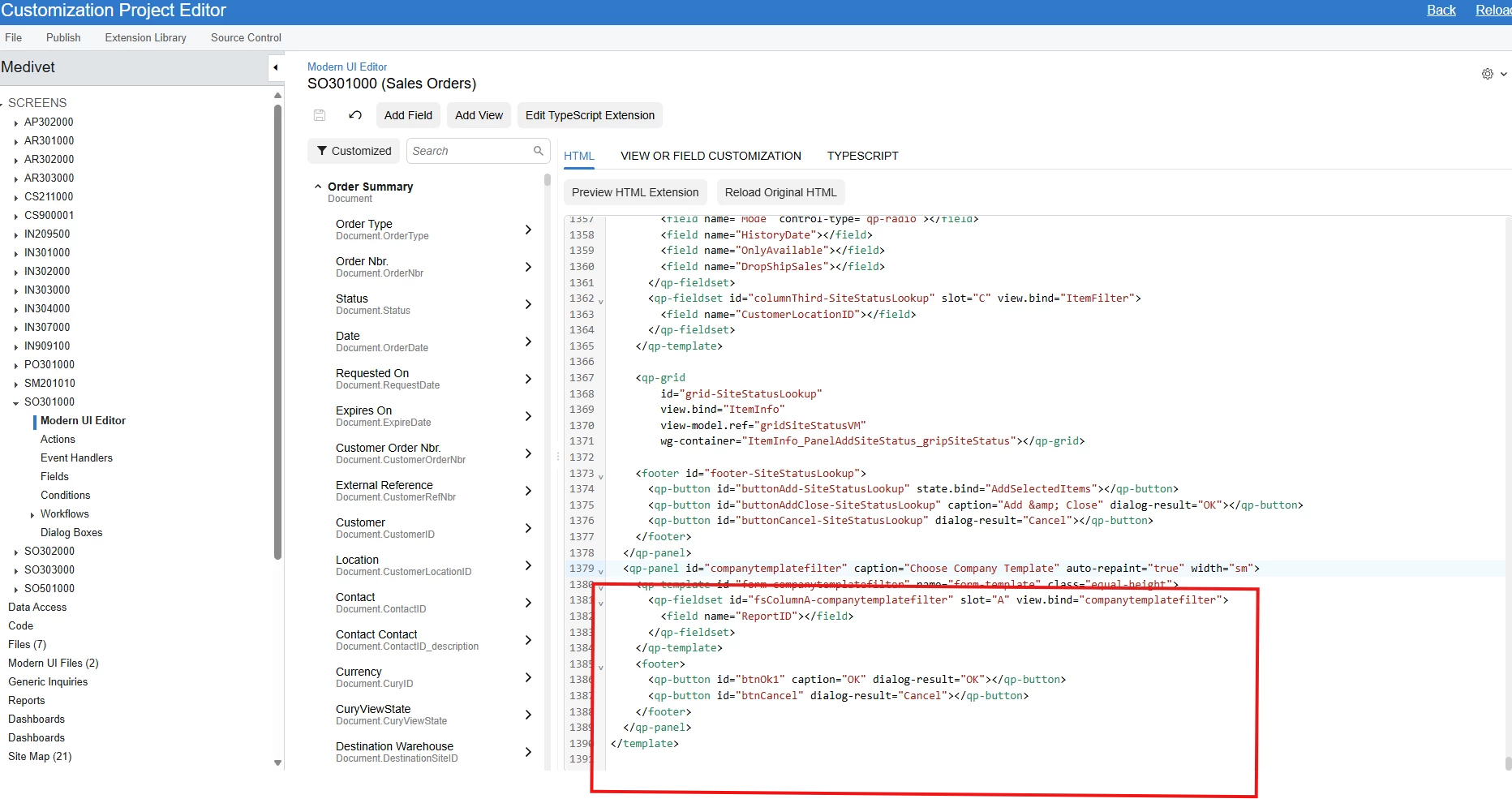
I believe, <qp-panel> is what you are looking for.

Class QpPanelCustomElement (qp-panel)

Translate

darylbowman
Captain II
Forum|alt.badge.img+17

Learning the Modern UI is not something you will do quickly. It takes a considerable amount of time (and frustration). I would suggest using the Classic UI on customized screens until sufficient time can be invested to do it properly.

Translate

Forum|alt.badge.img
  • Author
  • Freshman II
  • September 26, 2025

In classic ui my pxsmartpanel can display but after switch to moder ui when click button it doesn’t show dialogbox

</px:PXSmartPanel> <px:PXSmartPanel runat="server" ID="PopUpReportFilter" Caption="Choose Company Template" Key="companytemplatefilter" AcceptButtonID="btnOk1" DesignView="Content" AutoCallBack-Command="Refresh" AutoCallBack-Target="fromRunSoReport" LoadOnDemand="True" AutoCallBack-Enabled="True" AutoCallBack-Behavior-CommitChanges="True" AutoCallBack-Behavior-PostData="Page"> <px:PXFormView runat="server" ID="fromRunSoReport" DataMember="companytemplatefilter" CaptionVisible="True" DataSourceID="ds" Width="100%"> <Template> <px:PXLayoutRule runat="server" ID="CstPXLayoutRule14" StartColumn="True" ControlSize="XM" LabelsWidth="S" /> <px:PXSelector runat="server" ID="CstPXSelector19" DataField="ReportID" CommitChanges="True" /></Template></px:PXFormView> <px:PXPanel runat="server" ID="CstPanel9" SkinID="Buttons"> <px:PXButton runat="server" ID="btnOK1" DialogResult="OK" Text="OK"> <AutoCallBack Command="Save" Target="fromRunSoReport" /></px:PXButton></px:PXPanel></px:PXSmartPanel>. I try to add customized field to modern ui it worked but only pxsmartpanel I don’t know how to do it. I go through developer note but I cannot find it.

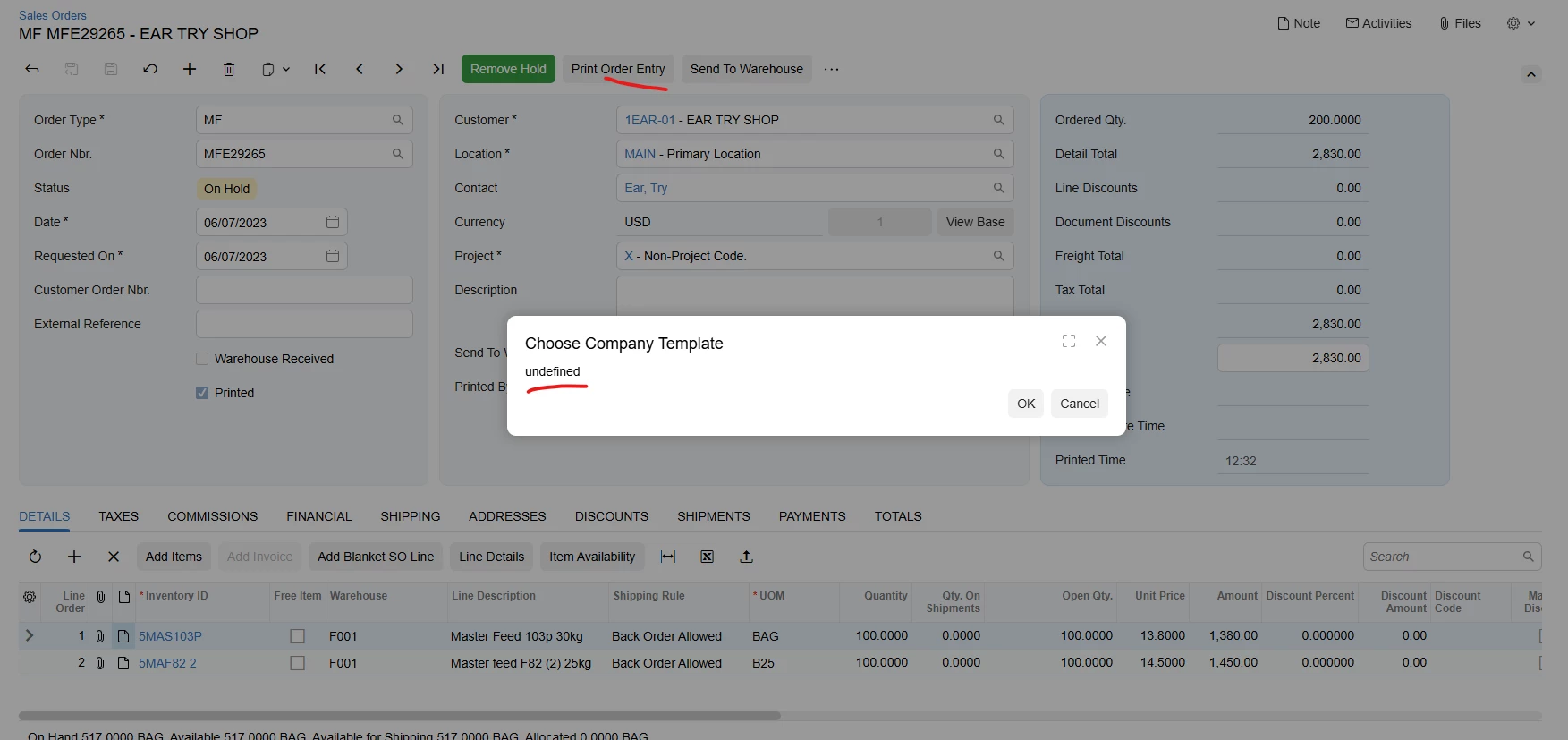
After add qb-panel in modern ui, I can display dialogbox. But reportID field is undefine.


Translate

darylbowman
Captain II
Forum|alt.badge.img+17

Have you defined a TypeScript class called ‘companytemplatefilter’ with a ReportID field?

Translate

Forum|alt.badge.img
  • Author
  • Freshman II
  • September 29, 2025

Have you defined a TypeScript class called ‘companytemplatefilter’ with a ReportID field?

Not yet

Translate

darylbowman
Captain II
Forum|alt.badge.img+17

Well, that’s your problem. That’s what tells the UI what the field is. Without that, you’re going to get errors.

Translate

Forum|alt.badge.img
  • Author
  • Freshman II
  • October 1, 2025

Well, that’s your problem. That’s what tells the UI what the field is. Without that, you’re going to get errors.

Can you guide me how to define typescript

Translate

darylbowman
Captain II
Forum|alt.badge.img+17

There are plenty of examples in the Modern UI section of help.acumatica.com

Translate

Forum|alt.badge.img+11
  • Captain II
  • Answer
  • October 1, 2025

​@vannakheng 


You should complete the T290 course, it is beneficial

Translate

Forum|alt.badge.img
  • Author
  • Freshman II
  • October 7, 2025

​@vannakheng 


You should complete the T290 course, it is beneficial

Now I make it work

Translate