Solved

Modern UI in Acumatica 2025R2

  • September 25, 2025
  • 10 replies
  • 185 views

Forum|alt.badge.img

In classic ui my pxsmartpanel can display but after switch to moder ui when click button it doesn’t show dialogbox

</px:PXSmartPanel> <px:PXSmartPanel runat="server" ID="PopUpReportFilter" Caption="Choose Company Template" Key="companytemplatefilter" AcceptButtonID="btnOk1" DesignView="Content" AutoCallBack-Command="Refresh" AutoCallBack-Target="fromRunSoReport" LoadOnDemand="True" AutoCallBack-Enabled="True" AutoCallBack-Behavior-CommitChanges="True" AutoCallBack-Behavior-PostData="Page"> <px:PXFormView runat="server" ID="fromRunSoReport" DataMember="companytemplatefilter" CaptionVisible="True" DataSourceID="ds" Width="100%"> <Template> <px:PXLayoutRule runat="server" ID="CstPXLayoutRule14" StartColumn="True" ControlSize="XM" LabelsWidth="S" /> <px:PXSelector runat="server" ID="CstPXSelector19" DataField="ReportID" CommitChanges="True" /></Template></px:PXFormView> <px:PXPanel runat="server" ID="CstPanel9" SkinID="Buttons"> <px:PXButton runat="server" ID="btnOK1" DialogResult="OK" Text="OK"> <AutoCallBack Command="Save" Target="fromRunSoReport" /></px:PXButton></px:PXPanel></px:PXSmartPanel>. I try to add customized field to modern ui it worked but only pxsmartpanel I don’t know how to do it. I go through developer note but I cannot find it.


Best answer by aiwan

@vannakheng 


You should complete the T290 course, it is beneficial

10 replies

Forum|alt.badge.img+8
  • Captain II
  • 537 replies
  • September 25, 2025

@vannakheng 


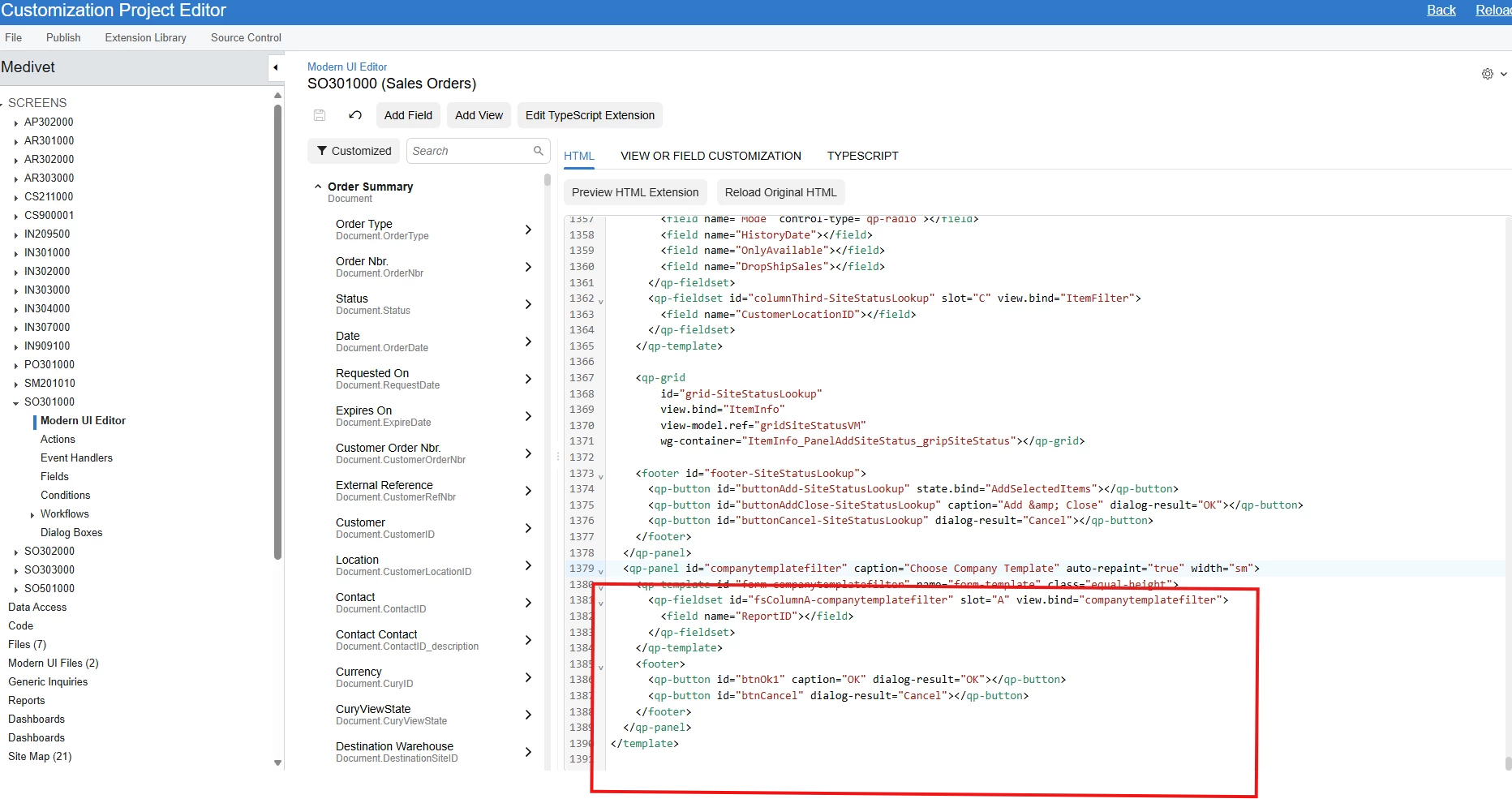
I believe, <qp-panel> is what you are looking for.

Class QpPanelCustomElement (qp-panel)


darylbowman
Captain II
Forum|alt.badge.img+14
  • 2076 replies
  • September 25, 2025

Learning the Modern UI is not something you will do quickly. It takes a considerable amount of time (and frustration). I would suggest using the Classic UI on customized screens until sufficient time can be invested to do it properly.


Forum|alt.badge.img
  • Author
  • Freshman II
  • 34 replies
  • September 26, 2025

In classic ui my pxsmartpanel can display but after switch to moder ui when click button it doesn’t show dialogbox

</px:PXSmartPanel> <px:PXSmartPanel runat="server" ID="PopUpReportFilter" Caption="Choose Company Template" Key="companytemplatefilter" AcceptButtonID="btnOk1" DesignView="Content" AutoCallBack-Command="Refresh" AutoCallBack-Target="fromRunSoReport" LoadOnDemand="True" AutoCallBack-Enabled="True" AutoCallBack-Behavior-CommitChanges="True" AutoCallBack-Behavior-PostData="Page"> <px:PXFormView runat="server" ID="fromRunSoReport" DataMember="companytemplatefilter" CaptionVisible="True" DataSourceID="ds" Width="100%"> <Template> <px:PXLayoutRule runat="server" ID="CstPXLayoutRule14" StartColumn="True" ControlSize="XM" LabelsWidth="S" /> <px:PXSelector runat="server" ID="CstPXSelector19" DataField="ReportID" CommitChanges="True" /></Template></px:PXFormView> <px:PXPanel runat="server" ID="CstPanel9" SkinID="Buttons"> <px:PXButton runat="server" ID="btnOK1" DialogResult="OK" Text="OK"> <AutoCallBack Command="Save" Target="fromRunSoReport" /></px:PXButton></px:PXPanel></px:PXSmartPanel>. I try to add customized field to modern ui it worked but only pxsmartpanel I don’t know how to do it. I go through developer note but I cannot find it.

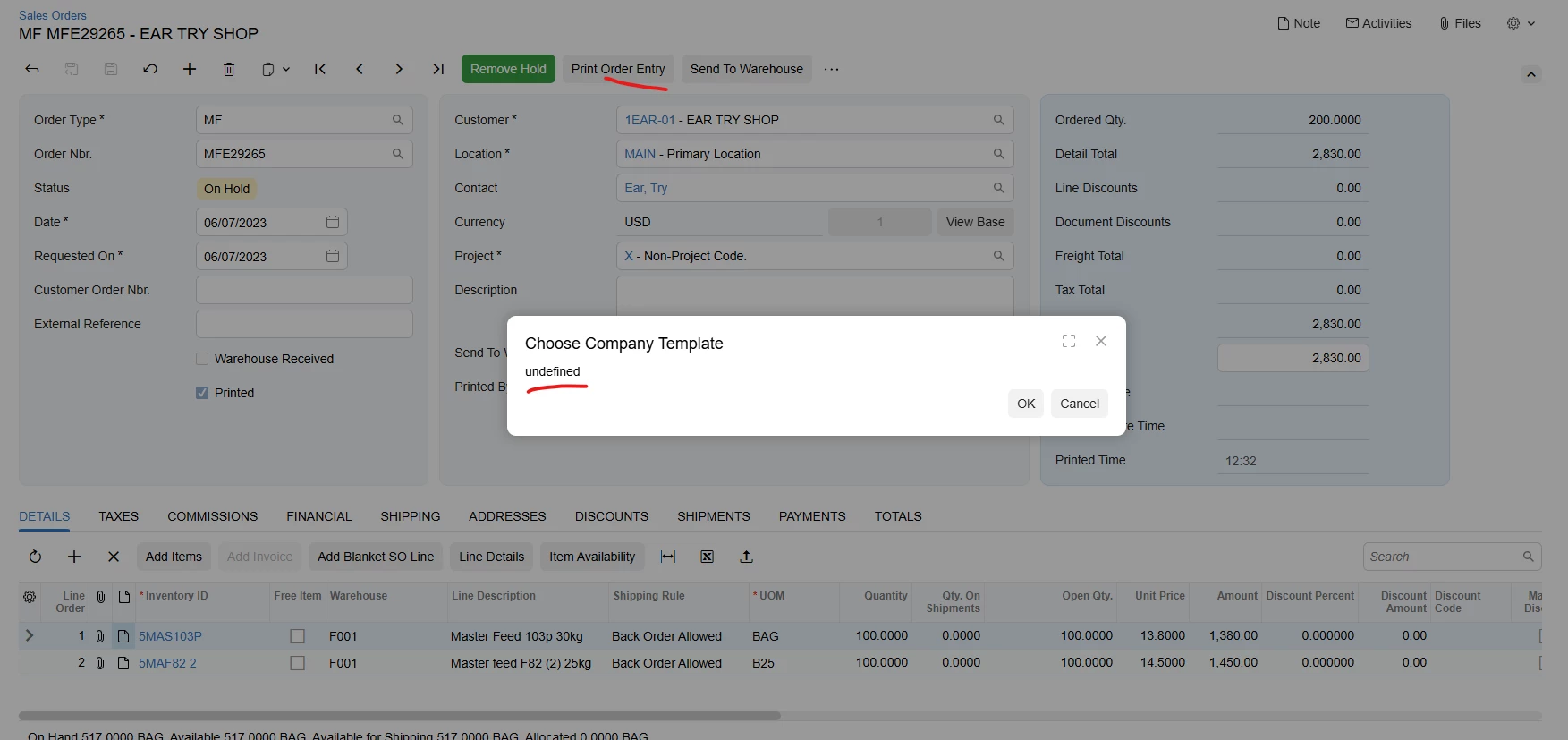
After add qb-panel in modern ui, I can display dialogbox. But reportID field is undefine.


darylbowman
Captain II
Forum|alt.badge.img+14
  • 2076 replies
  • September 26, 2025

Have you defined a TypeScript class called ‘companytemplatefilter’ with a ReportID field?


Forum|alt.badge.img
  • Author
  • Freshman II
  • 34 replies
  • September 29, 2025

Have you defined a TypeScript class called ‘companytemplatefilter’ with a ReportID field?

Not yet


darylbowman
Captain II
Forum|alt.badge.img+14
  • 2076 replies
  • September 29, 2025

Well, that’s your problem. That’s what tells the UI what the field is. Without that, you’re going to get errors.


Forum|alt.badge.img
  • Author
  • Freshman II
  • 34 replies
  • October 1, 2025

Well, that’s your problem. That’s what tells the UI what the field is. Without that, you’re going to get errors.

Can you guide me how to define typescript


darylbowman
Captain II
Forum|alt.badge.img+14
  • 2076 replies
  • October 1, 2025

There are plenty of examples in the Modern UI section of help.acumatica.com


Forum|alt.badge.img+8
  • Captain II
  • 537 replies
  • Answer
  • October 1, 2025

@vannakheng 


You should complete the T290 course, it is beneficial


Forum|alt.badge.img
  • Author
  • Freshman II
  • 34 replies
  • October 7, 2025

@vannakheng 


You should complete the T290 course, it is beneficial

Now I make it work