

Solved

Link field to other form

  • October 20, 2025
  • 6 replies
  • 137 views
  • Translate All

Forum|alt.badge.img

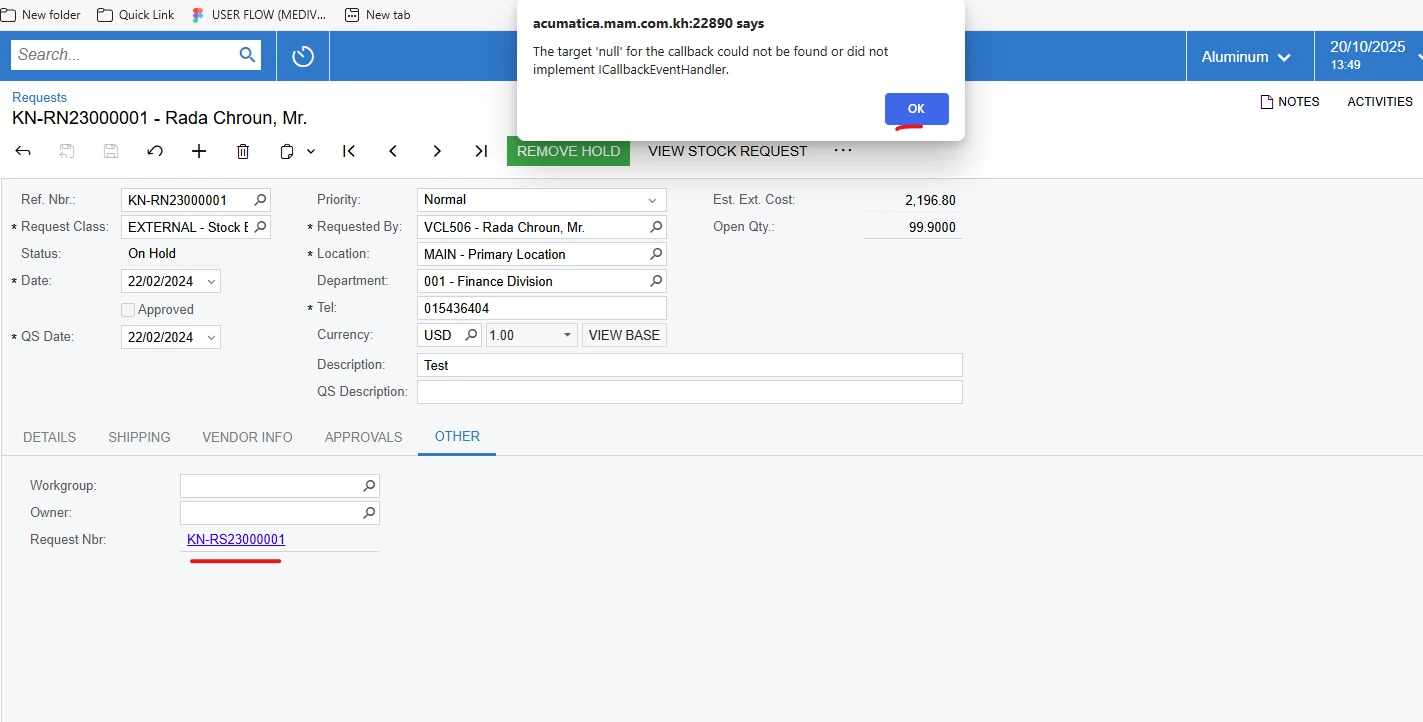
I have action that want to link field. when I click it error like above 

Best answer by aleksandrsechin

If the Request Nbr field is read-only and has the PXSelector attribute, set the following properties:
Enabled="False"
AllowEdit="True"
Also remove the Command and Target properties.

And if the Request Nbr field is just a PXTextEdit, you can specify the Command="YourCommand" and Target="ds" properties, where YourCommand is an action defined like this:
 

public PXAction<PMRegister> YourCommand;

[PXButton]
[PXUIField]
public virtual IEnumerable yourCommand(PXAdapter adapter)
{
    var graph = PXGraph.CreateInstance<RegisterEntry>();
    
    graph.Document.Current = graph.Document.Search<PMRegister.refNbr>(Base.Document.Current?.Description, "PM");

    throw new PXRedirectRequiredException(graph, true, null);
}
 

In my case, this allows opening the PM00002237 Project Transaction in a new tab by simply clicking the Description text field.

View original

6 replies

Forum|alt.badge.img+11
  • Captain II
  • October 20, 2025

​@vannakheng 


Have you considered using AllowEdit=true in .aspx?


This would also require the DAC to have the PXPrimaryGraph attribute, and the DAC field to have the PXSelector attribute that includes key fields of the record. 

Translate

Forum|alt.badge.img
  • Author
  • Freshman II
  • October 20, 2025

​@vannakheng 


Have you considered using AllowEdit=true in .aspx?


This would also require the DAC to have the PXPrimaryGraph attribute, and the DAC field to have the PXSelector attribute that includes key fields of the record. 

Can we use text field because I don’t want to modify existing customization

Translate

Forum|alt.badge.img+11
  • Captain II
  • October 20, 2025

​@vannakheng 


I don’t think so, I believe it has to be a PXSelector.


Translate

Forum|alt.badge.img+4

If the Request Nbr field is read-only and has the PXSelector attribute, set the following properties:
Enabled="False"
AllowEdit="True"
Also remove the Command and Target properties.

Translate

Forum|alt.badge.img+4

If the Request Nbr field is read-only and has the PXSelector attribute, set the following properties:
Enabled="False"
AllowEdit="True"
Also remove the Command and Target properties.

And if the Request Nbr field is just a PXTextEdit, you can specify the Command="YourCommand" and Target="ds" properties, where YourCommand is an action defined like this:
 

public PXAction<PMRegister> YourCommand;

[PXButton]
[PXUIField]
public virtual IEnumerable yourCommand(PXAdapter adapter)
{
    var graph = PXGraph.CreateInstance<RegisterEntry>();
    
    graph.Document.Current = graph.Document.Search<PMRegister.refNbr>(Base.Document.Current?.Description, "PM");

    throw new PXRedirectRequiredException(graph, true, null);
}
 

In my case, this allows opening the PM00002237 Project Transaction in a new tab by simply clicking the Description text field.

Translate

Forum|alt.badge.img
  • Author
  • Freshman II
  • October 20, 2025

If the Request Nbr field is read-only and has the PXSelector attribute, set the following properties:
Enabled="False"
AllowEdit="True"
Also remove the Command and Target properties.

And if the Request Nbr field is just a PXTextEdit, you can specify the Command="YourCommand" and Target="ds" properties, where YourCommand is an action defined like this:
 

public PXAction<PMRegister> YourCommand;

[PXButton]
[PXUIField]
public virtual IEnumerable yourCommand(PXAdapter adapter)
{
    var graph = PXGraph.CreateInstance<RegisterEntry>();
    
    graph.Document.Current = graph.Document.Search<PMRegister.refNbr>(Base.Document.Current?.Description, "PM");

    throw new PXRedirectRequiredException(graph, true, null);
}

Thanks It’s working

Translate
