

Solved

How to limit the data source of a selector?

  • May 10, 2021 2:25 PM UTC
  • 4 replies
  • 412 views
  • Translate All

Forum|alt.badge.img+6

Hello,

          With other’s help, I was able to add a selector of employees on shipment screen.
I’ve created an employeeclass (Which is referred to VendorClassID in DAC) named “PICKER”,

I’d like to limit the selector only shows the employees from “PICKER”,

I write the below code, but it gives out errors:


[PXSelector(typeof(Search<EPEmployee.bAccountID,
Where<EPEmployee.vendorClassID,Equal<"PICKER">>>),
 typeof(EPEmployee.acctCD), 
typeof(EPEmployee.acctName), 
typeof(EPEmployee.vendorClassID),
SubstituteKey = typeof(EPEmployee.acctCD))]
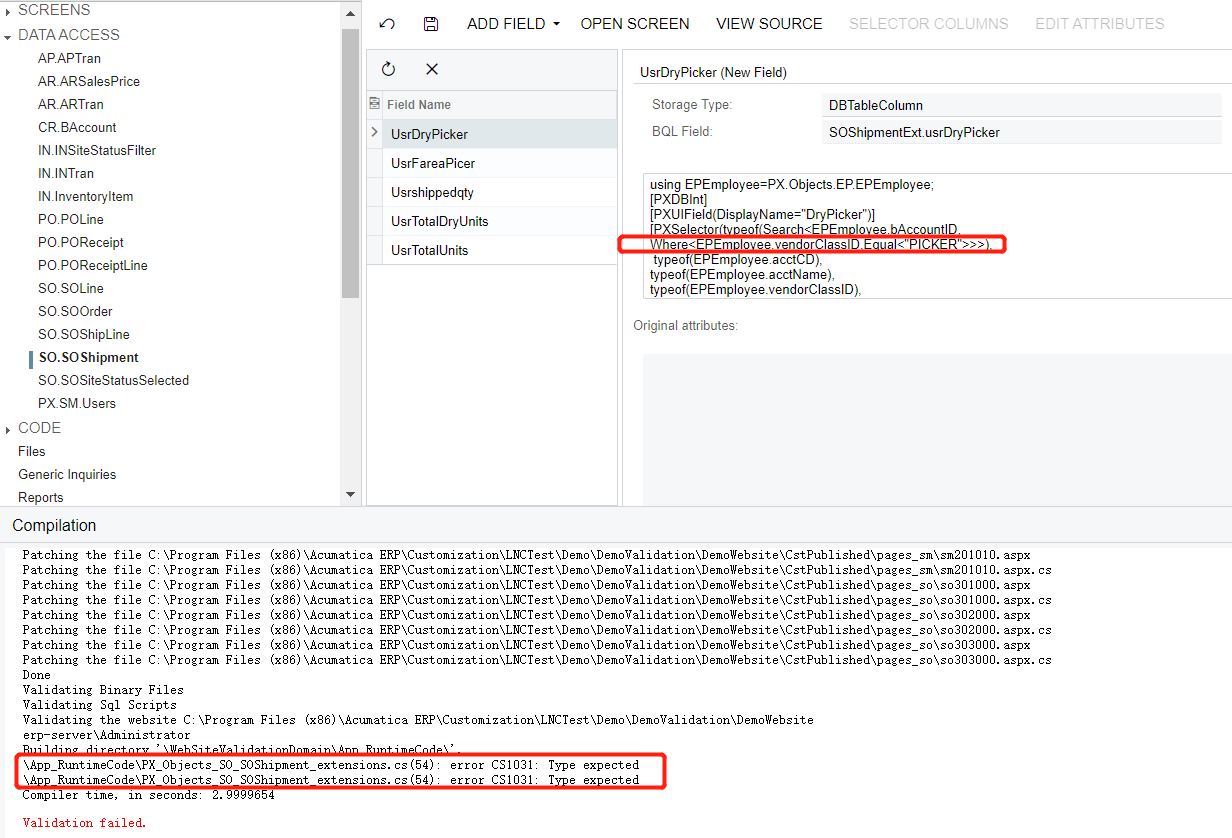


       What is the right way to write the codes. Please advise. Thank you.

Best answer by Naveen Boga

Hi @ray20 

We can not pass directly that value, and for this, we need to use SQL constants.

Please use the below code and check….

public class SQLConstants

{
 public class PICKER : PX.Data.BQL.BqlString.Constant<PICKER>
        {
            public PICKER() : base("PICKER") { }
        }

}

[PXSelector(typeof(Search<EPEmployee.bAccountID,
Where<EPEmployee.vendorClassID,Equal<SQLConstants.PICKER>>>),
 typeof(EPEmployee.acctCD), 
typeof(EPEmployee.acctName), 
typeof(EPEmployee.vendorClassID),
SubstituteKey = typeof(EPEmployee.acctCD))]

View original

4 replies

Naveen Boga
Captain II
Forum|alt.badge.img+20
  • Captain II
  • Answer
  • May 10, 2021 2:30 PM UTC

Hi @ray20 

We can not pass directly that value, and for this, we need to use SQL constants.

Please use the below code and check….

public class SQLConstants

{
 public class PICKER : PX.Data.BQL.BqlString.Constant<PICKER>
        {
            public PICKER() : base("PICKER") { }
        }

}

[PXSelector(typeof(Search<EPEmployee.bAccountID,
Where<EPEmployee.vendorClassID,Equal<SQLConstants.PICKER>>>),
 typeof(EPEmployee.acctCD), 
typeof(EPEmployee.acctName), 
typeof(EPEmployee.vendorClassID),
SubstituteKey = typeof(EPEmployee.acctCD))]

Translate

Forum|alt.badge.img+8
  • Captain II
  • May 10, 2021 2:35 PM UTC

The code that you’re looking for is something like this:

#region HelperClasses    

    private class string_PICKER: Constant<string>    

    {

        public string_PICKER():base("PICKER"){}

    }      

#endregion

Then, in your field code you’ll reference that custom class:

Where<EPEmployee.vendorClassID,Equal<class_PICKER>>>),

Now, I typically use the “Convert To Extension” button under the Data Access group to turn the automatically generated code to files under the Code group and that’s where I’d place the code that I wrote above. But I’m not sure where you’d place that code while keeping your code organized in the way that your project currently shows. Other people might be able to help there.

Edit: Naveen has shown you the same thing but done a litte more correctly. :)

Translate

Forum|alt.badge.img+6
  • Author
  • Captain II
  • May 10, 2021 2:54 PM UTC

@Naveen B @ddunn 
Thank you , experts. Really, really appreciate. Codes are working.

Translate

Naveen Boga
Captain II
Forum|alt.badge.img+20
  • Captain II
  • May 10, 2021 2:55 PM UTC

@ray20  Great :) Thanks for sharing the update.

Translate
