

Dear ALL,
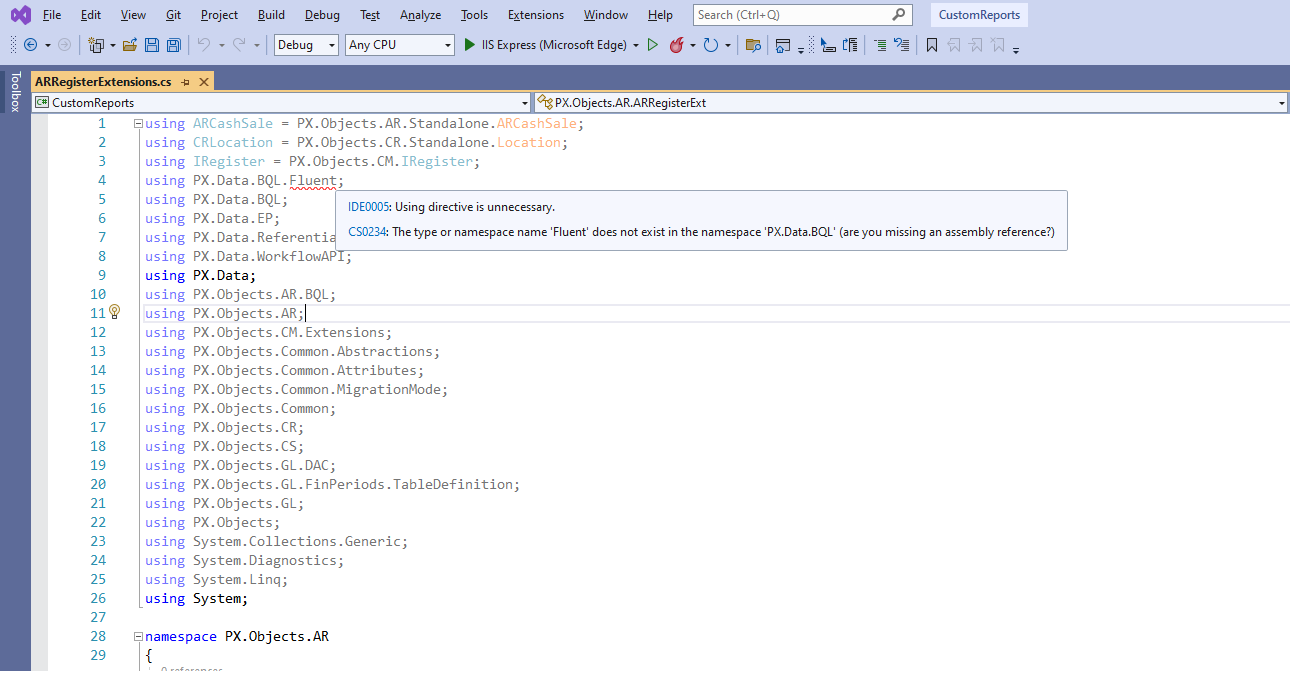
Please help to fix Error CS0234 The type or namespace name 'Fluent' does not exist in the namespace 'PX.Data.BQL' (are you missing an assembly reference?) in Visual Studio.
Best Regards,
NNT


 +14
+14Dear ALL,
Please help to fix Error CS0234 The type or namespace name 'Fluent' does not exist in the namespace 'PX.Data.BQL' (are you missing an assembly reference?) in Visual Studio.
Best Regards,
NNT
Best answer by sweta68
Hi
Go to References.→ Right click on Reference and click on Add Reference and add reference of PX.Data.BQL.Fluent.dll from BIN folder of your instance.
Hope, it helps!
Regards,
Sweta
Enter your E-mail address. We'll send you an e-mail with instructions to reset your password.

