Solved

How to Enable Upload Button on Bank Deposits (CA305000) Screen?

  • April 16, 2025
  • 8 replies
  • 168 views

DipakNilkanth
Pro III
Forum|alt.badge.img+14

Hi Community,

I'm trying to enable the Upload button on the Bank Deposits (CA305000) screen. Here's what I have done so far:

  • Set AllowUpload = true for the grid (DepositPayments).

  • Added the [PXImport(typeof(CADepositDetail))] attribute to the DepositPayments view.

However, the Upload button is still not enabled on the screen.

Is there any additional steps I need to take to make the Upload button functional here?

Any guidance or insight would be greatly appreciated!

Thanks in advance. 😊

Best answer by DipakNilkanth

I tried using a base upload action, but it doesn't seem feasible for this scenario. So, I'm moving forward with implementing a custom upload action, which will take inputs from an Excel file and upload them into the Payments grid section.

8 replies

darylbowman
Captain II
Forum|alt.badge.img+16
  • Added the [PXImport(typeof(CADepositDetail))] attribute to the DepositPayments view.

How did you do this? I think you’d have to redefine the data view, and there’s also a data view delegate. Did you redefine both?

Have you tried just adding [PXImport] instead?


DipakNilkanth
Pro III
Forum|alt.badge.img+14
  • Author
  • Pro III
  • April 16, 2025

Hi ​@darylbowman,

Yes, initially I tried using only [PXImport] before the view declaration. Later, I updated it to [PXImport(typeof(CADepositDetail))].


darylbowman
Captain II
Forum|alt.badge.img+16

I’m not actually able to find where AllowInsert for DepositPayments is being disabled, but this will enable it.

protected virtual void _(Events.RowSelected<CADeposit> e, PXRowSelected b)
{
b?.Invoke(e.Cache, e.Args);

CADeposit row = e.Row;
if (row is null) return;

Base.DepositPayments.Cache.AllowInsert = true;
}

I’m guessing Acumatica disabled it for a reason and you should investigate and build accordingly.


DipakNilkanth
Pro III
Forum|alt.badge.img+14
  • Author
  • Pro III
  • April 16, 2025

Hi ​@darylbowman,

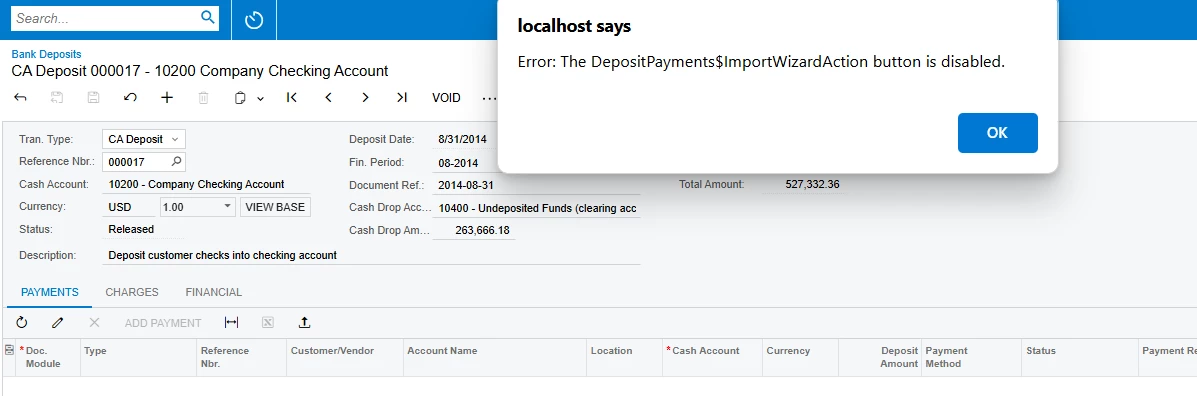
Thank you so much for your suggestions! Following your second suggestion, I was able to enable the Upload button. However, after uploading the Excel file, I’m still encountering the following issue.


DipakNilkanth
Pro III
Forum|alt.badge.img+14
  • Author
  • Pro III
  • April 16, 2025
  • Added the [PXImport(typeof(CADepositDetail))] attribute to the DepositPayments view.

How did you do this? I think you’d have to redefine the data view, and there’s also a data view delegate. Did you redefine both?

Have you tried just adding [PXImport] instead?

I have added PXImport to the Deposit Payments view. I copied this view from base code and just added PXImport attribute to this view. May I need to define date view delegate as well? 


darylbowman
Captain II
Forum|alt.badge.img+16

Maybe I need to define date view delegate as well? 

Yes, in order to maintain the out-of-box data view functionality. However, I’m not sure that would cause your issue.


DipakNilkanth
Pro III
Forum|alt.badge.img+14
  • Author
  • Pro III
  • Answer
  • April 18, 2025

I tried using a base upload action, but it doesn't seem feasible for this scenario. So, I'm moving forward with implementing a custom upload action, which will take inputs from an Excel file and upload them into the Payments grid section.


Forum|alt.badge.img+1
  • Semi-Pro I
  • January 2, 2026

@DipakNilkanth Did you manage to set up a custom upload action for this?  I have been working on my own customization trying to insert payments in to the grid but have not been able to get it to work as when I try to save after inserting the records I get an error that BranchID is missing but not sure what that is referring to,

If you have any advice on how to insert the payments into the grid I’d be extremely grateful as I’m tearing out my hair at the moment trying to work out the correct method to insert them.