Answer

How to Enable Upload Button on Bank Deposits (CA305000) Screen?

  • April 16, 2025
  • 7 replies
  • 126 views

DipakNilkanth
Pro III
Forum|alt.badge.img+13

Hi Community,

I'm trying to enable the Upload button on the Bank Deposits (CA305000) screen. Here's what I have done so far:

  • Set AllowUpload = true for the grid (DepositPayments).

  • Added the [PXImport(typeof(CADepositDetail))] attribute to the DepositPayments view.

However, the Upload button is still not enabled on the screen.

Is there any additional steps I need to take to make the Upload button functional here?

Any guidance or insight would be greatly appreciated!

Thanks in advance. 😊

Best answer by DipakNilkanth

I tried using a base upload action, but it doesn't seem feasible for this scenario. So, I'm moving forward with implementing a custom upload action, which will take inputs from an Excel file and upload them into the Payments grid section.

7 replies

darylbowman
Captain II
Forum|alt.badge.img+15
  • Added the [PXImport(typeof(CADepositDetail))] attribute to the DepositPayments view.

How did you do this? I think you’d have to redefine the data view, and there’s also a data view delegate. Did you redefine both?

Have you tried just adding [PXImport] instead?


DipakNilkanth
Pro III
Forum|alt.badge.img+13
  • Author
  • Pro III
  • April 16, 2025

Hi ​@darylbowman,

Yes, initially I tried using only [PXImport] before the view declaration. Later, I updated it to [PXImport(typeof(CADepositDetail))].


darylbowman
Captain II
Forum|alt.badge.img+15

I’m not actually able to find where AllowInsert for DepositPayments is being disabled, but this will enable it.

protected virtual void _(Events.RowSelected<CADeposit> e, PXRowSelected b)
{
b?.Invoke(e.Cache, e.Args);

CADeposit row = e.Row;
if (row is null) return;

Base.DepositPayments.Cache.AllowInsert = true;
}

I’m guessing Acumatica disabled it for a reason and you should investigate and build accordingly.


DipakNilkanth
Pro III
Forum|alt.badge.img+13
  • Author
  • Pro III
  • April 16, 2025

Hi ​@darylbowman,

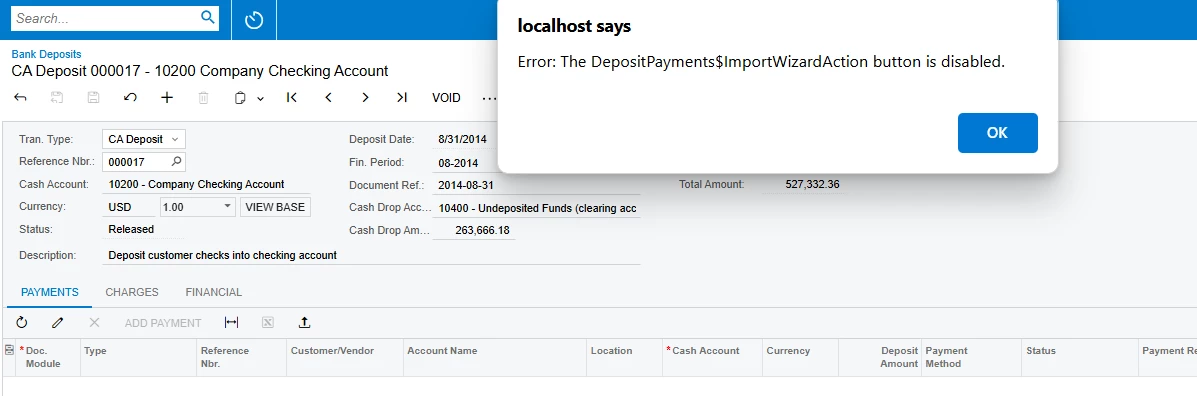
Thank you so much for your suggestions! Following your second suggestion, I was able to enable the Upload button. However, after uploading the Excel file, I’m still encountering the following issue.


DipakNilkanth
Pro III
Forum|alt.badge.img+13
  • Author
  • Pro III
  • April 16, 2025
  • Added the [PXImport(typeof(CADepositDetail))] attribute to the DepositPayments view.

How did you do this? I think you’d have to redefine the data view, and there’s also a data view delegate. Did you redefine both?

Have you tried just adding [PXImport] instead?

I have added PXImport to the Deposit Payments view. I copied this view from base code and just added PXImport attribute to this view. May I need to define date view delegate as well? 


darylbowman
Captain II
Forum|alt.badge.img+15

Maybe I need to define date view delegate as well? 

Yes, in order to maintain the out-of-box data view functionality. However, I’m not sure that would cause your issue.


DipakNilkanth
Pro III
Forum|alt.badge.img+13
  • Author
  • Pro III
  • Answer
  • April 18, 2025

I tried using a base upload action, but it doesn't seem feasible for this scenario. So, I'm moving forward with implementing a custom upload action, which will take inputs from an Excel file and upload them into the Payments grid section.