

Solved

How to add more than three columns to the Form template in Modern UI?

  • January 20, 2025
  • 4 replies
  • 772 views
  • Translate All

aaghaei
Captain II
Forum|alt.badge.img+11

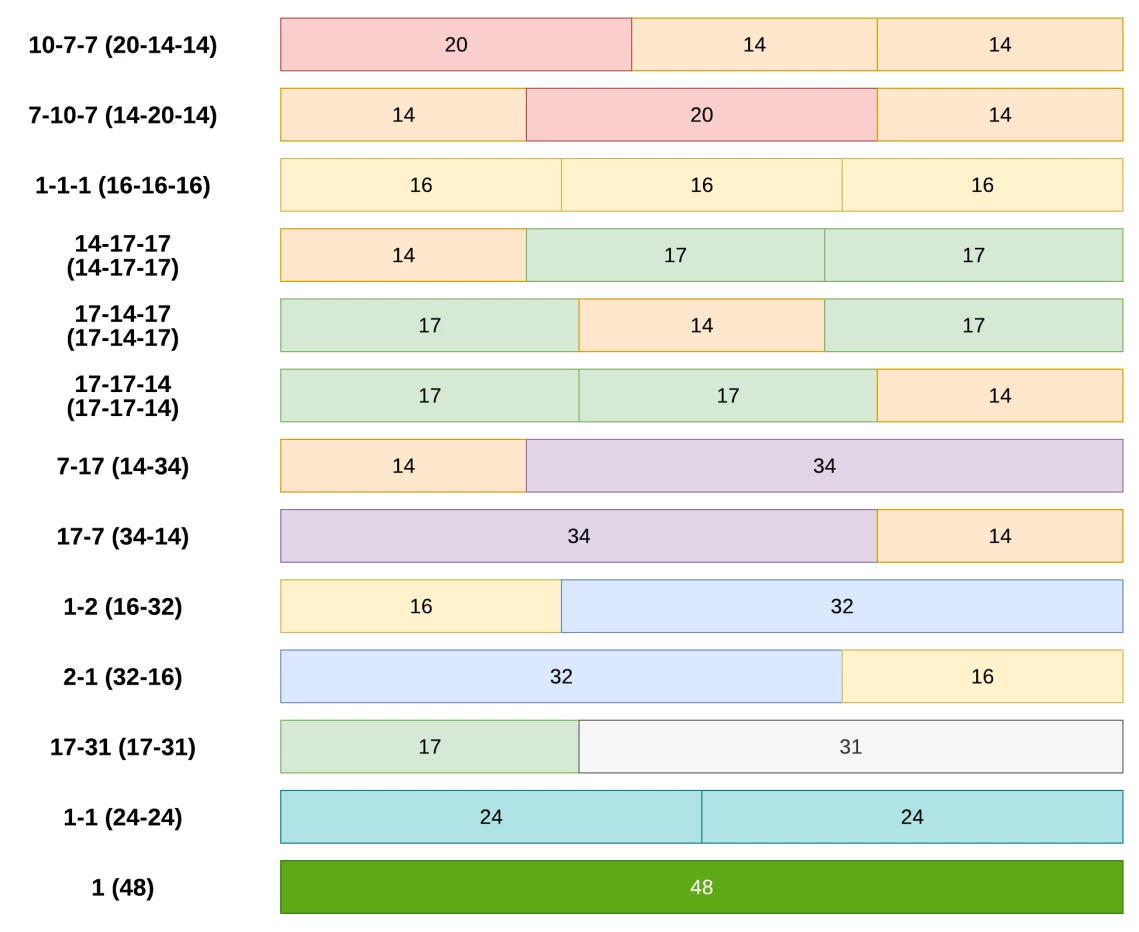
Has anyone added more than three columns to Acumatica Modern UI form. It seems we only have som pre-defined templates that we can select from that supports a maximum of three columns as per the Modern UI Development guide.

 

Best answer by Vignesh Ponnusamy

Hi ​@aaghaei,

You can modify the template like below to add more columns,

<qp-template name="1-1-1" ...>
<div slot="A">...</div>
<div slot="B">...</div>
<qp-template slot="C" name="1-1">
<div slot="A">...</div>
<div slot="B">...</div>
</qp-template>
</qp-template>

This should provide analog template with name “2-2-1-1”. As per my discussion with our engineering team, it is not recommended to go over more than 3 column template. Good Luck.!


View original

4 replies

Vignesh Ponnusamy
Acumatica Moderator
Forum|alt.badge.img+5

Hi ​@aaghaei,

You can modify the template like below to add more columns,

<qp-template name="1-1-1" ...>
<div slot="A">...</div>
<div slot="B">...</div>
<qp-template slot="C" name="1-1">
<div slot="A">...</div>
<div slot="B">...</div>
</qp-template>
</qp-template>

This should provide analog template with name “2-2-1-1”. As per my discussion with our engineering team, it is not recommended to go over more than 3 column template. Good Luck.!


Translate

aaghaei
Captain II
Forum|alt.badge.img+11
  • Author
  • Captain II
  • January 22, 2025

Thank you ​@Vignesh Ponnusamy with some small tweaks to your suggested code I made it work. Two questions:

  1. Why engineering team doesn’t recommend placing more than three columns?
  2. Are we not supposed to merge fields too? I couldn’t find anything in the Modern UI documentation about it. Any unofficial document on how to merge fields?
Translate

Vignesh Ponnusamy
Acumatica Moderator
Forum|alt.badge.img+5

Hi ​@aaghaei,

Glad that helped.!

I haven’t experimented with more than 3 columns. I assume using more than 3 column could cause inconsistency in the rendering elements for different resolutions. 

When you mention merge fields, can you please provide an example to what it implies?

Translate

aaghaei
Captain II
Forum|alt.badge.img+11
  • Author
  • Captain II
  • January 22, 2025

Thank you ​@Vignesh Ponnusamy 

As for merge, for example what is the equivalent of the below classic UI code in the modern UI. (They both are copied from AP301000 out-of-the-box classic screen). As you see they are merged together so like they are one field displayed in a column. Also Checkboxes are aligned left to save space. After merging two or more fields using Merge=”True” then adding an empty Rule, would reset the merge so the next fields are not merged anymore.

<px:PXLayoutRule runat="server" Merge="True" />
<px:PXDateTimeEdit CommitChanges="True" ID="edDueDate" runat="server" DataField="DueDate" />
<px:PXCheckBox runat="server" ID="chkIsRetainageDocument" DataField="IsRetainageDocument" AlignLeft="true" Enabled="false" />
<px:PXCheckBox runat="server" ID="chkRetainageApply" DataField="RetainageApply" CommitChanges="true" AlignLeft="true" />
<px:PXLayoutRule runat="server" />

or

<px:PXLayoutRule runat="server" Merge="True" />
<px:PXDateTimeEdit CommitChanges="True" ID="edDiscDate" runat="server" DataField="DiscDate" />
<px:PXCheckBox runat="server" ID="chkPaymentsByLinesAllowed" DataField="PaymentsByLinesAllowed" CommitChanges="True" AlignLeft="true" />
<px:PXLayoutRule runat="server" />


Translate


