Solved

Error when creating a PXDBLocalizeable field in a new table/DAC

  • Nov 3, 2026 6:29 PM UTC
  • 7 replies
  • 44 views
  • Translate All

kevlynch
Jr Varsity II
Forum|alt.badge.img

Hi, 

I’m creating a pretty simple new table / DAC to create a validated list of cities for custom usage. 

This table consists of 2 fields, a CityID (int) identifier and a CityName (string). 

I want the CityName to be multi-lingual, so based on what I found in documentation, I’m creating it with the  [PXDBLocalizableString(50, IsUnicode = true)] attribute. 

When I try to open a simple grid view screen I get this error “Invalid object name 'UsrCityKvExt'.”

The field is displayed and I see the language selector in it, but data can’t be displayed/inserted/updated.

When I just use a PXDBString instead, I have no errors, and I can do everything in a single language.


This is a snippet of the DAC I’m using for UsrCity (it also has the typical Acumatica system fields CreatedBy, TStamp, etc.)


    #region CityID
    [PXDBIdentity(IsKey = true)]
    [PXUIField(DisplayName = "City ID", Enabled = false)]
    public virtual int? CityID { get; set; }

    public abstract class cityID : PX.Data.BQL.BqlInt.Field<cityID> { }
    #endregion

    #region NoteID
    [PXNote()]
    public virtual Guid? NoteID { get; set; }
    public abstract class noteID : PX.Data.BQL.BqlGuid.Field<noteID> { }
    #endregion      
      
    #region CityName
    [PXDBLocalizableString(50, IsUnicode = true)]
    //[PXDBString(50, IsUnicode = true)]
    [PXUIField(DisplayName = "City")]
    public virtual string CityName { get; set; }
    public abstract class cityName : PX.Data.BQL.BqlString.Field<cityName> { }
    #endregion


Any idea what I’m missing to get this to work as expected?

Best answer by Steve Milner

@kevlynch your DAC is fine. NoteID with PXNote is what PXDBLocalizableString needs. What's missing is the table the translations live in.

Multilanguage values are stored in a companion table named after your table plus KvExt, keyed on NoteID. That's the UsrCityKvExt the error is looking for. PXDBString never touches it, which is why that version works.

Publishing builds that table for you, but only when UsrCity is in your customization project as a Custom Table Schema item and the schema includes the NoteID column. If you created UsrCity with a SQL script item, created it straight in SSMS, or added the schema before NoteID was in the table, publish has nothing to build it from.

On the Database Scripts page, add UsrCity with Add Custom Table Schema. If it's already there, run Reload from Database so the schema picks up NoteID. Then publish, and UsrCityKvExt gets created alongside UsrCity.

If you'd rather script it yourself, copy the structure of any stock KvExt table, such as InventoryItemKvExt.

View original

7 replies

Forum|alt.badge.img+8
  • Captain II
  • Nov 3, 2026 7:04 PM UTC

What’s interesting is that UsrCityKvExt will be a table in your database and it should have nothing to do with your table.

You’ll have UsrCity and UsrCityKvExt

Do you see both tables in your database?

Translate

Steve Milner
Varsity III
Forum|alt.badge.img+6
  • Varsity III
  • Answer
  • Nov 3, 2026 7:21 PM UTC

@kevlynch your DAC is fine. NoteID with PXNote is what PXDBLocalizableString needs. What's missing is the table the translations live in.

Multilanguage values are stored in a companion table named after your table plus KvExt, keyed on NoteID. That's the UsrCityKvExt the error is looking for. PXDBString never touches it, which is why that version works.

Publishing builds that table for you, but only when UsrCity is in your customization project as a Custom Table Schema item and the schema includes the NoteID column. If you created UsrCity with a SQL script item, created it straight in SSMS, or added the schema before NoteID was in the table, publish has nothing to build it from.

On the Database Scripts page, add UsrCity with Add Custom Table Schema. If it's already there, run Reload from Database so the schema picks up NoteID. Then publish, and UsrCityKvExt gets created alongside UsrCity.

If you'd rather script it yourself, copy the structure of any stock KvExt table, such as InventoryItemKvExt.

Translate

kevlynch
Jr Varsity II
Forum|alt.badge.img
  • Author
  • Jr Varsity II
  • Nov 3, 2026 9:07 PM UTC

Thanks! This was my issue. I had created the table via database script so it did not create the KvExt table. Deleting my scripts and instead creating the table schemas from database then republishing the customization created these tables and solved the problem.


Translate

kevlynch
Jr Varsity II
Forum|alt.badge.img
  • Author
  • Jr Varsity II
  • Nov 4, 2026 8:06 PM UTC

Follow-up issue now that I have the multi-language field working. When I create a PXSelector in another DAC that refers to this one, the SubstituteKey is not working (when I remove the SubstituteKey it will properly save the int value, but I’d want to display my CityName to the user in that users’ locale language). 

    #region CityID
    [PXDBInt]
    [PXUIField(DisplayName = "City")]
    [PXSelector(
      typeof(SearchFor<UsrCity.cityID>),
      typeof(UsrCity.cityID),
      typeof(UsrCity.cityName),
      SubstituteKey = typeof(UsrCity.cityName))]
    public virtual int? CityID { get; set; }
    public abstract class cityID : PX.Data.BQL.BqlInt.Field<cityID> { }
    #endregion 

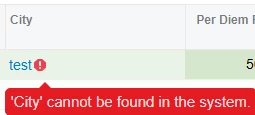
this results in a selector pop-up that displays my cities without issue, but when a value is selected and I try to save the record I get this: 


I can’t find any documentation supporting what would need to be done to support a LocalizeableString in a PXSelector. Is it not possible to do this?

Translate

Steve Milner
Varsity III
Forum|alt.badge.img+6
  • Varsity III
  • Nov 4, 2026 9:28 PM UTC

@kevlynch glad the KvExt part sorted it.

Not as the SubstituteKey, no. The popup works because it only reads rows. Saving is different. With SubstituteKey set, the selector turns the name you picked back into a CityID by selecting UsrCity where CityName equals that text. In that select, PXDBLocalizableString doesn't give the WHERE the plain name. It swaps the column for a subquery on UsrCityKvExt that returns all the translations joined together, which only get split apart after the row is read. "test" never equals that joined value, so the lookup comes back empty and you get the cannot be found error.

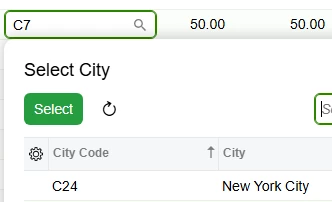
Stock PMCostCode shows the way around it. Its Description is a PXDBLocalizableString, CostCodeCD is the SubstituteKey, and Description is the DescriptionField. Do the same: add a plain PXDBString code column to UsrCity, make it the SubstituteKey, and set DescriptionField = typeof(UsrCity.cityName). The lookup then runs on the code, and the name shows as the description in the user's language.

Translate

kevlynch
Jr Varsity II
Forum|alt.badge.img
  • Author
  • Jr Varsity II
  • Nov 5, 2026 3:44 PM UTC

I just tried this, and while I also no longer have an error message, what ends up being displayed in the field is the CityCD value, and not the CityName I’d want to see. Based on this, is the only way to get the CityName to display to add a calculated field that updates on change of the CityCD value?


Translate

kevlynch
Jr Varsity II
Forum|alt.badge.img
  • Author
  • Jr Varsity II
  • Nov 5, 2026 4:04 PM UTC

Scratch that. I just found my solution by adding this to my PXSelector in the DAC entry. Thanks again for all your help.

SelectorMode = PXSelectorMode.DisplayModeText
Translate