Answer

Error CS Form

  • December 12, 2022
  • 6 replies
  • 173 views

Hi, 

I get the following error when created a Sales Order and not sure how to resolve this. 

“An error occurred during processing of the field InventoryID: Invalid mask specified in segment 1 for Combine Sales Sub. From..”

Can you, please, help

Best answer by Laura03

Hello,

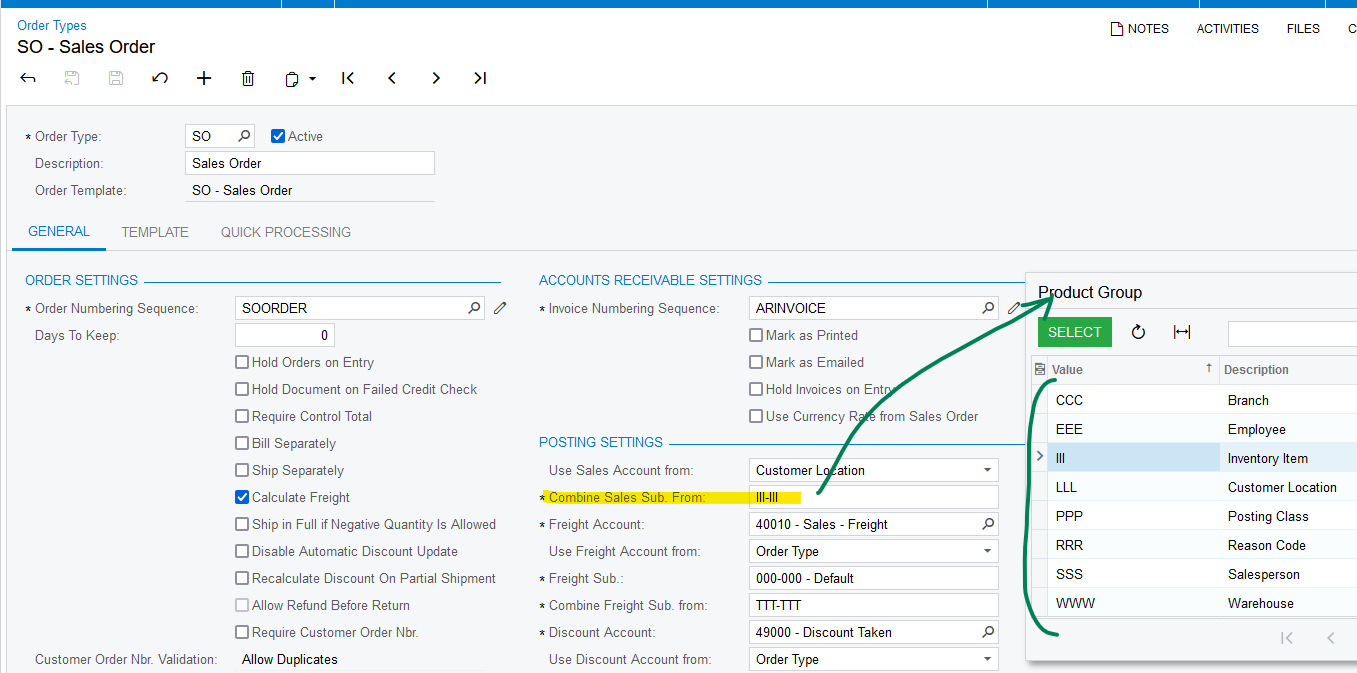
Kandy is correct - Sales Order “Combine Subaccount from” settings can be found in Order Types screen.  Press F3 on the subaccount wildcard field ( fn+f3  if using a Mac) to see the list of choices.

Then go to the source of your Combine Subaccount From entity and see how it is set.

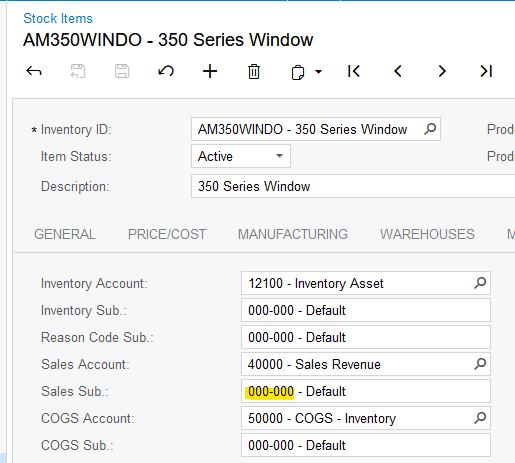
For example, IIII-IIII means ‘get the subaccount from the item’. In this case, look at the GL Accounts tab of the Stock or Non-Stock Item that you are using for testing. Is the Sales Sub populated correctly?
Laura

6 replies

Shawn Burt
Jr Varsity I
Forum|alt.badge.img+1
  • Jr Varsity I
  • December 12, 2022

not a lot to go on here, but guessing that the you have a Sub Account specified in your object definition for SOLine and that Sub Account reference has an issue.

I would really need to see how you are setting things and what values you are sending through.


  • Author
  • Freshman I
  • December 12, 2022

Thank you . No “subaccount”. I did try to use “Customization” to add a field to the Invoice FORMin Test and the problem occured in Production. I am guessing both are related. Not sure how to revert back to original.


Kandy Beatty
Captain II
Forum|alt.badge.img+17
  • Captain II
  • December 12, 2022

Hi @AFILIPOVA 

Can you share the screenshots of the settings of the Order Type you created? I think if we see that, we could help you more. 


Chris Hackett
Community Manager
Forum|alt.badge.img
  • Acumatica Community Manager
  • March 15, 2023

Hi @AFILIPOVA  were you able to find a solution? Thank you!


Manikanta Dhulipudi
Captain II
Forum|alt.badge.img+15

Laura03
Captain II
Forum|alt.badge.img+19
  • Captain II
  • Answer
  • February 20, 2024

Hello,

Kandy is correct - Sales Order “Combine Subaccount from” settings can be found in Order Types screen.  Press F3 on the subaccount wildcard field ( fn+f3  if using a Mac) to see the list of choices.

Then go to the source of your Combine Subaccount From entity and see how it is set.

For example, IIII-IIII means ‘get the subaccount from the item’. In this case, look at the GL Accounts tab of the Stock or Non-Stock Item that you are using for testing. Is the Sales Sub populated correctly?

Laura