Solved

Equal Height in Form

  • March 16, 2026
  • 8 replies
  • 225 views
  • Translate All

Forum|alt.badge.img

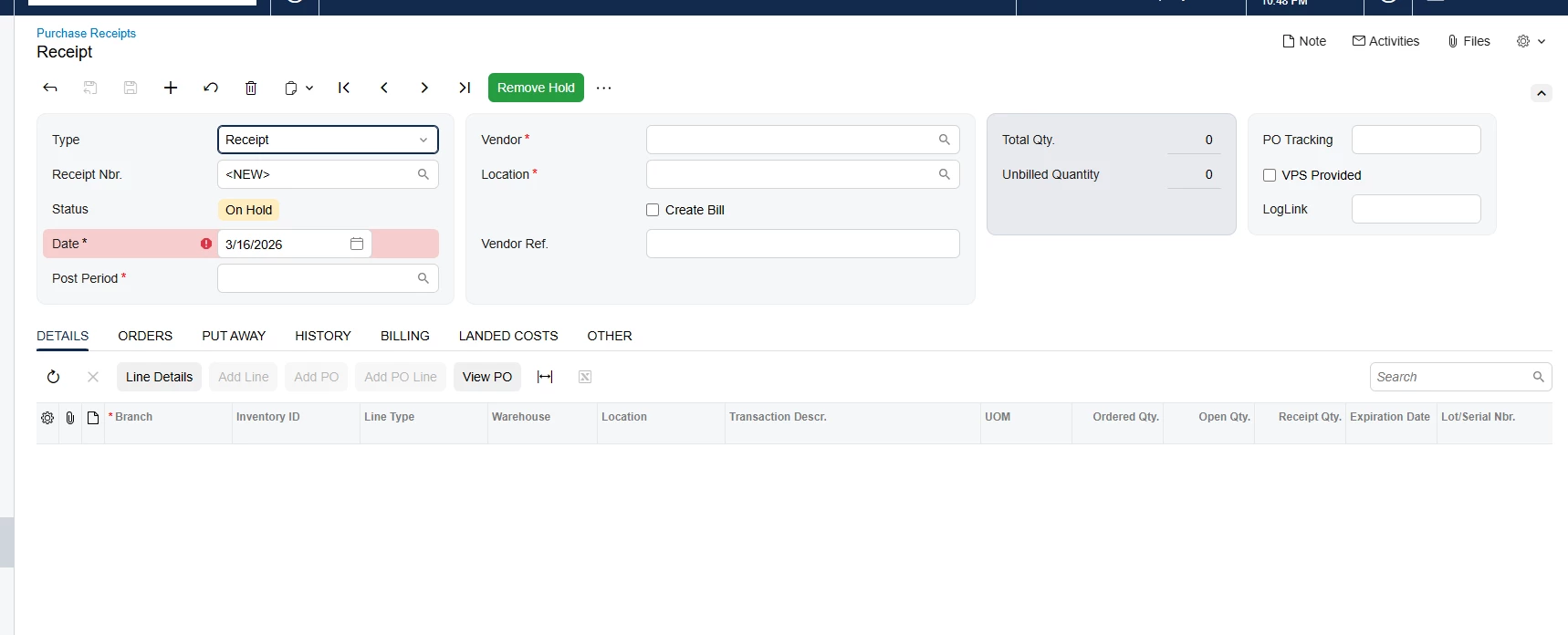
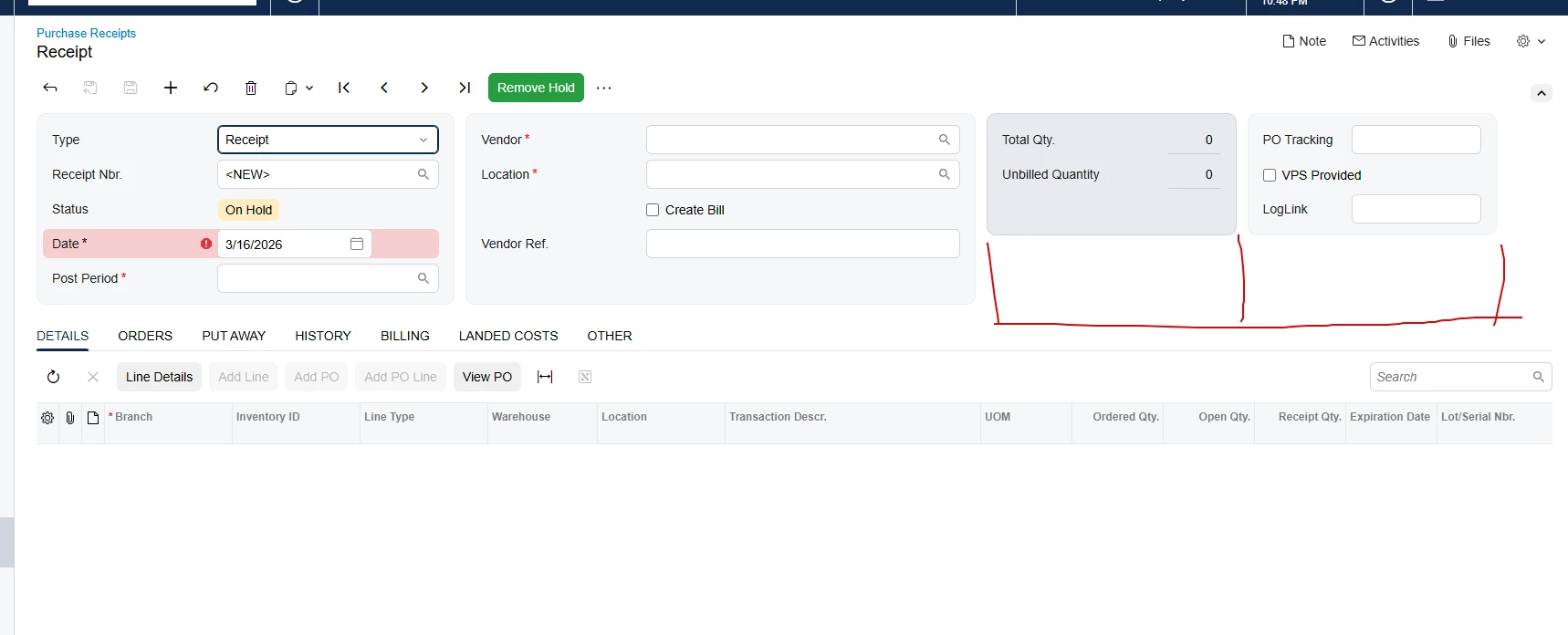
Hi everyone, I have an issue when trying to add a fourth column to the form. I can't align the 3rd and 4th columns with the others.
Here is my HTML

    <qp-template modify="#form-Receipt" id="form-Receipt" name="14-17-17" class="equal-height" qp-collapsible wg-container="document_form"></qp-template>
<template remove="#fsColumnC-Receipt">
</template>
<template modify="#form-Receipt">
<qp-template id="fsColumnC-Receipt" after="#fsColumnB-Receipt" slot="C" view.bind="Document" name="1-1" class="equal-height">
<qp-fieldset id="fsColumnC-Receipt-Original" view.bind="Document" class="highlights-section" slot="A">
<field name="OrderQty" pinned="true"></field>
<field name="ControlQty" pinned="true"></field>
<field name="UnbilledQty" pinned="true"></field>
<field name="CuryOrderTotal" pinned="true"></field>
</qp-fieldset>
<qp-fieldset id="Item_CstPXLayoutRule3_fs24" view.bind="Document" slot="B">
<field name="UsrBZDSTracking" class="label-size-xs"></field>
<field name="UsrBZVPSProvided" class="no-label"></field>
<field name="UsrBZLogLink" class="label-size-xs"></field>
</qp-fieldset>
</qp-template>
</template>

 

Best answer by arpine08

Hi @VaheGhazaryan,

Please see also Yuriy Zaletskyy’s post about adding more than three columns to form templates in the Modern UI:

https://www.blog.zaletskyy.com/post/2025/01/22/enhancing-acumaticas-modern-ui-adding-more-than-three-columns-to-form-templates


View original

8 replies

Dipak Nilkanth
Pro III
Forum|alt.badge.img+14

Hi ​@VaheGhazaryan , 

Since you need 4 columns, please update the first line of the <qp-template> as shown below:

<qp-template modify="#form-Receipt" id="form-Receipt" name="14-17-17-17" class="equal-height" qp-collapsible wg-container="document_form"></qp-template>

This change will adjust the template layout to support four columns.

Translate

arpine08
Jr Varsity I
Forum|alt.badge.img+3
  • Jr Varsity I
  • Answer
  • March 16, 2026

Hi @VaheGhazaryan,

Please see also Yuriy Zaletskyy’s post about adding more than three columns to form templates in the Modern UI:

https://www.blog.zaletskyy.com/post/2025/01/22/enhancing-acumaticas-modern-ui-adding-more-than-three-columns-to-form-templates


Translate

Forum|alt.badge.img

Right now it looks like this.

I want all columns to have the same height.


Translate

darylbowman
Captain II
Forum|alt.badge.img+17

Creating a 4th column in Acumatica with the Modern UI is not supported by Acumatica. Please don’t do it. It breaks the improved layout and responsive behavior of the Modern UI.

Translate

Dipak Nilkanth
Pro III
Forum|alt.badge.img+14

Hi ​@VaheGhazaryan ,

Yes, you can ignore my previous comment, as adding more than three columns is not recommended.

This link will give you a better understanding of how to add columns in the Modern UI and the recommended ways about the same. ​@Vignesh Ponnusamy shared a solution here, but please note that it is not recommended.


Translate

Hi ​@VaheGhazaryan , try to remove “class="equal-height"” from your split column

Translate

Forum|alt.badge.img

Hi ​@andriihavrylow29,

Unfortunately, this did not help.


Translate

Hi ​@VaheGhazaryan ,

Since Acumatica anyways sets it to auto height, try to use this
 

<qp-template id="fsColumnC-Receipt" after="#fsColumnB-Receipt" slot="C" view.bind="Document" name="1-1" class="equal-height h-full" style="height: 100%;">


We trick slot C to set full available height (which should be height of other blocks)​​

Translate