Solved

Dynamic link for Task email template

  • June 17, 2024
  • 6 replies
  • 339 views
  • Translate All

Forum|alt.badge.img

Hi all,

I’m trying to set up an email template for our users so when they receive a Task notification, there is a direct link to the Task


for tasks listed on ScreenId=EP4040PL

I have this dynamic link in the body of the email:


((GeneralInfo.NotificationSiteUrl))/Main?ScreenId=CR306020&NoteID=((PMTimeActivity.NoteID))


However, PMTimeActivity.NoteID doesn’t pull the specific note.

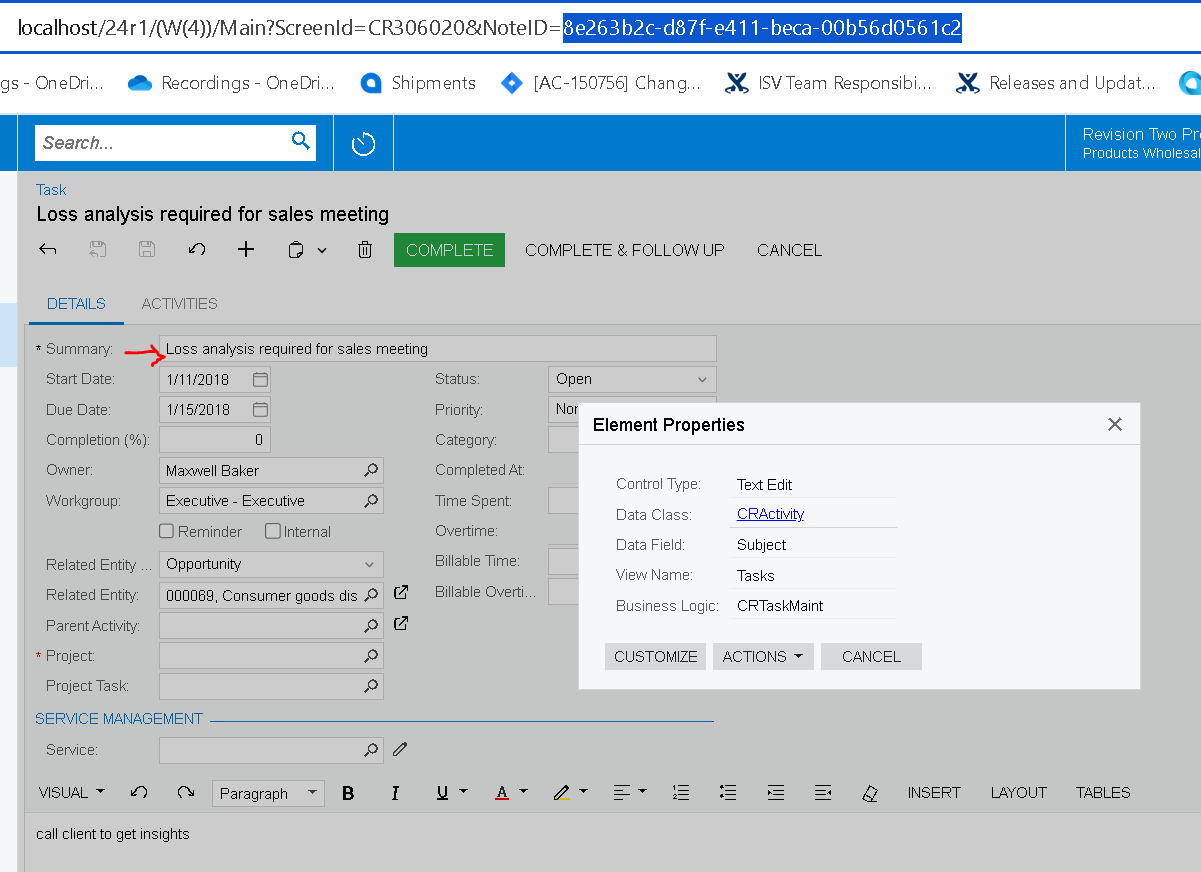
When I drill down into a specific Task, here’s what the NoteID looks like in the URL:

How do I dynamically load a specific task using something like
 

((GeneralInfo.NotificationSiteUrl))/Main?ScreenId=CR306020&NoteID=


Thanks!

Best answer by Yuriy Zaletskyy

You can create custom bound field in the DAC and set whatever you want on some action or event, like this one:

public PXAction<ARInvoice> release;

[PXUIField(DisplayName = "Release", MapEnableRights = PXCacheRights.Update, MapViewRights = PXCacheRights.Update)]
[PXProcessButton]
[ARMigrationModeDependentActionRestriction(false, true, true)]
public virtual IEnumerable Release(PXAdapter adapter)
{
PXCache cache = Base.Document.Cache;
List<ARRegister> list = new List<ARRegister>();
foreach (ARInvoice item in adapter.Get<ARInvoice>())
{
DAC.ARInvoiceExt aRInvoiceExt = item.GetExtension<DAC.ARInvoiceExt>();
aRInvoiceExt.srPlnTbyLinkUrl = SetPlnTbyLinkUrl();
}

return Base.Release(adapter);
}

private string SetPlnTbyLinkUrl()
{
// Implementation for setting the PlnTbyLink URL
}


View original

6 replies

Forum|alt.badge.img+1

Hello,


The NoteID on the URL for the Task comes from CRActivity table.  Can you please try using the CRActivity’s noteID instead of PMTimeActivity to create the dynamic URL?


Thank you!

Translate

Forum|alt.badge.img
  • Author
  • Jr Varsity II
  • June 18, 2024

Hello,


The NoteID on the URL for the Task comes from CRActivity table.  Can you please try using the CRActivity’s noteID instead of PMTimeActivity to create the dynamic URL?


Thank you!

Hi!


I’ve tried both CRActivity.NoteID and Tasks.ID.

CRActivity does not pull the NoteID over at all.

Tasks.NoteID pulls the NoteID, but it does not pass the NoteID along in the URL.

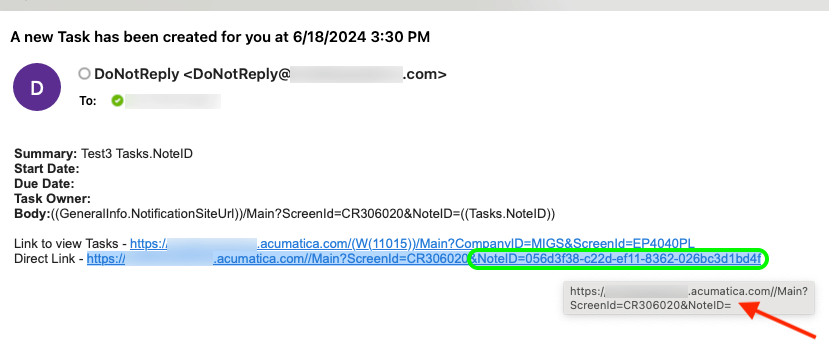
Look at the screenshot -- you can see that the full URL is printed correctly in the body of the email; however, when you hover over the link, you can see that the NoteID is not being passed correctly. Copying the link or clicking on the link passes an empty NoteID=


Very strange!

Translate

Forum|alt.badge.img+1

Can you please share how you are accessing the CRActivity’s noteID field?

Translate

Chris Hackett
Community Manager
Forum|alt.badge.img
  • Acumatica Community Manager
  • July 30, 2024

Hi @swartzfeger were you able to find a solution? Thank you!

Translate

Yuriy Zaletskyy
Jr Varsity II
Forum|alt.badge.img+4

You can create custom bound field in the DAC and set whatever you want on some action or event, like this one:

public PXAction<ARInvoice> release;

[PXUIField(DisplayName = "Release", MapEnableRights = PXCacheRights.Update, MapViewRights = PXCacheRights.Update)]
[PXProcessButton]
[ARMigrationModeDependentActionRestriction(false, true, true)]
public virtual IEnumerable Release(PXAdapter adapter)
{
PXCache cache = Base.Document.Cache;
List<ARRegister> list = new List<ARRegister>();
foreach (ARInvoice item in adapter.Get<ARInvoice>())
{
DAC.ARInvoiceExt aRInvoiceExt = item.GetExtension<DAC.ARInvoiceExt>();
aRInvoiceExt.srPlnTbyLinkUrl = SetPlnTbyLinkUrl();
}

return Base.Release(adapter);
}

private string SetPlnTbyLinkUrl()
{
// Implementation for setting the PlnTbyLink URL
}


Translate

rcreasy
Varsity I
Forum|alt.badge.img
  • Varsity I
  • August 7, 2024

Is there a solution to this issue that does not involve a customization?

Translate