

Solved

conditionally make filed mandatory

  • May 29, 2023
  • 3 replies
  • 334 views
  • Translate All

Michael Ndungipartnerhold
Varsity I
Forum|alt.badge.img

Hello everyone,
I want make AFE number mandatory only when the approver workgroup is “AFE APPROVAL” 
I have tried to get that value in that field in the specified DAC but I’m getting no response on the UI.
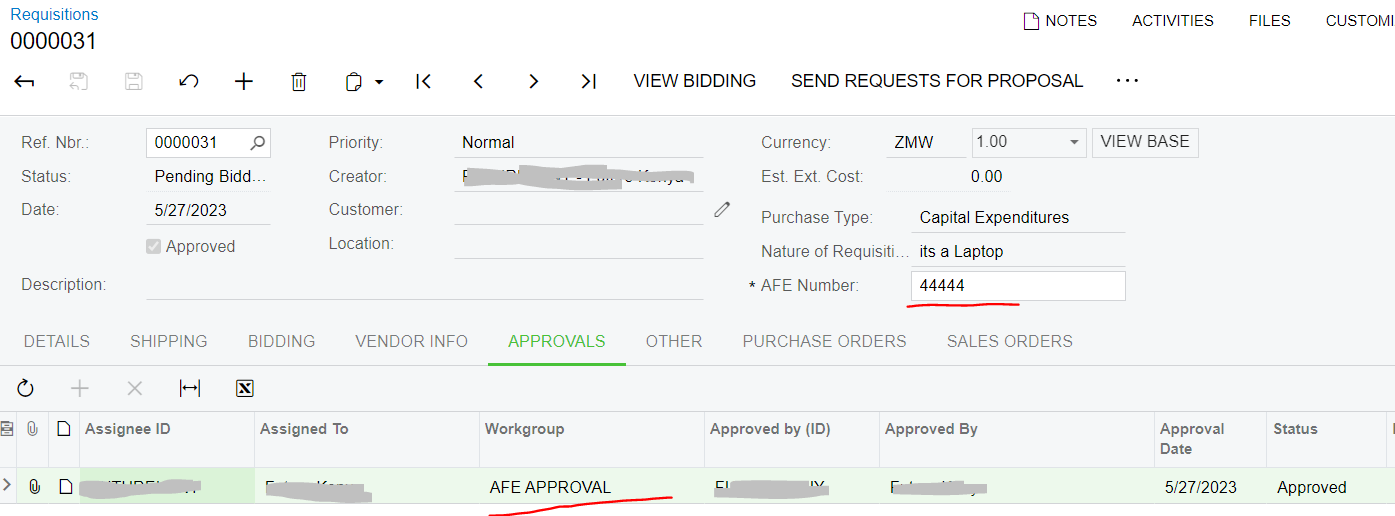
 

kindly assist.
All responses will be highly appreciated.

Best answer by Giri K

@development93

Write the below code in RowSelected event.

PXDefaultAttribute.SetPersistingCheck<DAC.Field>(pxcache, data, PXPersistingCheck.NullOrBlank).

Make sure that AFE number field contains PXDefault attribute.

View original

3 replies

darylbowman
Captain II
Forum|alt.badge.img+17

Please post the code 😏

Translate

Forum|alt.badge.img+1
  • Pro I
  • Answer
  • May 31, 2023

@development93

Write the below code in RowSelected event.

PXDefaultAttribute.SetPersistingCheck<DAC.Field>(pxcache, data, PXPersistingCheck.NullOrBlank).

Make sure that AFE number field contains PXDefault attribute.

Translate

Naveen Boga
Captain II
Forum|alt.badge.img+20

@development93  Two things..

  1. Your Form should be added with Properly called MarkRequired="Dynamic"
  2. And add the SetRequired and  SetPersistingCheck code in the RowSelected event.

Here is the KB article to make the field mandatory dynamically based on the conditions.

https://asiablog.acumatica.com/2016/05/dynamically-changing-attribute-property.html

https://stackoverflow.com/questions/58012786/pxpersistingcheck-nullorblank-set-at-run-time


Hope this helps!

Translate

