

Answer

Adding Custom Field from Stock Item to Inventory Transaction Lines

  • February 23, 2023
  • 1 reply
  • 527 views

Forum|alt.badge.img+1

Hi All,

So I am currently adding a Custom Field onto the Stock item (Kitting Required is separate from any of the typical Kitting functionality in ACM).

I am wondering if it is possible to access this on the Inventory Transfer transaction for example.
Looking at the Inventory Item DAC it looks like it was added to the DAC, yet I am not sure on how to get this field (or any other field not available) to show here:
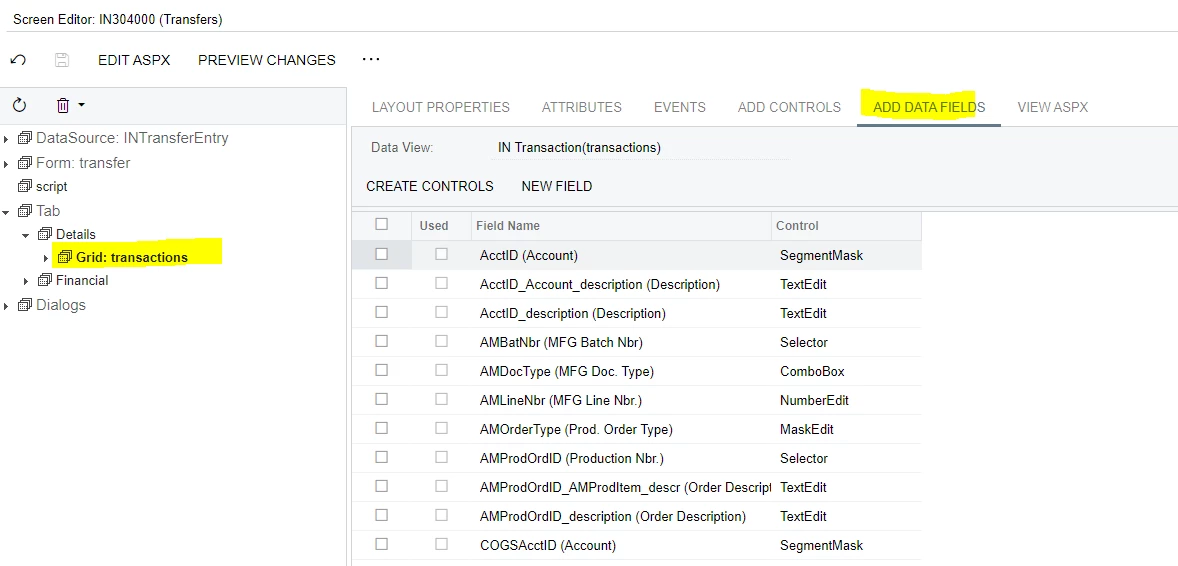
 

This is where I would need it to get to actually use the value from the Inventory item correct?

I am a little lost on how to let the Field show up in the Transaction Grid and bring over the value it has assigned on the Stock item.

Any thoughts/ideas?

Best answer by Patrick Chen

So you have a UDF field on the InventoryItem table and you’d like this field to be included in the Transactions grid on IN304000.  Looking at the definition of the Transactions view on IN304000, it is a simple Select into the INTran table.  In order to see the UDF in the transaction grid along with the Inventory transactions, you would need to extend the INTransferEntry graph and override the Transactions view to add a join to the InventoryItem DAC.  Then you would be able to add your UDF to the grid.

https://help-2022r2.acumatica.com/Help?ScreenId=ShowWiki&pageid=5312e75a-6f0a-4b2c-a28c-38da20782087

1 reply

Patrick Chen
Varsity II
Forum|alt.badge.img+2
  • Varsity II
  • Answer
  • February 24, 2023

So you have a UDF field on the InventoryItem table and you’d like this field to be included in the Transactions grid on IN304000.  Looking at the definition of the Transactions view on IN304000, it is a simple Select into the INTran table.  In order to see the UDF in the transaction grid along with the Inventory transactions, you would need to extend the INTransferEntry graph and override the Transactions view to add a join to the InventoryItem DAC.  Then you would be able to add your UDF to the grid.

https://help-2022r2.acumatica.com/Help?ScreenId=ShowWiki&pageid=5312e75a-6f0a-4b2c-a28c-38da20782087
