Solved

Add Field Value From Customer Screen to Custom Form

  • December 20, 2022
  • 3 replies
  • 168 views
  • Translate All

Forum|alt.badge.img+2

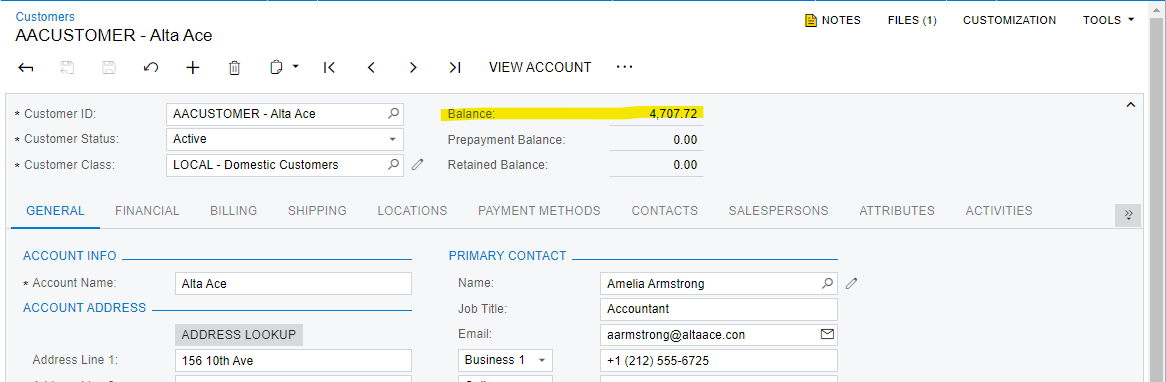
Hi, I need to add a field value in the customers form to my custom form. I tried using field selecting to achieve this but no value is populated to the custom form.
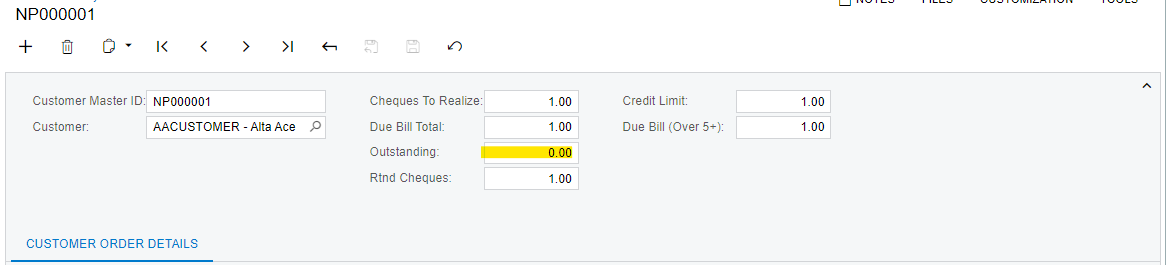
custom form field needed to populate
value needed from customer form
protected void NCPMCustomerMaster_Outstanding_FieldSelecting(PXCache cache, PXFieldSelectingEventArgs e)
{
NCPMCustomerMaster row = (NCPMCustomerMaster)e.Row;
if (row != null)
{

Customer customerObj = PXSelect<Customer, Where<Customer.acctCD, Equal<Required<Customer.acctCD>>>>.Select(this, row.CustomerIntType);
if (customerObj != null)
{

row.Outstanding = customerObj.Balance;

}
}
}

 

Best answer by andriikravetskyi35

Hi everybody,

Customer DAC doesn’t have Balance field, so the compiler send error during build of project.

You need to use ARBalances table and select balance from it, like this:

var arBalance = SelectFrom<ARBalances>.Where<ARBalances.customerID.IsEqual<@P.AsInt>>.View.Select(this, row.CustomerIntType)?.TopFirst;

e.ReturnValue = arBalance?.CurrentBal;

View original

3 replies

Fernando Amadoz
Jr Varsity I
Forum|alt.badge.img+2

@TharidhiP try this alternative version to your logic

protected void NCPMCustomerMaster_Outstanding_FieldSelecting(PXCache cache, PXFieldSelectingEventArgs e)
{
NCPMCustomerMaster row = (NCPMCustomerMaster)e.Row;
if (row != null)
{

Customer customerObj = PXSelect<Customer, Where<Customer.acctCD, Equal<Required<Customer.acctCD>>>>.Select(this, row.CustomerIntType);
if (customerObj != null)
{

e.ReturnValue = customerObj.Balance;

}
}
}

Also, make sure that the variable customerObj is not NULL. You appear to be comparing a string (Customer.acctCD) to an integer (row.CustomerIntType)

Translate

andriikravetskyi35
Jr Varsity I
Forum|alt.badge.img+1

Hi everybody,

Customer DAC doesn’t have Balance field, so the compiler send error during build of project.

You need to use ARBalances table and select balance from it, like this:

var arBalance = SelectFrom<ARBalances>.Where<ARBalances.customerID.IsEqual<@P.AsInt>>.View.Select(this, row.CustomerIntType)?.TopFirst;

e.ReturnValue = arBalance?.CurrentBal;

Translate

Forum|alt.badge.img+2
  • Author
  • Pro III
  • December 21, 2022

Hi, @andriikravetskyi35 thank you for the help!

Translate