Solved

First time user of CRM needs help with Customers and Prospects

  • December 7, 2024
  • 8 replies
  • 195 views
  • Translate All

DJMcBride
Semi-Pro I
Forum|alt.badge.img

We are trying to use the features of CRM and are stuggling to set up a Marketing Campaign. We are attempting to use CRM to market to existing customers and to prospects.  We have taken on a new product line and will sell the new product line to both existing customers and to prospects that we have not sold to.  

  1. We think we should treat both customers and propsects as “Leads” for this new product line. Is that correct?
  2. When we add customers and prospects to the Members of the Marketing Campaign, do we add them as a “Lead” or as a “Contact”? 

Any guidance is greatly appreciated.
Best answer by mianniello80

​@dougmcbride79 

For your questions above, marketing campaigns are a great tool to get potential new business, reengage existing clients...and to track your ROI on if the campaign is successful or not. 

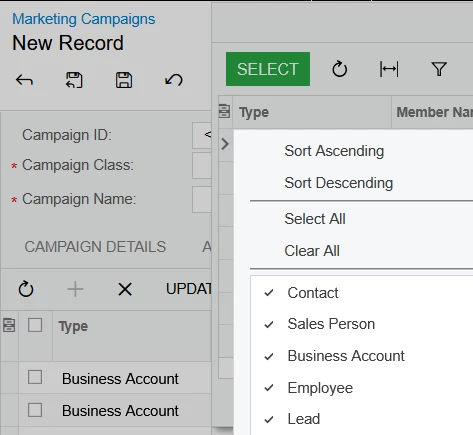
  1.  The system will allow you to tie in existing business accounts (existing customers, vendors, and prospects, as well as leads) if you wish to use the campaign to any of them) As you see in the drop down of the members tab on the Campaigns screen. The system will populate the email on the account profile if there is one. 


 I dont see a need to use the “Leads” Screen for existing clients...since they are already in the system as contacts in acumatica, the leads are more so for beginning prospects, for your sales team to reach out to.

Hope this clarifies! 


View original

8 replies

darylbowman
Captain II
Forum|alt.badge.img+17

bump

Translate

DJMcBride
Semi-Pro I
Forum|alt.badge.img
  • Author
  • Semi-Pro I
  • December 11, 2024

What is “bump”?

Translate

darylbowman
Captain II
Forum|alt.badge.img+17

Most contributors are watching the first couple pages of recent posts. If a post goes too long without any action, it can be helpful to bump it back up to the top.

Translate

DJMcBride
Semi-Pro I
Forum|alt.badge.img
  • Author
  • Semi-Pro I
  • December 11, 2024

Thank you so much.  Greatly appreciated. 


Translate

Chris Hackett
Community Manager
Forum|alt.badge.img
  • Acumatica Community Manager
  • February 4, 2025

Hi ​@dougmcbride79 were you able to find a solution? Thank you!

Translate

DJMcBride
Semi-Pro I
Forum|alt.badge.img
  • Author
  • Semi-Pro I
  • February 5, 2025

No answer yet.  Still hopeful. 

Translate

mianniello80
Varsity II
Forum|alt.badge.img

​@dougmcbride79 

For your questions above, marketing campaigns are a great tool to get potential new business, reengage existing clients...and to track your ROI on if the campaign is successful or not. 

  1.  The system will allow you to tie in existing business accounts (existing customers, vendors, and prospects, as well as leads) if you wish to use the campaign to any of them) As you see in the drop down of the members tab on the Campaigns screen. The system will populate the email on the account profile if there is one. 


 I dont see a need to use the “Leads” Screen for existing clients...since they are already in the system as contacts in acumatica, the leads are more so for beginning prospects, for your sales team to reach out to.

Hope this clarifies! 


Translate

wrudofker
Freshman I

We are new to the Acumatica community as we recently completed a successful 2-way, real time integration of Acumatica with our cloud-based CRM, WiredContact for a client.  If you are still struggling with how to manage campaigns with leads / customers, feel free to reach out. 


Wendy

Translate