Solved

Retention on AP bill not working?

  • October 3, 2023
  • 5 replies
  • 154 views
  • Translate All

Forum|alt.badge.img

Hello!


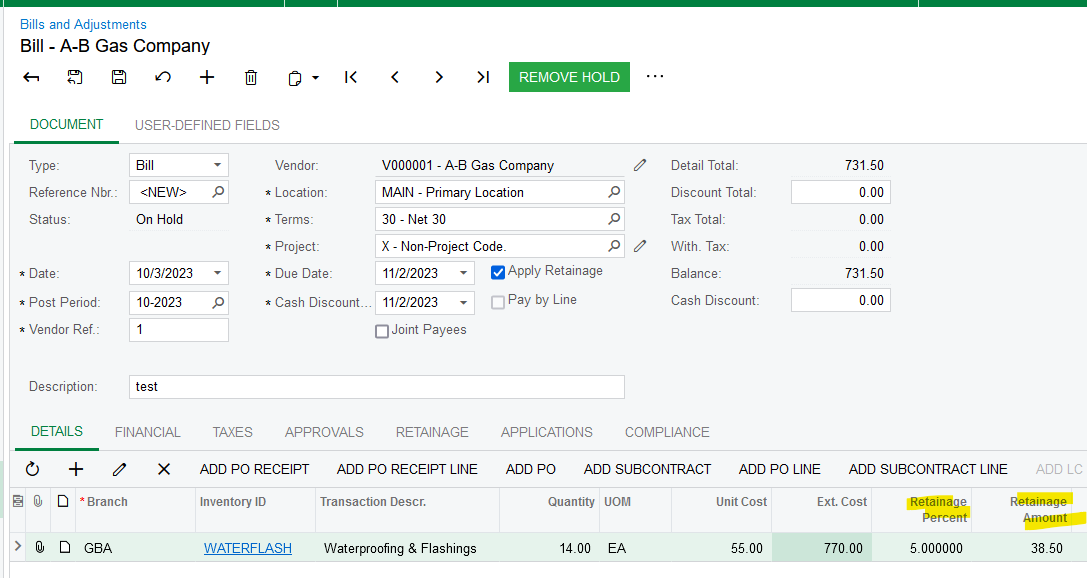
We have AP bills that we are trying to put in and apply retention to put it’s not working.  Some have commitments tied to them, some don’t.  We click the “apply retention” button and nothing is working. 


Can someone help? Seems like we’re doing something wrong.  
Best answer by Laura03

Hello,

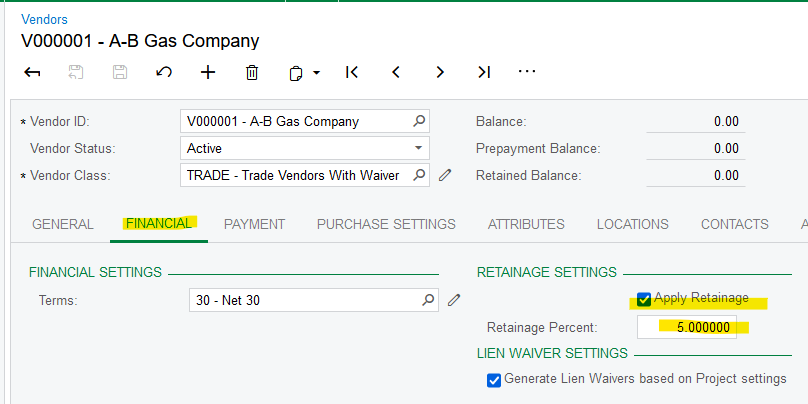
What are the retainage settings on the vendor? You’ll want 5.00 for 5%, not 0.05.

That’s it!  :

Laura

View original

5 replies

Kandy Beatty
Captain II
Forum|alt.badge.img+18

Hi @katiedavison 

Can you share what steps you are taking and share possibly screenshots?


Translate

Laura03
Captain II
Forum|alt.badge.img+20
  • Captain II
  • Answer
  • October 3, 2023

Hello,

What are the retainage settings on the vendor? You’ll want 5.00 for 5%, not 0.05.

That’s it!  :

Laura

Translate

Heidi Dempsey
Community Manager
Forum|alt.badge.img+3

@katiedavison  @Laura02 is correct with the retainage settings

Translate

Forum|alt.badge.img

is that the primary place that acumatica pulls the retention withholding from? 


Translate

Laura03
Captain II
Forum|alt.badge.img+20
  • Captain II
  • October 3, 2023

Hi @katiedavison ,

Please try a new bill.  If the new bill takes on the retention recently added to the Vendor, then delete/re-enter the bill.

If new bills do not take on the retention %, the next step is to find out if customizations have been published, that might be interfering with normal behavior.  If you experience the same behavior with customizations temporarily unpublished, the next step is to raise a case with Acumatica support.

Good luck!


Laura

Translate