Answer

How to remove budgets from project templates?

  • September 13, 2022
  • 8 replies
  • 155 views

dmzasdf
Varsity I
Forum|alt.badge.img

Hi,

For the given project template, the project template screen revenue and cost tabs show $0, the project budget screen has 0 records, but a the PMBudget table has 21 records.

The GI we built to analyze project budgets is including the project template due to these 21 records, so does anyone know how to get rid of these records?

Thank you,

Dave Z

Best answer by dmzasdf

After further review, we found that the records were those from the templates themselves; not from projects converted to templates.

8 replies

Heidi Dempsey
Community Manager
Forum|alt.badge.img+3
  • Community Manager
  • September 16, 2022

@dmzasdf  Can you send me the GI you made so we can take a look?  Was the template made from an existing project originally?  Happy to set up a meeting if you would like.

-Heidi


dmzasdf
Varsity I
Forum|alt.badge.img
  • Author
  • Varsity I
  • September 20, 2022

@Heidi Dempsey not sure whether template was made from an existing project originally. Attached is GI XML which we do not simply want to filter out templates, but rather have the incorrect data correctly deleted. If a meeting would be best, I’m available after noon Pacific on Thursday and Friday.

Thank you,

Dave Z


Laura03
Captain II
Forum|alt.badge.img+19
  • Captain II
  • September 20, 2022

Hi,

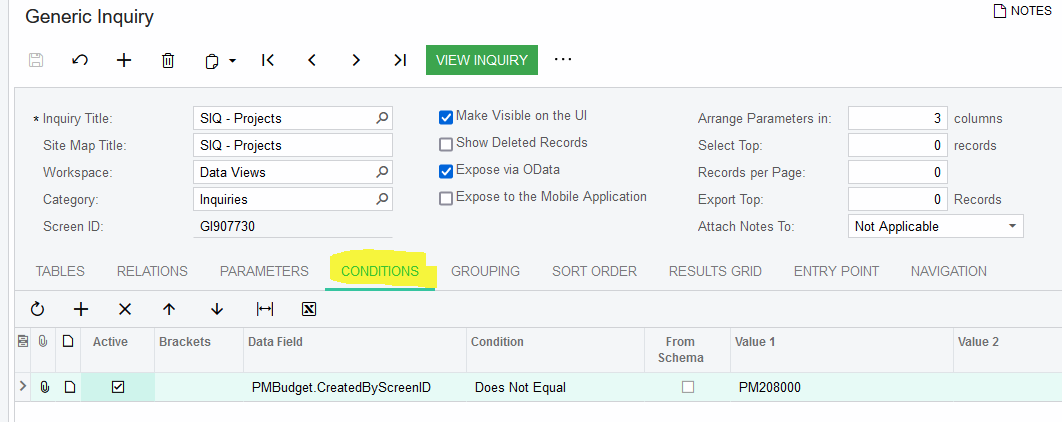
I have a idea that may work. Try adding this Condition to your GI, to exclude budgets added in the Project Templates screen.  This condition excludes all budgets added in any project templates… not just one template. I hope it meets your need.


dmzasdf
Varsity I
Forum|alt.badge.img
  • Author
  • Varsity I
  • September 20, 2022

@laura01 thank you for the idea, but that will not address mistakenly pulling in budgets associated with templates throughout the system which is our goal


Heidi Dempsey
Community Manager
Forum|alt.badge.img+3
  • Community Manager
  • October 12, 2022

@dmzasdf  can you please email me the GI so I can download it?  heidi.dempsey@acumatica.com


dmzasdf
Varsity I
Forum|alt.badge.img
  • Author
  • Varsity I
  • October 12, 2022

@Heidi Dempsey email sent with above linked GI XML.


Chris Hackett
Community Manager
Forum|alt.badge.img
  • Acumatica Community Manager
  • November 21, 2022

Hi @dmzasdf - were you able to find a solution? Thank you!


dmzasdf
Varsity I
Forum|alt.badge.img
  • Author
  • Varsity I
  • Answer
  • November 22, 2022

After further review, we found that the records were those from the templates themselves; not from projects converted to templates.