Answer

Contact ID mismatched with Default Contact ID

  • June 22, 2022
  • 4 replies
  • 175 views

dmzasdf
Varsity I
Forum|alt.badge.img

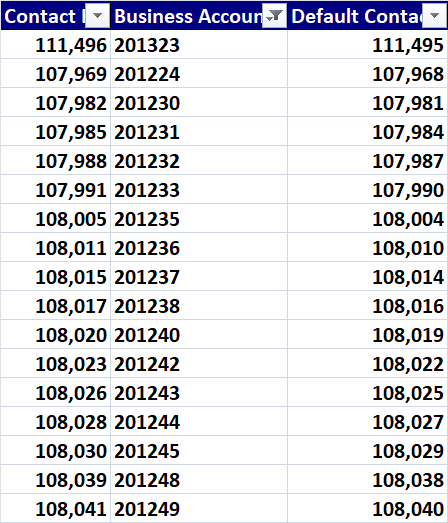
Just found that my Default Contact ID are one less than the correct Contact ID. I can work around it in formula, but makes me nervous being out of sync. System working correctly, so is that just the way it is on Vendors which I’m working on now?

Best answer by dmzasdf

All I found out was that although the numbers do not match, the application somehow matches them

4 replies

Laura03
Captain II
Forum|alt.badge.img+19
  • Captain II
  • June 23, 2022

Hello,

I think it will help us to answer your question, if you explain what you are trying to do, and what problem you are having that keeps you from completing your goals.   A screen shot will be helpful.  Thank you.


dmzasdf
Varsity I
Forum|alt.badge.img
  • Author
  • Varsity I
  • June 23, 2022

Hi @laura01,


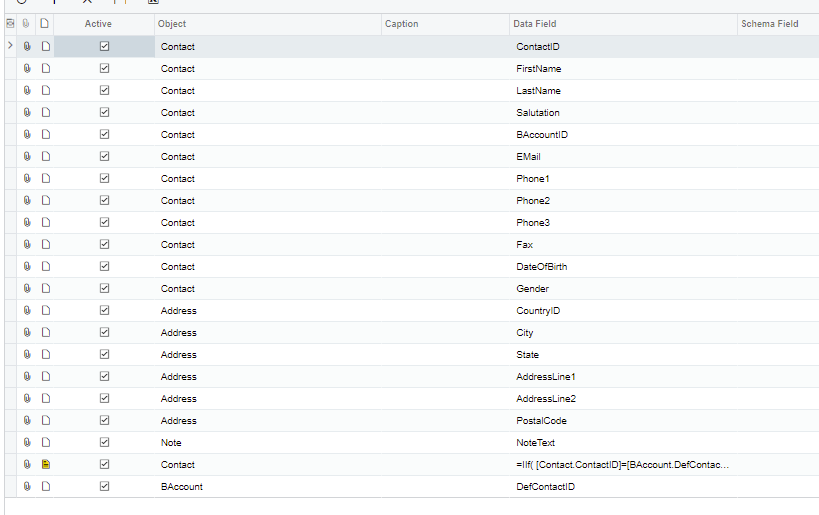
As part of splitting one branch into two branches, we are duplicating some vendors. The Acumatica Vendor copy function does not bring the contacts, so we extracted the contacts from the source vendors and are importing them to the target vendors. When trying to identify the default contacts on the source vendors, we found the mismatch between the vendor default contact ID and the contact ID marked as default on the vendor.


Below are the GI results grid and export.


Chris Hackett
Community Manager
Forum|alt.badge.img
  • Acumatica Community Manager
  • July 26, 2022

Hi @dmzasdf - were you able to find a solution for your issue? Thank you!


dmzasdf
Varsity I
Forum|alt.badge.img
  • Author
  • Varsity I
  • Answer
  • July 26, 2022

All I found out was that although the numbers do not match, the application somehow matches them