Answer

Unable to Install Acumatica 2023 R1 Build 23.116.0019

  • October 4, 2024
  • 5 replies
  • 145 views

Forum|alt.badge.img

Hi there,


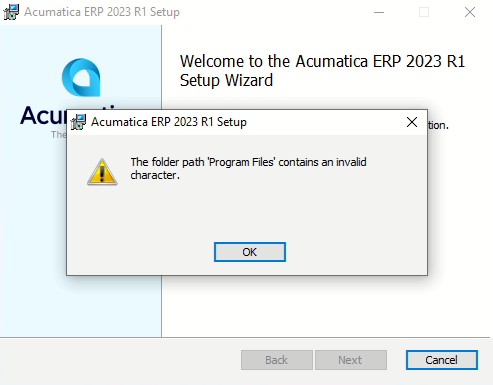
I am facing an issue on installing Acumatica on local machine. The error message shown:
 

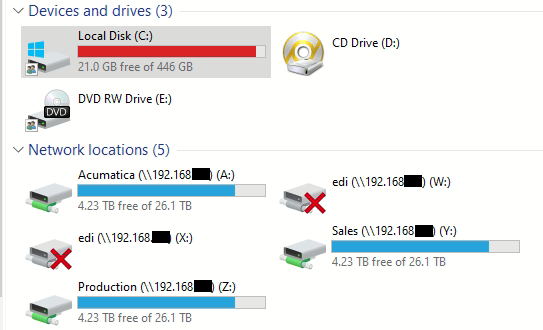
The drive structure:
 

I would appreciate it if anyone could point me to the right direction on this.

Best answer by ErickLasimin

Hi @iqraharrison  & @hdussa , thank you for your help. I managed to resolve the issue.


Previously, I installed all the instances and the program on D drive. Somewhere along the way, I detached the HDD and this was the root cause of it. Once I reattached the drive, Acumatica detects the old program and proceed to uninstall the old version and reinstall the 23R1 version.


Thanks for your assistance, guys!

5 replies

Naveen Boga
Captain II
Forum|alt.badge.img+19
  • Captain II
  • October 4, 2024

@ericklasimin61 

Could you please double-check the file path to ensure it's correct and does not contain any special characters before proceeding with the instance installation? Please confirm.


Forum|alt.badge.img
  • Author
  • Varsity I
  • October 4, 2024

Hi @Naveen Boga , unfortunately, I am not even getting to that part. The error popped up right after the installer is executed.


The issue is that I am unable to install the program itself, let alone the instances.


iqraharrison
Captain II
Forum|alt.badge.img+8
  • Captain II
  • October 4, 2024

@ericklasimin61 have you looked at the “program file” folder through the file explorer? does anything look off? 


hdussa
Jr Varsity I
Forum|alt.badge.img+1
  • Jr Varsity I
  • October 4, 2024

Hello @ericklasimin61 ,

Are you able to install other program? If not, there is something wrong with the Windows OS. You need to fix the OS. The solution in the below article may help you.

https://answers.microsoft.com/en-us/windows/forum/all/cant-uninstall-or-install-a-program-the-folder/a9ded674-d1d7-4358-89e2-38d037beb093

If you are able to install other program, retry downloading the latest version of Acumatica build.


Hope this helps!


Forum|alt.badge.img
  • Author
  • Varsity I
  • Answer
  • October 5, 2024

Hi @iqraharrison  & @hdussa , thank you for your help. I managed to resolve the issue.


Previously, I installed all the instances and the program on D drive. Somewhere along the way, I detached the HDD and this was the root cause of it. Once I reattached the drive, Acumatica detects the old program and proceed to uninstall the old version and reinstall the 23R1 version.


Thanks for your assistance, guys!