Solved

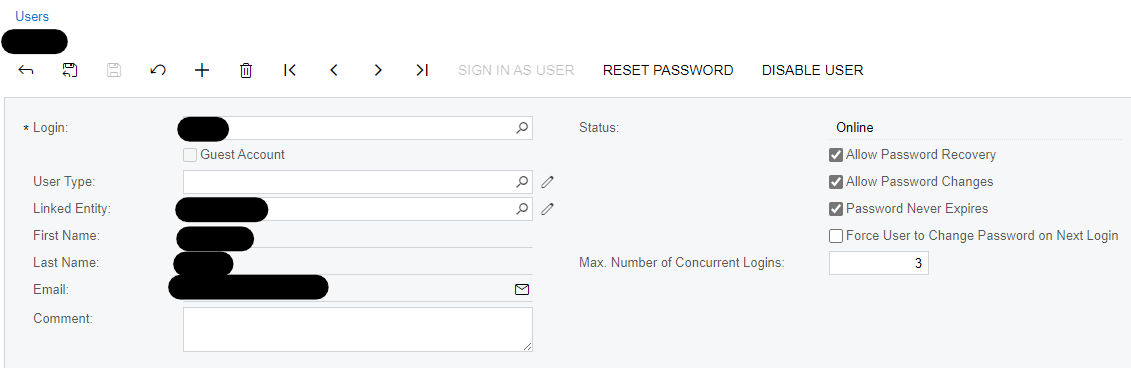
"Sign In As User" is Unavailable

  • Jan 23, 2024 8:07 PM UTC
  • 4 replies
  • 643 views
  • Translate All

Aschneid
Jr Varsity III
Forum|alt.badge.img+1

Does anyone know why the “Sign in as user” function is greyed out and unavailable on the user screen (SM201010). This functionality is usually available, but every once in awhile it will be greyed out. Screenshot below. 

Thanks!


Best answer by dcomerford

I find it get greyed out if you use it to sign in and then use that to sign in a different user you then try and do it again it wont allow you. So you need to log off and login again before using it.

View original

4 replies

dcomerford
Captain II
Forum|alt.badge.img+16
  • Captain II
  • Answer
  • Jan 23, 2024 8:10 PM UTC

I find it get greyed out if you use it to sign in and then use that to sign in a different user you then try and do it again it wont allow you. So you need to log off and login again before using it.

Translate

meganfriesen37
Captain II
Forum|alt.badge.img+13

If I am signing in as another user, I either will do it in a second browser (i.e. in Edge vs. Chrome) or in an In Private/Incognito window as that reduces the ghosting/cookies that seem to sometimes stick around when using the log in as user feature (especially if you have multiple windows open both as “you” and as “them”)

Translate

estebanperalta54
Captain II
Forum|alt.badge.img+4

@Aschneid If you sign out and sign back in it will let you do it. This could be because you’ve already used that feature to sign in as someone else in your current session. If you need to be signed in simultaneously as different users use different browsers.

Translate

Aschneid
Jr Varsity III
Forum|alt.badge.img+1
  • Author
  • Jr Varsity III
  • Jan 23, 2024 8:32 PM UTC

Thanks everyone, I appreciate the quick responses. 

Translate