Solved

New Task emails not sending immediately

  • Jan 29, 2026 8:11 PM UTC
  • 13 replies
  • 246 views
  • Translate All

Forum|alt.badge.img

Hello,

I have my task emails set up to send out when a user gets a new task. For some reason, the emails are only sending out once a day at 8:30am. What is the best way to get them to send out as the task is assigned?

Thank You,

Brent

Best answer by bbondura

Hello all. I was able to get it working on a schedule. I didn’t realize the one option allowed scheduling to actually become a thing. I’m a newb… Thanks again all! I now have two schedules for it. One for daytime and one for night time.


View original

13 replies

jhouser
Captain II
Forum|alt.badge.img+7
  • Captain II
  • Jan 29, 2026 11:19 PM UTC

​@bbondura Emails are not processed automatically. I would suggest an automation schedule for the Send / Receive Emails screen. You could set it to run every 15 minutes or so. 

Translate

Forum|alt.badge.img
  • Jr Varsity III
  • Jan 30, 2026 6:00 AM UTC

​@bbondura 

Task emails in Acumatica are not sent immediately; they are queued and processed by the email engine. If emails are only sent once a day, the email processing schedule is the cause.

How to fix:

Go to Emails Pending Processing (SM204002)
Check if task emails are queued there. If yes, they are waiting for processing.

Go to Automation Schedules (SM205020)
Find the schedule for Send Email Notification.
Make sure it is active and change the interval to a short frequency (for example, every 30 minutes).

Verify System Email Account / SMTP settings
Ensure the default email account is active and SMTP credentials are valid.


Translate

mohammadnawaz51
Varsity I
Forum|alt.badge.img+8

​@bbondura can you check if emails are stuck in pending processing, if yes please create a scheduler to send emails immediately.

Translate

shushanna34
Jr Varsity I
Forum|alt.badge.img
  • Jr Varsity I
  • Jan 30, 2026 1:09 PM UTC

Hi ​@bbondura ,In addition of ​@VaheGhazaryan’s reply, I would like to ask if you are using Business Event for the email to be sent?

Translate

Forum|alt.badge.img
  • Author
  • Jr Varsity III
  • Jan 30, 2026 2:18 PM UTC

Hello all!

We currently have a schedule set up to process emails every 5 minutes during the day, and every 1 hour after the work day is over. They are not stuck and sending as they should. I had an employee create a Task yesterday, and that email never popped into the pending processing screen. 

Yes, a business event is set up for it. I followed this guide:

Streamlining Task Management: Get Acumatica Task Notifications in Your Emai

Everything appears perfect other than the timely sending of the emails.

Translate

shushanna34
Jr Varsity I
Forum|alt.badge.img
  • Jr Varsity I
  • Jan 30, 2026 3:36 PM UTC

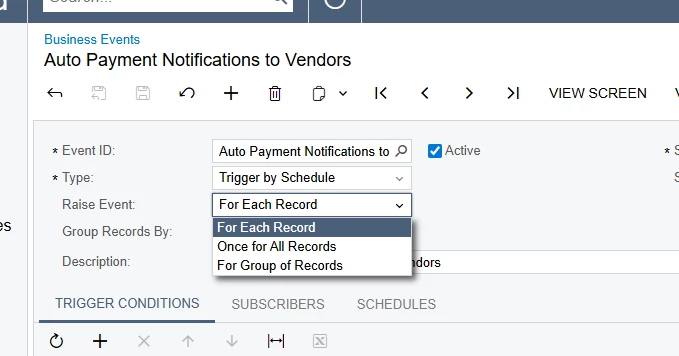
Hi ​@bbondura please check the Business Event Raise Event, if it is set to Once for all Records, no matter the scheduler’s configurations it will run just one time.

In this case you should set “For Each Record”, this might be the problem 


Translate

harutyungevorgyan
Jr Varsity I
Forum|alt.badge.img+4

Hi ​@bbondura,

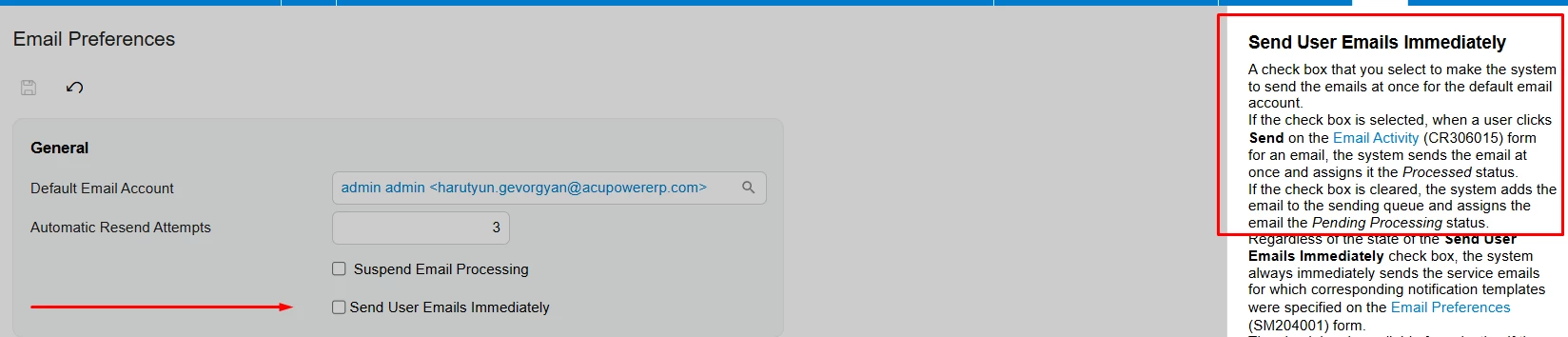
Try ticking the Send User Emails Immediately box on the Email Preferences (SM204001) screen. Let me know if that does the trick.


Translate

Forum|alt.badge.img
  • Author
  • Jr Varsity III
  • Jan 30, 2026 4:39 PM UTC

This is how I currently have it set up.

​@harutyungevorgyan I made that change. I’ll see if that does the trick.

Translate

Forum|alt.badge.img

Hi ​@bbondura,
Since the email never reaches Pending Processing at task creation, check Business Event History to confirm whether the event is executing at that time.

If there’s no entry, the trigger condition or record change isn’t qualifying, so review the event’s monitored fields and ensure the task creation method actually raises the event.

Translate

Forum|alt.badge.img
  • Author
  • Jr Varsity III
  • Answer
  • Mar 4, 2026 4:59 PM UTC

Hello all. I was able to get it working on a schedule. I didn’t realize the one option allowed scheduling to actually become a thing. I’m a newb… Thanks again all! I now have two schedules for it. One for daytime and one for night time.


Translate

MissyMain41
Jr Varsity III
Forum|alt.badge.img
  • Jr Varsity III
  • Mar 4, 2026 10:02 PM UTC

Hello all. I was able to get it working on a schedule. I didn’t realize the one option allowed scheduling to actually become a thing. I’m a newb… Thanks again all! I now have two schedules for it. One for daytime and one for night time.


Hey there, so glad to hear this is working for you now! 

Regarding the schedule, I believe this could be optimized down to one schedule by using the “every” box on the scheduler. 

Scheduler configuration would be set to “Daily”, Start time set to...let’s say 8am for reference, then the “every” box can be configured to repeat every 12:00 hours. 

This would mean under 1 schedule, it would repeat (process) from 8am, then again once more that same day 8pm (the time can be changed depending on your preference).


Translate

Forum|alt.badge.img
  • Author
  • Jr Varsity III
  • Mar 5, 2026 5:13 PM UTC

They want the schedule to repeat every 30 minutes during the day and then every 5 hours overnight after 5pm. I don’t know if I can be that granular in one schedule.

Translate

MissyMain41
Jr Varsity III
Forum|alt.badge.img
  • Jr Varsity III
  • Mar 5, 2026 5:22 PM UTC

They want the schedule to repeat every 30 minutes during the day and then every 5 hours overnight after 5pm. I don’t know if I can be that granular in one schedule.

Hello,

Correct, if they want it to repeat differently overnight than during day then that would take two schedules. I do recommend consolidating schedules when you can. I am unsure if this has changed yet but last time I checked automation schedules increased ETV’s. This may have changed, but I am unsure if it has yet or not. 

Translate