Answer

Issue with login screen after update

  • October 14, 2025
  • 10 replies
  • 90 views

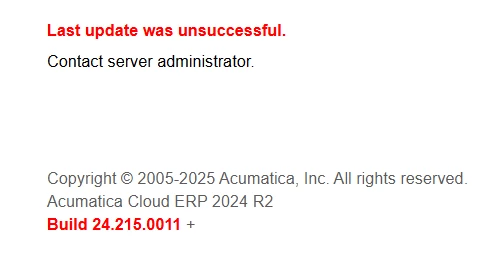
I updated our production site a couple of days ago and have encountered a strange issue where the site still works, the GIs, reports and customizations all still work, the updates screen is showing the correct version, the server is showing the correct version for the site and the database but the login screen says “Last update was unsuccessful”. I’ve tried running the update again and it does not show the correct update date, it still shows the original one from two days ago and the update history does not show a timestamp for when the update finished. Any ideas on what I can do to get rid of the error message and ensure that there is nothing wrong with the site?

 

Best answer by Manikanta Dhulipudi

@shelbyf 

10 replies

Manikanta Dhulipudi
Captain II
Forum|alt.badge.img+15

@shelbyf Are you referring login images issue, 


Unable to publish the customization project after upgrade

Please refer attached steps


  • Author
  • Freshman I
  • October 15, 2025

@Manikanta Dhulipudi 

It’s not with the login images specifically, it's an error message on the login screen below the username and password fields. Incidentally, the custom login images are replaced with the stock images every time I’ve attempted the update. Since it’s an on-prem build I replaced the images in the Icons folder directly on the server rather than push a customization package. I can try to build and push a customization with the login images if that might help get rid of the error message?


Manikanta Dhulipudi
Captain II
Forum|alt.badge.img+15

@shelbyf can you post error message?


  • Author
  • Freshman I
  • October 15, 2025

@Manikanta Dhulipudi

 This is what is on the login screen, users are still able to login and use the site with no issues.


Manikanta Dhulipudi
Captain II
Forum|alt.badge.img+15

@shelbyf This is server issues, 


As this upgrade not execute successfully.


darylbowman
Captain II
Forum|alt.badge.img+15

Are you saying the Configuration Wizard shows the Database and Site Version are matching and the expected version? Or did you run the update from the Apply Updates screen?


  • Author
  • Freshman I
  • October 15, 2025

@darylbowman

I ran the update from the Apply Updates screen, afterward both the Apply Updates screen and the config wizard showed the expected version for the site and the database. 


darylbowman
Captain II
Forum|alt.badge.img+15

Did you try restarting the application (from Apply Updates)?


Manikanta Dhulipudi
Captain II
Forum|alt.badge.img+15

@shelbyf what is the DB version?


Manikanta Dhulipudi
Captain II
Forum|alt.badge.img+15

@shelbyf