Answer

File Upload Preferences

  • April 8, 2022
  • 3 replies
  • 957 views

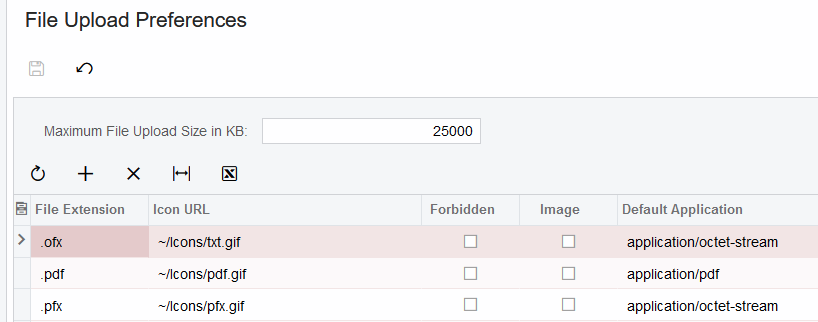
I am trying to follow the guide for adding a filetype of .pfx for use with SFTP.

I am able to view the screen 20.25.50, and can create a new line, but when I go to save, it refreshes and removes the new .pfx line.


I do not get any errors or other pop ups; I’m at a loss!


Has anyone seen this issue?
Best answer by Laura03

Hello,

First, I am in version 2022 R1 and .pfx is already in my list of allowed files.

If it’s not in yours, and you’ve filled in the required fields  and you did not see any errors, I think your new file type did save, possibly. The File Attachments screen saves in alphabetical order and likely is wrapped to multiple pages.  Look for the paging button at lower right and see whether your addition is on the next page.  If not, you may need a support ticket.


3 replies

Laura03
Captain II
Forum|alt.badge.img+19
  • Captain II
  • Answer
  • April 8, 2022

Hello,

First, I am in version 2022 R1 and .pfx is already in my list of allowed files.

If it’s not in yours, and you’ve filled in the required fields  and you did not see any errors, I think your new file type did save, possibly. The File Attachments screen saves in alphabetical order and likely is wrapped to multiple pages.  Look for the paging button at lower right and see whether your addition is on the next page.  If not, you may need a support ticket.


  • Author
  • Freshman I
  • April 8, 2022

As dumb as I now feel, you are correct. I don’t know why I didn’t look there 1st.


Thank you for the gentle reminder! :D


Laura03
Captain II
Forum|alt.badge.img+19
  • Captain II
  • April 8, 2022

😉 It happens to everyone, sometimes. Have a nice weekend!