Question

Email bounce backs Issue

  • September 11, 2026
  • 2 replies
  • 31 views

Ghazalshokrollahi
Jr Varsity III
Forum|alt.badge.img

Hi All, 

I need to get Email bounced backs and this setting which had been recommended in some related topics is not working. Anyone has any suggestion if this can be achieved in Acumatica? so these emails are not failing they are processed but due to incorrect email addresses they bounce back. and my client need tobe notified of these. 

Thanks for your help in advanced. 

Ghazal 

2 replies

Forum|alt.badge.img+6
  • Jr Varsity II
  • September 11, 2026

Hi ​@Ghazalshokrollahi ,

Can you try below suggestions


Hope above helps!!


valentynbeznosiuk
Jr Varsity II
Forum|alt.badge.img+4

Hi ​@Ghazalshokrollahi 

With those settings, emails bounced back, and you should have received a Non-Delivery Report for them, which should appear on the All Emails screen. To troubleshoot this, I'd try the following:

  1. Make sure the Non-Delivery Report is being received into the mailbox using your email account (outside of Acumatica) — check if it's there.
  2. Try to find it on the All Emails screen (note that by default it's filtered to display Outgoing emails, so you'll need to switch to the All or Incoming Emails tab). You can filter by email Subject using "Contains" in the Summary column, or by the sender's email address using "Contains" in the From column. If it's in Acumatica, then it's landing there — you just need to build something to catch those instances and notify the internal team about them.
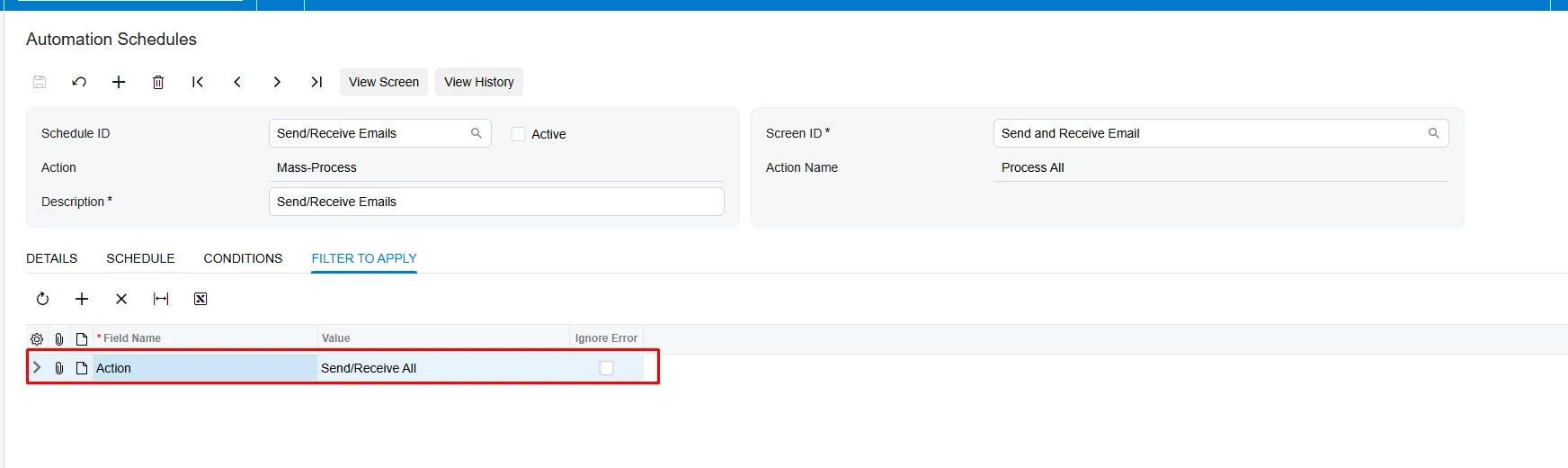
  3. Check your email processing automation schedule to make sure it runs the "Send/Receive All" action, as shown:


  4. If it still doesn't appear, check the incoming Mail Server settings on the Email Account.

Together, these steps should help get those emails into Acumatica if they arrive. From there, you'd need to build an email notification through a Business Event using the SMEmail table, filtered by the From column with the email address from that message — usually something like MAILER-DAEMON@ or postmaster@ — or by subject, which is often something like "Undeliverable." Send those notifications to the internal team that needs to know about it.