Answer

Connection to RabbitMQ failed

  • December 27, 2022
  • 22 replies
  • 5273 views

Forum|alt.badge.img

Hi,

I have this error after install the last version of Acumatica. 

Connection to RabbitMQ failed

The service RabbitMQ is running. 

Thanks,

EV

Best answer by dh69

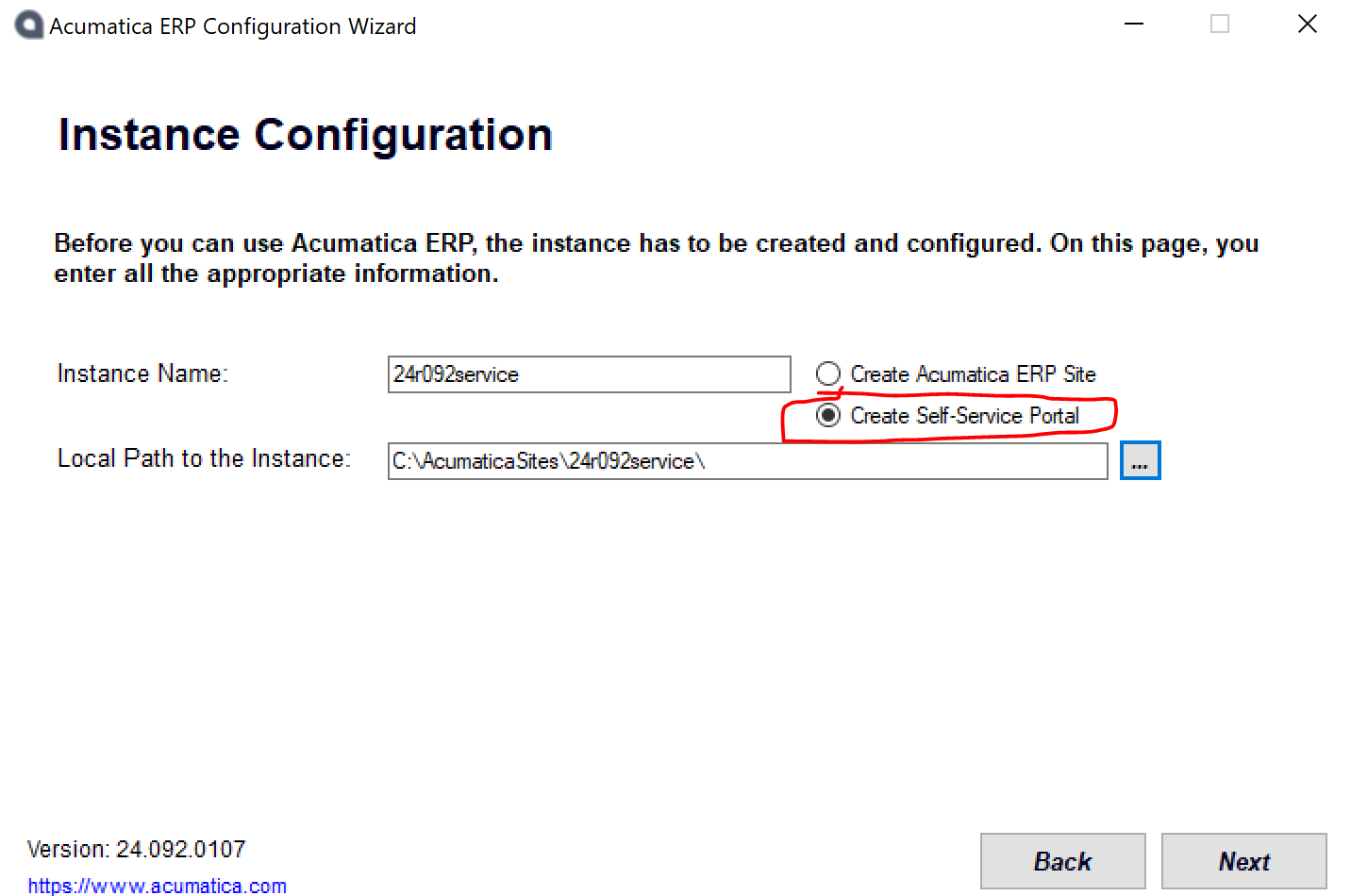
Hi @edsonvelez64  You might have missed this option while creating the instance.

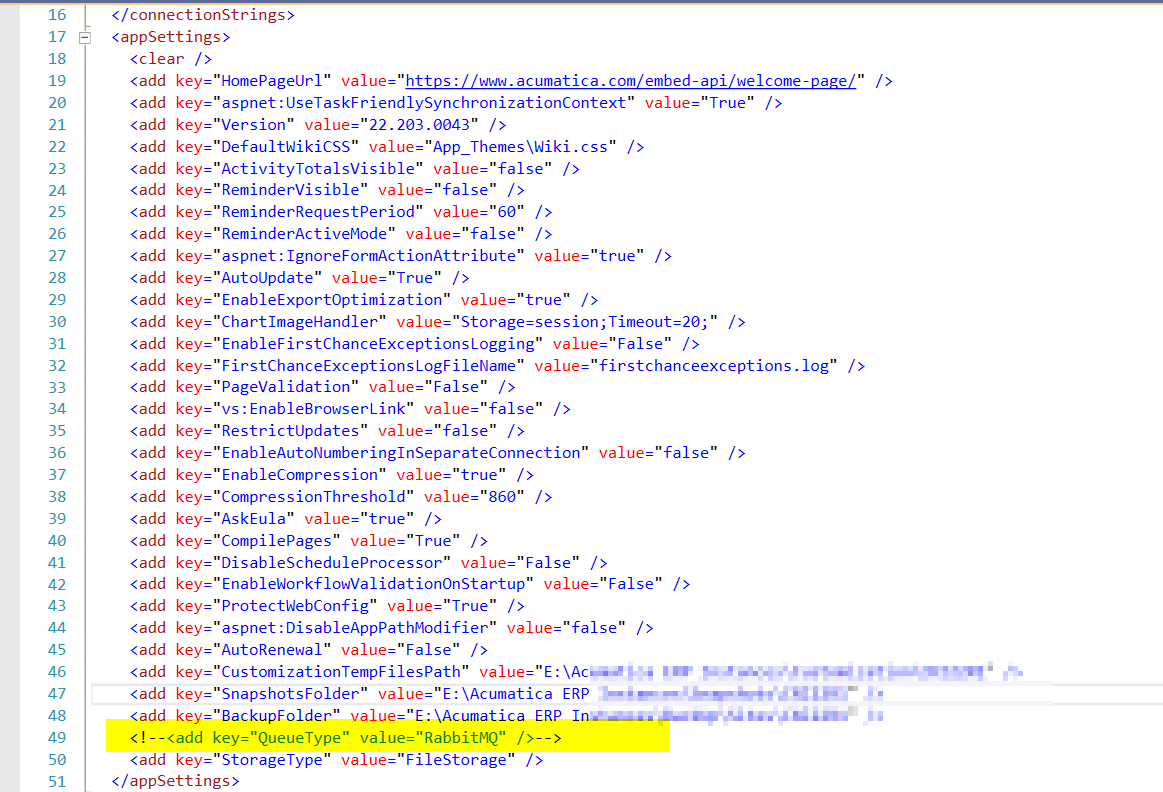
To fix this, you can comment on the below code from the web.config file and verify.


 <add key="QueueType" value="RabbitMQ" />


Hi, Thank for your response. 

I did that, but, what if I want to use the RabbitMQ? 


Thanks,

Ev

you can check services of Rabbit MQ (RabbitMQ Windows - Start Server automatically - Stack Overflow

22 replies

Naveen Boga
Captain II
Forum|alt.badge.img+19
  • Captain II
  • December 27, 2022

Hi @edsonvelez64  You might have missed this option while creating the instance.

To fix this, you can comment on the below code from the web.config file and verify.


 <add key="QueueType" value="RabbitMQ" />


Forum|alt.badge.img
  • Author
  • Jr Varsity III
  • December 27, 2022

Hi @edsonvelez64  You might have missed this option while creating the instance.

To fix this, you can comment on the below code from the web.config file and verify.


 <add key="QueueType" value="RabbitMQ" />


Hi, Thank for your response. 

I did that, but, what if I want to use the RabbitMQ? 


Thanks,

Ev


Forum|alt.badge.img
  • Jr Varsity III
  • February 8, 2023

I’m having the same issue with the latest 2023r1 Beta.   I do not have a RabbitMQ line in my Web.config file.   The RabbitMQ service is running.


Anyone have any other thoughts to try?

Thanks,

Brett


Naveen Boga
Captain II
Forum|alt.badge.img+19
  • Captain II
  • February 13, 2023

@Chris Hackett  Could you please forward this question to the Acumatica team internally and help us with the above question?


Chris Hackett
Community Manager
Forum|alt.badge.img
  • Acumatica Community Manager
  • February 13, 2023

Hi @brettnothan9 - I checked internally and there wasn’t an obvious answer. It was suggested to create a case to investigate further. Thank you!


Forum|alt.badge.img+5
  • Semi-Pro III
  • February 13, 2023

Can you please post the exact version of 2023 R1 that you are running? (23.091.0146, 23.092.0102, 23.093.0227 are the 3 current options). I have installed the latest version on Windows 10 and on Win Server 2019 and I haven’t run into this issue.


Also please confirm that you have installed .NET Framework v4.8 and .NET Core 3.1 prior to installation.


Thanks,


Jonathan


  • Freshman II
  • Answer
  • March 18, 2023

Hi @edsonvelez64  You might have missed this option while creating the instance.

To fix this, you can comment on the below code from the web.config file and verify.


 <add key="QueueType" value="RabbitMQ" />


Hi, Thank for your response. 

I did that, but, what if I want to use the RabbitMQ? 


Thanks,

Ev

you can check services of Rabbit MQ (RabbitMQ Windows - Start Server automatically - Stack Overflow


Forum|alt.badge.img

Do not know why… but restarting the computer solved the issue for me.


DavidEichner
Captain II
Forum|alt.badge.img+13
  • Captain II
  • January 10, 2024

We just updated to the latest build of Acumatica 23R2 yesterday.  Everything was fine after the upgrade yesterday but today all of our sites are getting this message.  The RabbitMQ service will not start.  I wonder if Microsoft did an automatic update that broke RabbitMQ?

I am trying a restart of the web server to see if that resolves it.  Will keep you posted.


DavidEichner
Captain II
Forum|alt.badge.img+13
  • Captain II
  • January 10, 2024

Restart of server didn’t work.  We also tried uninstalling RabbitMQ and then running the Acumatica Installer with Repair option. Service still not able to start.


DavidEichner
Captain II
Forum|alt.badge.img+13
  • Captain II
  • January 10, 2024

Here’s the fix that worked for us.

  1. Uninstall RabbitMQ
  2. Install Erlang 25.3 after checking check box to replace windows dlls
  3. Install RabbitMQ
  4. Restart the RabbitMQ service

Here’s a good link that includes links to download the Erlang and RabbitMQ installers:  https://www.rabbitmq.com/install-windows.html#installer

Hope this helps anyone dealing with the same issue.  Apparently, Windows Updates are replacing a dll that Erlang & RabbitMQ are dependent on.  

If you dont want to disable RabbitMQ in Acumatica, you may need to turn off automatic windows updates and do them manually knowing you might have to do the uninstall/reinstall dance.

Best,

David Eichner, CPA


DavidEichner
Captain II
Forum|alt.badge.img+13
  • Captain II
  • January 10, 2024

I spoke too quickly.  Although the service is now running, Acumatica still has the error.


DavidEichner
Captain II
Forum|alt.badge.img+13
  • Captain II
  • January 10, 2024

At this point, I guess we have to comment out and disable the RabbitMQ functionality.  Can anyone tell me what functionality within Acumatica is lost when this is disabled?


AaronB
Varsity II
Forum|alt.badge.img+1
  • Varsity II
  • January 12, 2024

@DavidEichner I ran into the same issue a few days ago as well trying to install 24r092.
I tried to install 23r203 - a version that I have installed with no issue before - that produced the same RabbitMQ error.

Today I have the site working with RabbitMQ after doing the following steps:
1) Disabling the RabbitMQ in the web.config worked to get it online
2) I restarted my pc this morning - not sure if this was needed but it is a step I took.

3) I re-added the line  <add key="QueueType" value="RabbitMQ" /> into my web.config in the original spot and the site works after reloading the new config.

My only lead on why this error happened is possibly due to installing the Acumatica Portal, it was exactly when i first encountered the issue. - It would be interesting to know if you have that installed as well recently.


ngerst
Freshman II
Forum|alt.badge.img
  • Freshman II
  • February 19, 2024

Here’s the fix that worked for us.

  1. Uninstall RabbitMQ
  2. Install Erlang 25.3 after checking check box to replace windows dlls
  3. Install RabbitMQ
  4. Restart the RabbitMQ service

Here’s a good link that includes links to download the Erlang and RabbitMQ installers:  https://www.rabbitmq.com/install-windows.html#installer

Hope this helps anyone dealing with the same issue.  Apparently, Windows Updates are replacing a dll that Erlang & RabbitMQ are dependent on.  

If you dont want to disable RabbitMQ in Acumatica, you may need to turn off automatic windows updates and do them manually knowing you might have to do the uninstall/reinstall dance.

Best,

David Eichner, CPA

I originally used this to fix the issue, but 2 weeks later I try to start Acumatica and I get the same error. Has anyone found a fix to this error that is permanent? Thankfully we are only seeing this in DEV on 2023R2, but the goal is to move this to PRD in the coming weeks. 


Forum|alt.badge.img+1
  • Semi-Pro III
  • June 26, 2024

Just a guess but things like this usually point to the port/socket that the service is listening on is being used by another application or is being blocked by a firewall. Sometimes this can just appear to be random and a reboot may fix it. I was not able to easily determine which port but you can run “netstat -a -b” and I think erl.exe are the ports that RabbitMQ may be listening on.


  • August 2, 2024

I had to login has a local user. Then ran the RabbitMQ installer it then installed without issues and I was able to access the site. I then rebooted and login in has a domain user everything seems to be good now. Hope this helps.


Encountered this again when installing 24R1 and 24R2. Re-installing the RabbitMQ Service fixed it. This is the option available in windows applications to reinstall the rabbitmq service and not to re-install the rabbitmq application itself.


stevec94
Freshman II
  • Freshman II
  • November 8, 2024

Self hosting here: Same problem, “Could not connect RabbitMQ”. Checking for the service shows that RabbitMQ is running, but the description is blank for some reason.

I administer the Acumatica server via RDP as it is a Hyper-V virtual machine. I found that the “HOMEDRIVE” environment variable was the issue. So, I created a local user “RabbitMQ”, signed in as that, and ran the “rabbitmq-service stop / remove / install / start” sequence from the RabbitMQ sbin directory, which completed without errors. Checking in services now shows it running, and the description is now populated.

Removing the comments around “<add key="QueueType" value="RabbitMQ" />” and then restarting the website has the issue resolved!


darinpaulsacumatica76
Jr Varsity II

I was able to resolve the issue completely by doing the following:

  1. Uninstall RabbitMQ and Erlang from the IIS server hosting Acumatica.
  2. Reboot the server to release files in use so they can be deleted.
  3. Delete the folders with RabbitMQ and Erlang in their name from the “Program Files” folder of the server.
  4. Delete the folder under C:\Users\<first user who installed Acumatica>\AppData\Roaming\RabbitMQ\.  You will have to make sure Hidden Files is turned on in your Windows Explorer settings.  The user who installed Acumatica first will be the user’s profile this folder sits under.
  5. Install a new instance of Acumatica in the ERP tool.  This will reinstall RabbitMQ and Erlang with the version associated with the version of Acumatica you already have installed.  If you want a newer version of RabbitMQ or Erlang, you’ll need to install a newer version of Acumatica.  Note: I’m not sure if older versions of Acumatica support newer versions of RabbitMQ and Erlang that are included in newer versions of Acumatica install files.

Now you can remove the comments from the webconfig of any of your instances as they all rely on the same RabbitMQ service.  Note, there have been numerous times where certain versions of RabbitMQ and Erlang have found to have security vulnerabilities and need to be upgraded.  It is critical to do so if you are exposing the IIS server to public access.  When you install new versions of Acumatica it doesn’t seem to update RabbitMQ or Erlang.  It seems to only install it if it doesn’t already exist on the server.

We are going to test upgrading both with later versions that are available to see if it breaks anything in Acumatica.  I’ll report back with any findings as we progress.


Ahmed
Varsity II
Forum|alt.badge.img+1
  • Varsity II
  • September 25, 2025

@darinpaulsacumatica76 ‘s instructions  worked for me to get 2025R2 working without turning off RabbitMQ in web.config. The key part was deleting the Program Files and App Data folders even after uninstallation.

Older instances of Acumatica may need RabbitMQ turned off since the newer Acumatica release auto-installs the specific RabbitMQ/Erlang that it needs. Even Acumatica 2025R2 depends on an older version of RabbitMQ and Erlang.


  • Freshman I
  • October 21, 2025

I’ll add this here.  I just tried to upgrade my local development instance to 25R2.  I’m new to Acumatica, so this is only my second time doing something like this.  I got an error during the upgrade that it couldn’t connect to the RabbitMQ server.  I tried installing a new version of RabbitMQ and Erlang which was the wrong thing to do.  
I uninstalled RabbitMQ and reran the upgrade.  It upgraded successfully this time, but I got the “Connection to RabbitMQ failed”  error when launching the site.  Commenting out the line in web.config worked for me.