Answer

Company level access rights

  • April 14, 2022
  • 3 replies
  • 971 views

Forum|alt.badge.img

How do I restrict access for users to only one of the two companies/branches?

Best answer by Laura03

Hi,

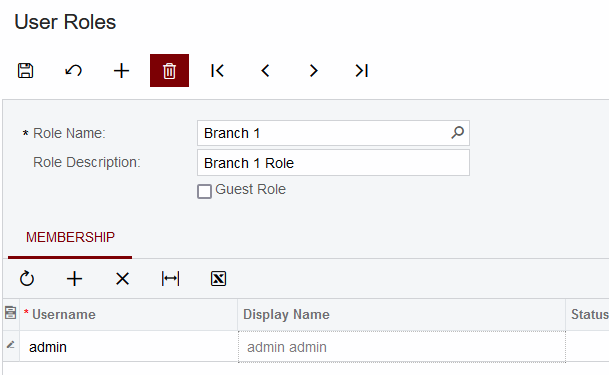
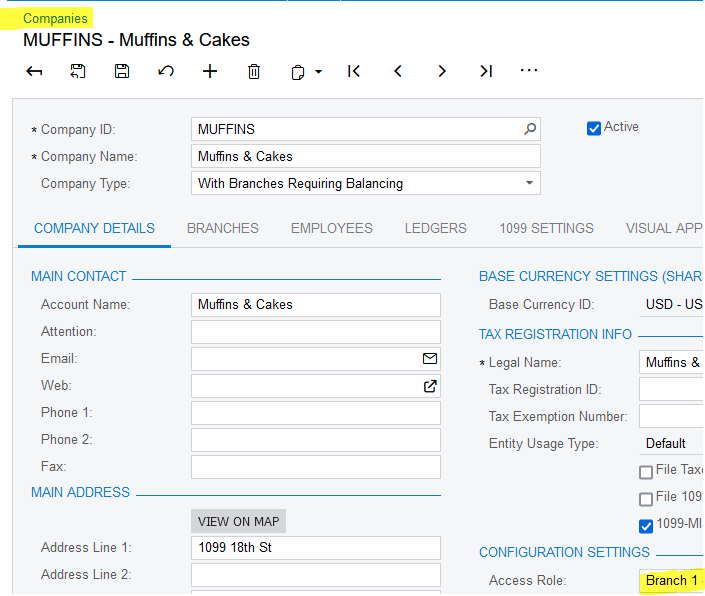
Create a branch role in User Security → Roles, and attach the Branch Role to the appropriate branch in Configuration → Branches screen (or Companies -- similar Role setting is available in both).  Then add the new role the users who are allowed in that particular branch, in the bottom half of the Users screen. Or, connect users to the role, in the bottom of the Role screen:
 

3 replies

Laura03
Captain II
Forum|alt.badge.img+19
  • Captain II
  • Answer
  • April 14, 2022

Hi,

Create a branch role in User Security → Roles, and attach the Branch Role to the appropriate branch in Configuration → Branches screen (or Companies -- similar Role setting is available in both).  Then add the new role the users who are allowed in that particular branch, in the bottom half of the Users screen. Or, connect users to the role, in the bottom of the Role screen:



antoons60
Jr Varsity III
Forum|alt.badge.img
  • Jr Varsity III
  • October 15, 2023

Hi:

In the Acumatica 2023R2 version, when I entered a user role, the company got listed at the top of the screen. Since I was signed in with user = admin, I entered the user role = administration. It worked. It didn’t work without a user role. 

Toon Six


Laura03
Captain II
Forum|alt.badge.img+19
  • Captain II
  • October 15, 2023

Hello @antoons60 ,

You are correct - Each new user in a multi company/branch tenant that uses Branch Roles also needs at least one “regular” User Role.

User Roles provide screen access and Branch Roles provide access to see vendors, customers, and transactions that belong to a particular company/branch.

A user that is only in a Branch Role won’t have access to screens.

Laura