Solved

Adding a Button

  • Jan 27, 2021 8:29 AM UTC
  • 5 replies
  • 2050 views
  • Translate All

Hello team,

I am new to the software. I busy building my own screen.

I have added a button on my screen, and the action i want it to perform is to clear all my textbox.


Where or how do i perform the action for this.   

Please i am struggling a lot.

Regards M.C. 

Best answer by Naveen Boga

Hi @mc37 

Below is a sample example to add a button in a graph.

public class TestGraph : PXGraph<TestGraph>
    {
          public PXAction<DACName> TestConnection; 
        [PXButton]
        [PXUIField(DisplayName = “TestConnection”, MapEnableRights = PXCacheRights.Select, MapViewRights = PXCacheRights.Select, Enabled = false)]
        protected virtual IEnumerable testConnection(PXAdapter adapter)
        {
                      // logic here


          return adapter.Get();
        }
    }


Hope this helps!!

View original

5 replies

Naveen Boga
Captain II
Forum|alt.badge.img+20
  • Captain II
  • Answer
  • Jan 27, 2021 9:54 AM UTC

Hi @mc37 

Below is a sample example to add a button in a graph.

public class TestGraph : PXGraph<TestGraph>
    {
          public PXAction<DACName> TestConnection; 
        [PXButton]
        [PXUIField(DisplayName = “TestConnection”, MapEnableRights = PXCacheRights.Select, MapViewRights = PXCacheRights.Select, Enabled = false)]
        protected virtual IEnumerable testConnection(PXAdapter adapter)
        {
                      // logic here


          return adapter.Get();
        }
    }


Hope this helps!!

Translate

bjeter78
Jr Varsity III
Forum|alt.badge.img
  • Jr Varsity III
  • Jan 24, 2022 9:34 PM UTC

I am new to Acumatica, and I have to change a name on a command button that was customized in the Construction module. Can anyone give me direction on where to go to perform this change?

Translate

jinin
Pro I
Forum|alt.badge.img+12
  • Pro I
  • Jan 25, 2022 5:08 AM UTC

Hi @bjeter94 

Please refer to the below document.

Renaming Workspace, Menu Item, Form, Action and Field, Part 3 — Acumatica Engineering

Hope this will help you.

Translate

bjeter78
Jr Varsity III
Forum|alt.badge.img
  • Jr Varsity III
  • Jan 25, 2022 3:01 PM UTC

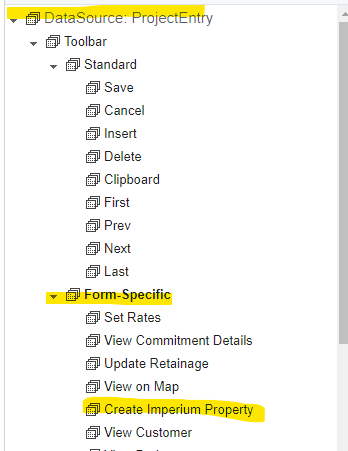
Thank you it did help me get closer. Now that I am able to get that far, I see it is “form-specific and not an action item. Any further ideas? I appreciate your help!


Barbie


Translate

jinin
Pro I
Forum|alt.badge.img+12
  • Pro I
  • Jan 25, 2022 4:17 PM UTC

Hi @bjeter94 

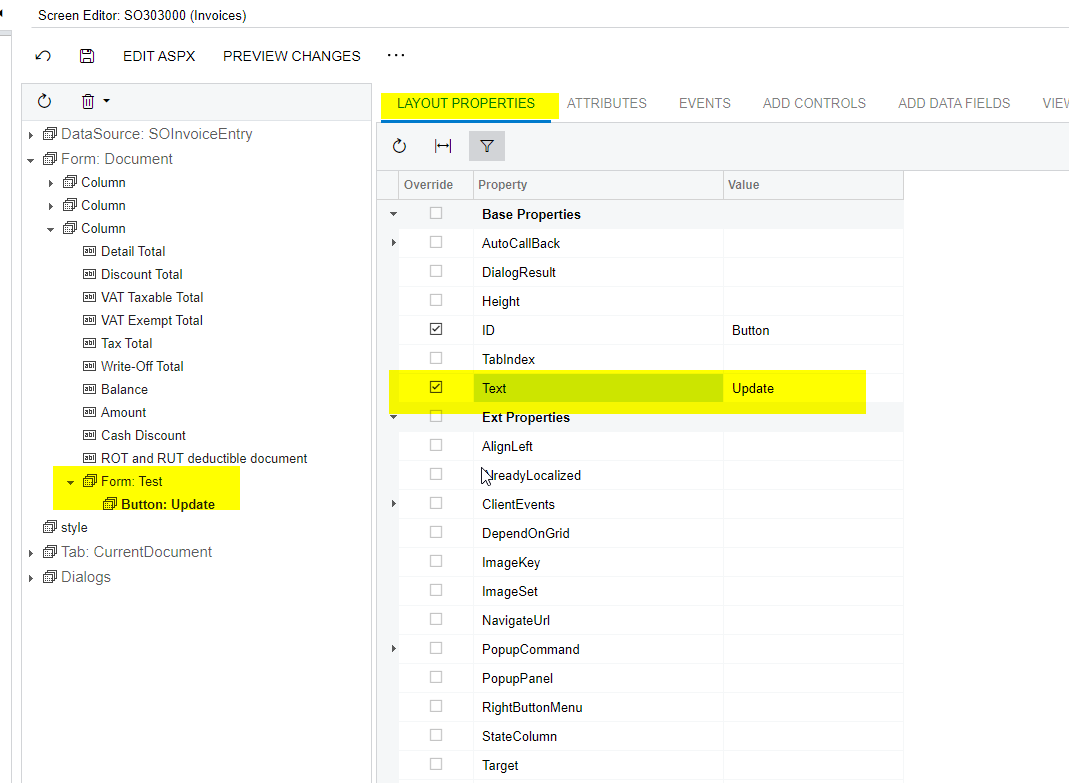
can you try with the Text property?


Translate