Question

Microsoft Edge typing into fields disappears

  • September 28, 2026
  • 18 replies
  • 320 views

This morning, users with Microsoft Edge are having issues when typing into fields, such as the Inventory ID field in the Inventory Summary page, When they start typing, their typed characters immediately disappear, and they cannot complete typing in a part number.  This does not impact our Chrome users.

Are there any other customers having this issue?

18 replies

mohammadnawaz51
Varsity I
Forum|alt.badge.img+8

​@doldham96 Are you still facing this issue continously? Is it Modern ui?


Forum|alt.badge.img
  • Jr Varsity III
  • September 28, 2026

​@doldham96 I can confirm this is happening to users on our system. Most notably in the Inventory Summary (IN401000) screen.  When attempting to type in a part number, the field will display the text, and then quickly delete it.  We are on 26.100.175.4 and currently using Classic UI. 

If I test this in my Local instance the issue does not seem to occur.  However that is just on 26.100.0175.


  • Author
  • Freshman I
  • September 28, 2026

​@mohammadnawaz51 we are using ClassicUI on version 25.201.0213.6

When I open the dev console on Edge I can see the browser is stuck in a loop making a script call

PX.ScriptBatch.axd?d=(some random text)&t=(some number)


mohammadnawaz51
Varsity I
Forum|alt.badge.img+8

​@doldham96 May be the edge browser updates causing this issue which has been recently Updated.


Forum|alt.badge.img
  • Freshman I
  • September 28, 2026

In our experience today, any classic UI is not working in Edge.  Firefox seems to work fine, but we have seen issues in Chrome as well.

Seems to be version 154 in Edge/Chrome that is causing the issues.


  • Author
  • Freshman I
  • September 28, 2026

Does anyone at Acumatica monitor these threads in realtime for emerging issues? I have reported it to our ISV.


  • Freshman I
  • September 28, 2026

​@doldham96 ​@mohammadnawaz51

We are having the same issue for majority of our users, but not all. This started last Friday and was initially realized at the inventory summary screen. However, this also notably effected our PO screen when creating a new PO and adding items. 

Issue was discovered using Microsoft Edge browser, ClassicUI, version 25.201.0213.6

Clearing browser cache/cookies did not do anything, so we had users try using another browser. After switching browser to Chrome, users did not experience these issues on the new browser. However, as of this morning, one user is now experiencing the same issues on both edge and chrome. 


Manikanta Dhulipudi
Captain II
Forum|alt.badge.img+16

​@doldham96 Edge update 154.0.4258.37 and it appears that this has broken something in classic UI for 25r1, 25r2 and 26r1.   Identified screens so far process orders, process shipments and process invoice from SO workspace, PO 'Add Items'.  I have confirmed in 26r1 classic doesn't work but modern does work with Edge


  • Freshman I
  • September 28, 2026

I have opened a case with Acumatica and reported that the issue appears to be Edge version 154.0.4258.37


Forum|alt.badge.img+1

It appears related only to Classic UI, not modern.  If you’re stuck on Classic here is the work around.  It involves modifying the registry for “XSLTEnabled” so you may want to back it up. 

Also Edge 155 might actually make this work around ineffective looking at the release notes.


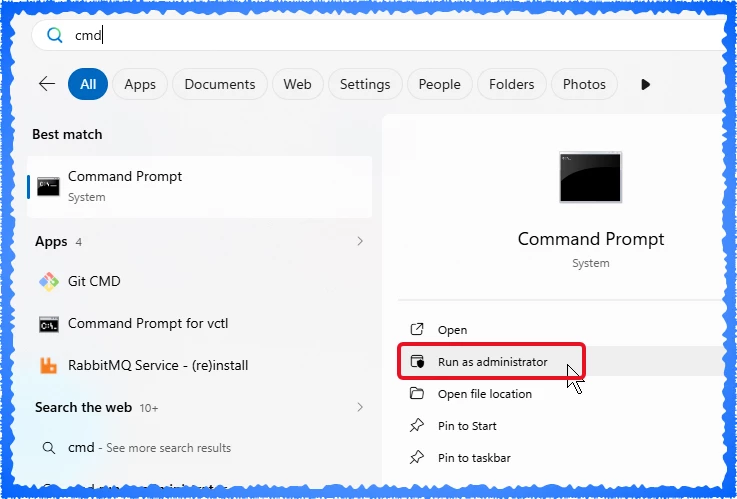
Open a Command Prompt, Terminal or PowerShell as administrator.  

Click on the “Start” or Windows menu, type in CMD for the search.


Then copy and paste the following to add/update the registry value.

For Edge browsers:  

reg add "HKLM\SOFTWARE\Policies\Microsoft\Edge" /v XSLTEnabled /t REG_DWORD /d 1 /f  

For Chrome browsers:

reg add "HKLM\SOFTWARE\Policies\Google\Chrome" /v XSLTEnabled /t REG_DWORD /d 1 /f


If using the Edge browser, open it. In the address bar enter:  edge://policy 

If using the Chrome browser, open it.  In the address bar enter:  chrome://policy 


Click Reload policies


Verify XSLTEnabled = 1 (true)


Close Edge and Chrome browsers and kill all Edge/Chrome processes (review with Task Manager)


Reopen Acumatica and try again.


If you’re an IT administrator, you can push this via GPO:

Microsoft Edge Browser Policy Documentation XSLTEnabled | Microsoft Learn


Release Notes:

  Microsoft Edge release notes for Stable Channel | Microsoft Learn


Deprecating the unload event. Microsoft Edge is changing the default behavior of the web platform unload event. As the rollout progresses, pages will no longer run unload event handlers unless the site explicitly permits them.

  • In Edge 152 and 153, unload handlers will stop firing by default for 60% of page loads unless the site explicitly enables them through Permissions Policy.

  • In Edge 154, the rollout will increase to 80% of page loads.

  • In Edge 155, the rollout will reach 100% of page loads.

The unload event is not a dependable way to save data, perform cleanup, or report the end of a session. Browsers and operating systems can suspend or terminate pages without firing it, and this can prevent pages from using the back/forward cache, which may make back and forward navigation slower.


Forum|alt.badge.img+1
  • Semi-Pro III
  • September 28, 2026

Travis, that worked for us (25R1, same issue that everyone else described).  I hadn’t updated Edge yet, so I tested before I applied the update (no issues), and then applied the update and confirmed that the fields were going crazy.

I applied the registry update and restarted, and Edge doesn’t have an issue now.  


  • Author
  • Freshman I
  • September 28, 2026

It’s unfortunate the fix can’t be accomplished by a hotfix from Acumatica as opposed to a user needing to do a browser rollback or a RegEdit. That is a lot of opportunity for user error.


Forum|alt.badge.img+1
  • Semi-Pro III
  • September 28, 2026

It’s unfortunate the fix can’t be accomplished by a hotfix from Acumatica as opposed to a user needing to do a browser rollback or a RegEdit. That is a lot of opportunity for user error.

I’ve been told that Acumatica is rolling out a fix next month that removes the reliance on XSLT, but it will only be in 26R1 and beyond.

Registry updates do pose a risk but I’m glad that option will be around for a year (I read that Chromium will hard disable XSLT in August 2027).


Adding another user experience here. One of my users with Edge update 154.0.4258.37 had issues using the Account Details screen.

Fields randomly cleared themselves. Switching to Chrome seemed to work for now.

Happy there is a workaround for 2025 r2.


Forum|alt.badge.img+1

It’s unfortunate the fix can’t be accomplished by a hotfix from Acumatica as opposed to a user needing to do a browser rollback or a RegEdit. That is a lot of opportunity for user error.


I’m not sure there is a Hotfix that Acumatica can do.  The code is deprecating and it’s a browser update issue.  The hot fix is:  Upgrade to Modern UI.


Forum|alt.badge.img+1

Adding another user experience here. One of my users with Edge update 154.0.4258.37 had issues using the Account Details screen.

Fields randomly cleared themselves. Switching to Chrome seemed to work for now.

Happy there is a workaround for 2025 r2.


When Chrome updates it’ll break again.  It’s the “Chromium” ecosystem which Edge runs on also that is breaking it.  


  • Freshman I
  • September 28, 2026

Same here on Account Details, cannot change any parameters on Microsoft Edge ( Version 154.0.4258.37 (Official build) (64-bit)). Acumatica version 25R1  Build 25.101.0153.11


  • Freshman I
  • September 28, 2026

I submitted a case with Acumatica and seems it is related to the XSLT that ​@travislawson  mentioned. 

Here’s a link that Acumatica sent me.