

Question

Files Count Refresh

  • October 15, 2025
  • 2 replies
  • 34 views

I have a strange problem that bugged me for ages. For certain records there is a mismatch with the number of attached files vs the count of files. In the example below, you can see it has one file, but states two for the count. 
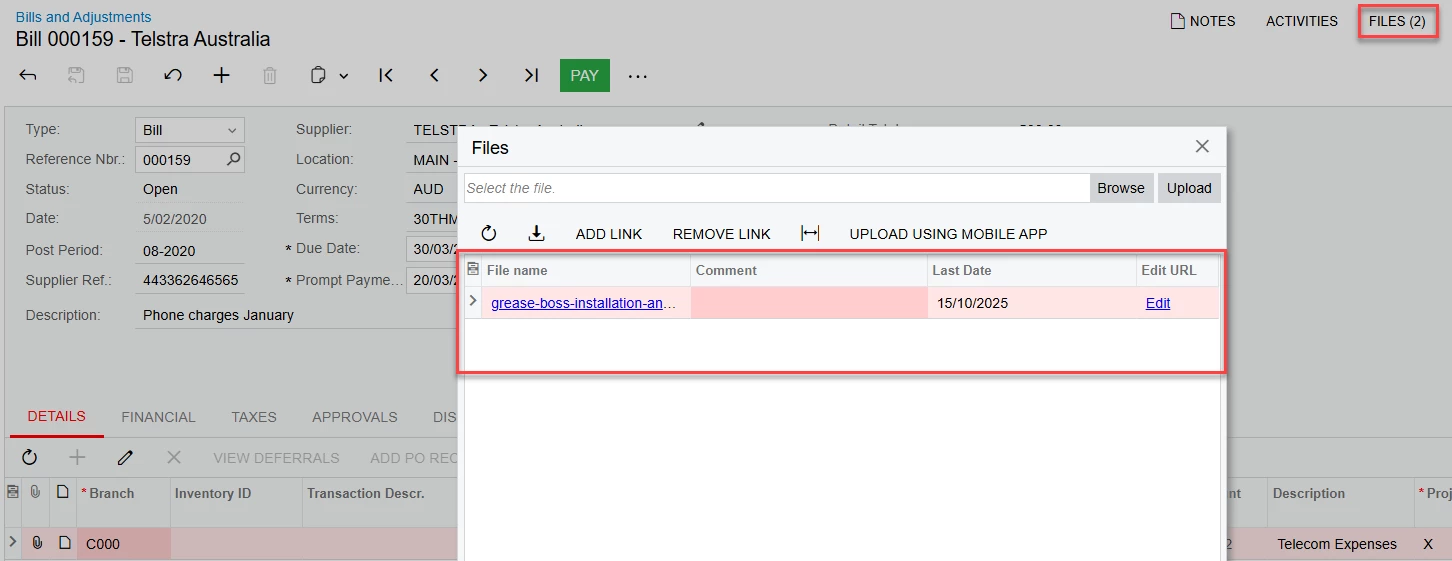
I’ve come across a similar thing in the Companies screen on the Visualization Tab, where the Logo File file URL has remained. In this instance, it is fixed by clicking Upload, which ‘nulls’ the path name due to no file being there.

In this example though that little trick doesn’t work. Please, any advice would be great, as it is confusing to see a file in the screen, but have no actual linked.

2 replies

Forum|alt.badge.img+2

Hello ​@NickSavageMady 

This can be fixed via a script to remove phantom file links using SQL. Navigating to ‘Search in Files’ should give us the exact number of Files that are available.

Kindly create a support case for the workaround script to be applied and share details if the issue can be replicated.


KrunalDoshi
Freshman II
Forum|alt.badge.img
  • Freshman II
  • February 20, 2026

Hi ​@NickSavageMady

I have never seen this issue unless someone has deleted the file directly from SQL (backend) or maybe if you don’t have certain permission. Have you tried on any other screen, other than Bills and Adjustments or have uploaded 2 or more files by yourselves but not able to see them?
