

We have expanded Field-level audit across five tenants for around 45 screens in each tenants(45 * 5 Screens). Before we promote this to Production we want to understand the cost and the correct way to operate it long term.
Solved
Filed Level Audit Enabled at Scale
Best answer by Steve Milner
@anupalone72 I've been burned by overhead from too much auditing, so I'd look hard at this before production.
Something that isn't obvious from the Audit form: it audits tables, not screens. When you add a screen on SM205510 you're really turning on a list of tables. Anything that writes to those tables gets logged, no matter which screen or process it comes from.
Quick test on my end. I only have Purchase Orders audited, 14 tables. I changed a description on Stock Items and got an audit row for it, because InventoryItem is one of the tables under Purchase Orders.
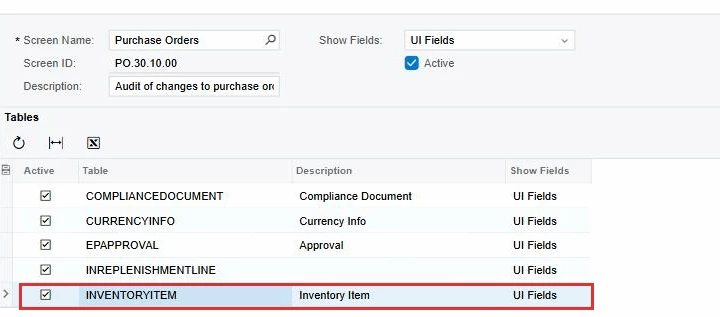
In that tenant about 15% of the audit rows actually came from Purchase Orders. The rest came from 15 other screens, Release AP Documents and Purchase Receipts among them.
The audit rows get written in the same transaction as the save, so your processing screens pay for it too. Updates are small since only the changed fields are logged. Inserts are the heavy ones. Mine run about 17 times the size of an update.
With 45 screens I'd open each one and turn off the shared tables you don't need for compliance, like InventoryItem and CurrencyInfo, and use UI Fields instead of All Fields. Then query AuditHistory grouped by ScreenID and TableName in a test tenant and you'll see what's really generating the volume. Nothing built in deletes this table, so get one of the purge options above sorted before you go live.








Enter your E-mail address. We'll send you an e-mail with instructions to reset your password.